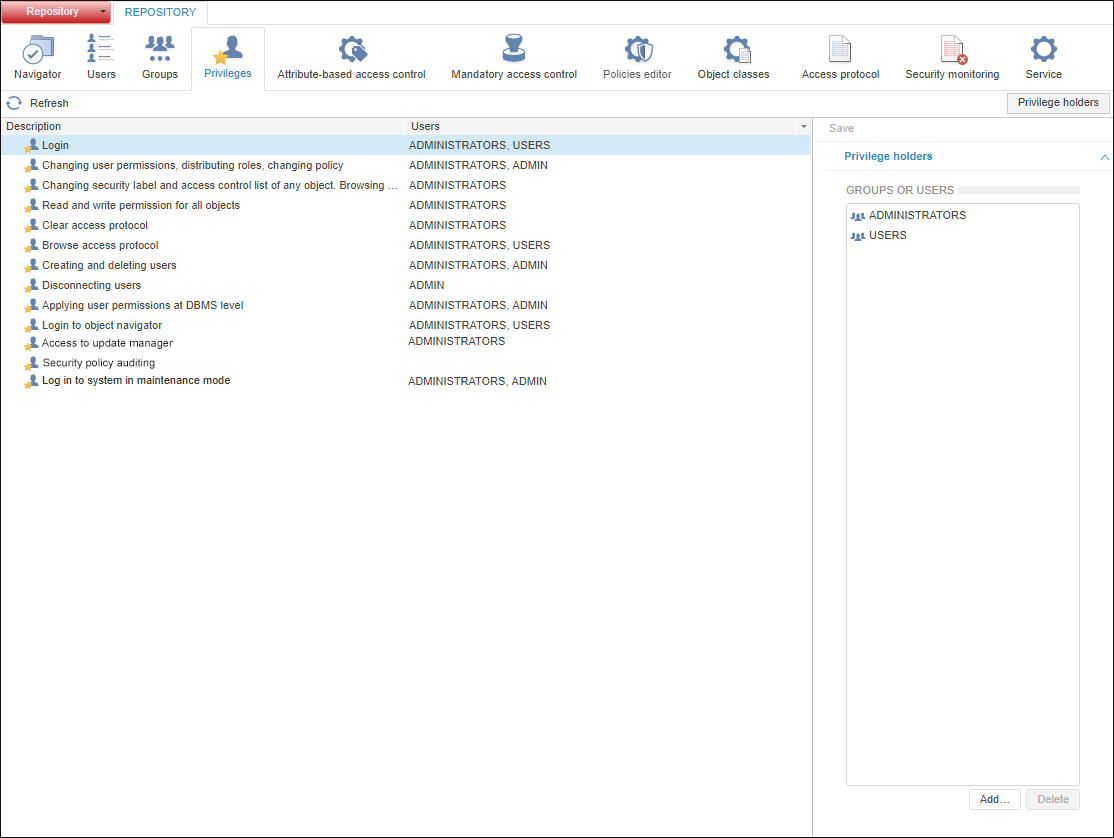
To distribute privileges between system users, use the Privileges section on the navigation panel:
NOTE. When roles of the information security administrator and the application administrator are separated, the Privileges section is available only for the information security administrator.
The privileges enable the user to execute various operations in Foresight Analytics Platform and at DBMS level. When the following operations are executed: create, delete, or edit object structure, grant object access permissions, create and update users, the system connects to the database and requests user credentials in the Database Authorization dialog box. To execute the operation, the user should have appropriate privileges and access permissions at DBMS level.
In the Privileges section, each privilege includes the list of users who have this privilege by default. The ADMIN schema owner is included in the ADMINISTRATORS built-in group and inherits privileges of this group.
Description of system privileges:
 Changing user permissions, distributing roles, changing policy
Changing security label and access control list of any object. Browse all objects in the navigator
Read and write permission for all objects
Apply user permissions at DBMS level
Log in to system in maintenance mode
Privileges are distributed by:
The ADMIN schema owner.
Members of the ADMINISTRATORS built-in group.
Users with the following privileges: Login; Changing User Permissions, Distributing Roles, Changing Policy.
Information security administrator when separation of administrator roles is used.
To distribute privileges:
Select a privilege.
Click the Add button on the Privilege Holders side panel.
After executing the operations the Search Users and Groups dialog box opens to add owners of the selected privilege.
To delete the selected privilege holders, click the Delete button on the Privilege Holders side panel. Deleting of the Login privilege for the ADMIN schema owner is not available.
NOTE. If a domain user/group is selected as the privilege holder, which is not created in Foresight Analytics Platform, the process of creating a domain user/domain group will be started.
To apply the specified settings, click the Save button on the toolbar or side panel.
NOTE. If section parameters have been changed, an attempt to go to another section of the security manager or to close it displays a request to apply changed settings.
See also:
Setting Up System Security Policy | Setting Up Object Access Permissions | Setting Up User Action Auditing
