In the object navigator select the Install Update item in the  Update Manager section on the side panel.
Use the UpdateManager utility.
An update can be executed by:
The ADMIN administrator (schema owner).
Information security administrator (ISA) if administrator roles are separated.
The user included in the ADMINISTRATORS built-in group.
The user/group member who has the Access to Update Manager privilege.
IMPORTANT. The update of database objects metadata or the change of access permissions on DBMS level for these objects is executed only under the ADMIN schema owner account. If update is installed or access permissions are changed by the ISA or the user, when user credentials are requested for database authorization one should enter schema owner credentials.
Before installing the update, study the System Update Recommendations and Features of Update Installation subsections.
To install the update, execute one of the operations:
In the object navigator select the Install Update item in the Update Manager section on the side panel.
Use the UpdateManager utility.
After executing the operation in the object navigator the update wizard opens:
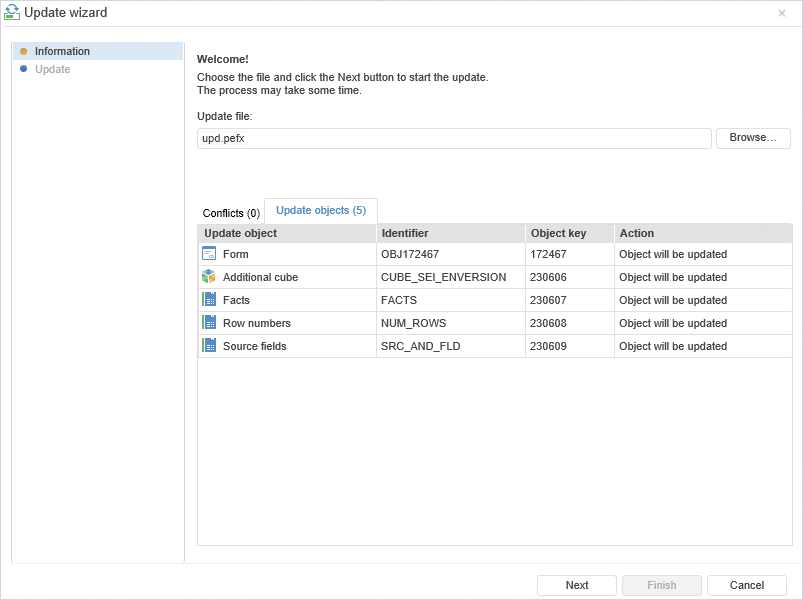
To select the update file, click the Browse button, after which the standard file selection dialog box opens. Specify path to update file with the *.pefx or *.updpack extension.
The update wizard contains the following pages:
Information. It is used to display the list of updated objects and conflicts that occurred during the update check.
Update. It is used to display object update progress.
NOTE. When selecting any method of access control the file is correctly updated, which elements are available for the user.
See also:
Working with Ready Update | System Update Recommendations | Features of Update Installation | Update Process