Select the Add Domain Group item in the drop-down menu of the  Group button on the toolbar. After executing the operation the Search Users and Groups dialog box opens:
Foresight Analytics Platform uses information from the domain directory service or global directory to work with domain security subjects. A domain group can be connected if the following supported DBMS are used: PostgreSQL, Oracle, Microsoft SQL Server.
Domain groups can be connected by the users who have the Changing User Permissions, Distributing Roles, Changing Policy and the Creating and Deleting Users privileges. When roles of the information security administrator and the application administrator are separated, only the information security administrator can connect domain groups.
For PostgreSQL DBMS one should prepare PostgreSQL server. Oracle-based DBMS require advanced settings, including a special mechanism of domain user authorization.
TIP. Before connecting domain groups it is recommended to check if LDAP settings are identical in the settings.xml files located in different environments.
To connect a domain user group in the Groups section:
Select the Add Domain Group item in the drop-down menu of the Group button on the toolbar. After executing the operation the Search Users and Groups dialog box opens:
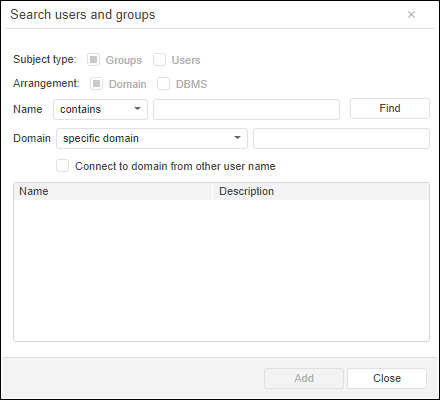
Set the parameters:
Name. Select the group search method in the drop-down list and enter group name in the search string.
Domain. Select the domain in the drop-down list, in which groups will be searched, and enter domain name in the search string.
Click the Find button. After executing the operation the domain groups, which names satisfy search conditions, will be displayed.
Select one or several found groups while holding down the CTRL key.
Click the Add button.
After executing the operations the Create Accounts dialog box opens:
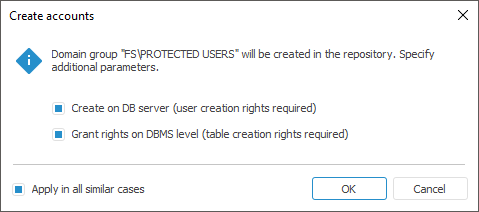
The Apply in All Similar Cases checkbox is selected by default, and the selected actions will be executed for all domain groups without additional requests.
When integrated domain authentication is used that is specified in repository connection settings, the user can only log in via domain groups. Domain group permissions are applied to the DBMS users included in the group without explicit addition of each account in the security manager.
NOTE. Support of domain groups is available if there are groups as roles and users included in these roles on DBMS level.
To log in to the system via a domain group:
Make sure that domain group support is enabled in PostgreSQL DBMS. DBMS security subjects are synchronized with directory service subjects.
Connect a domain group in the security manager. In the Create Accounts dialog box select the Grant Rights on DBMS Level checkbox.
Add privileges and set up access permissions for domain group objects.
After executing the operations the user included in the domain group can log in to the system.
A special mechanism of authorization of domain users who are not added in the security manager is implemented when working with the Oracle DBMS based repository. This mechanism uses domain groups with configured roles on the DBMS level. To enable adding of domain groups in the repository security manager, enable compatibility mode to work with domain groups in Oracle DBMS by means of the Fore language. After this the security manager will be able to connect domain groups.
To continue the setup, follow the steps:
Create a role on the DBMS server, give the CONNECT and RESOURCE grants for the role.
Add a domain user on the DBMS server. The adding method depends on DBMS settings and should correspond to the format used on repository connection. Include the user in the role created at Step 1.
In the security manager on the Groups tab add a domain group, in which the user is included. The group properties will have the Oracle DBMS Role box. The default role value is domain group name. In this box specify the role created at Step 1.
To add a domain group, grant necessary privileges or include the domain group in any existing group with configured access permissions - ADMINISTRATORS, USERS, or other. If level-based access control is used in the repository, determine the required access level for the domain group.
IMPORTANT. A single role should be created for each domain group. It is not allowed to link different groups with the same role. It is not allowed to link several roles with the same domain group.
When the domain user who is not in the repository security manager is being connected, the system checks if this user is included in the domain groups, which are connected in the security manager. If the user is included in a domain group, the system checks the correspondence of the role set for the group with the roles created on the DBMS server. If the server contains the specified role, the user is connected. When level-based access control is used, the user is connected according to the security level specified for the group. Otherwise the corresponding error message is displayed.
See also:
Creating User Groups and Working with Them | Creating and Editing User Group

 Create a group on DB server