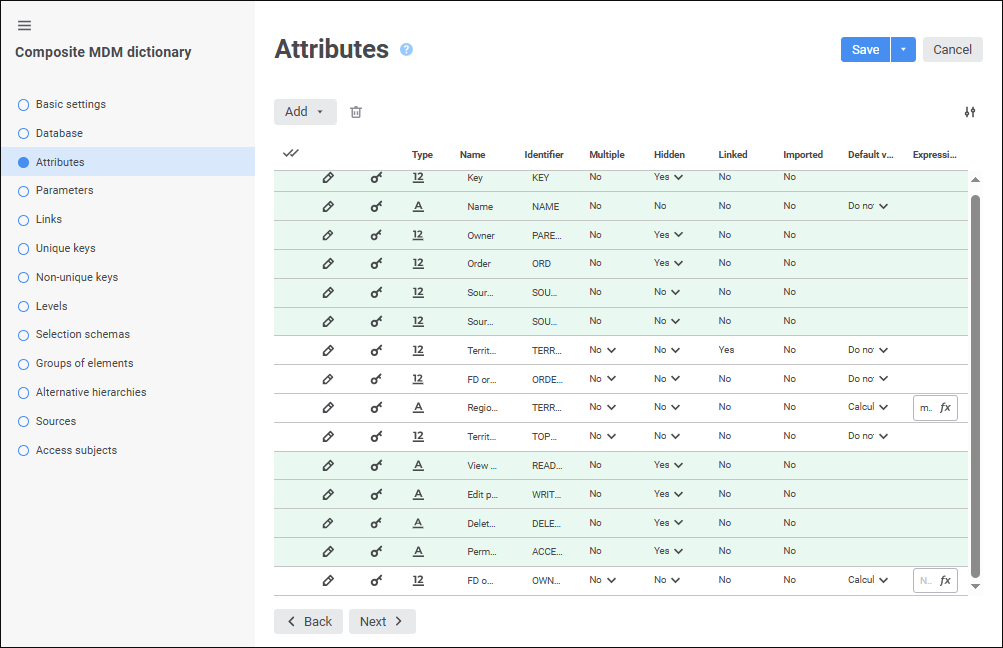
The Attributes page in the web application and in the desktop application is used to create a list of dictionary attributes.
Attributes determine a set of characteristics of each dictionary element.


If the Translate Dictionary into Other Languages checkbox is selected, the icons of attributes of the String and Long Text types requiring translation are replaced with the flag of the country that uses the current translation language as its official language.
There are the following types of attributes:
Composite MDM dictionary mandatory attributes that cannot be deleted. When creating a composite MDM dictionary, the Attributes page already contains a minimum set of system attributes:
Key (KEY). Composite MDM dictionaries support element keys within the range 0-2 billions.
Name (NAME). A value by formula can be created for the Name attribute.
Order (ORD).
Owner (PARENT_KEY). The attribute is added automatically on selecting the Elements have Hierarchy checkbox.
Source Dictionary (SOURCEDICTIONARY). The attribute stores source dictionary key (KEY). It is filled in automatically.
Source Element (SOURCEELEMENT). The attribute stores key (KEY) of source dictionary element. It is filled in automatically.
Version (VERSION). The attribute is added automatically on selecting the Elements can Change in Time checkbox.
Start Date (INDATE). The attribute is added automatically on selecting the Elements can Change in Time checkbox. The default start date is 01.01.1900.
End Date (OUTDATE). The attribute is added automatically on selecting the Elements can Change in Time checkbox. The default end date is 31.12.2999.
Hide (HIDDEN). The attribute is added automatically on selecting the Elements have Hidden Attribute checkbox.
Read Permission (READACCESS). The attribute is added automatically on selecting the Elements have Discretionary Access Permissions checkbox.
Edit Permission (WRITEACCESS). The attribute is added automatically on selecting the Elements have Discretionary Access Permissions checkbox.
Delete Permission (DELETEACCESS). The attribute is added automatically on selecting the Elements have Discretionary Access Permissions checkbox.
Permission to Edit Permissions (ACCESSACCESS). The attribute is added automatically on selecting the Elements have Discretionary Access Permissions checkbox.
Mandatory Access Control (MANDATORYACCESS). The attribute is added automatically on selecting the Elements have Discretionary Access Permissions checkbox.
All system attributes on the Attributes page are highlighted in green. The set of system attributes may vary depending on the parameters specified on the Description page.
Dictionary attributes created by the user:
General. They are used to create dictionary fields.
Imported. They are used to create dictionary fields, which values are imported from a linked dictionary.
NOTE. When working with data analysis and building reports tools data cannot be saved to dictionaries with multiple values of imported attribute.
To add a dictionary attribute:
In the web application:
Select the Add > General Attribute item to create a general attribute. The Attribute Properties dialog box opens.
Select the Add > Imported Attribute item to create an imported attribute. The Imported Attribute Properties dialog box opens.
In the desktop application:
Execute one of the operations:
Click the Add button.
Open the context menu on empty area of the Attributes tab.
Double-click the empty area of the Attributes tab.
Select attribute type:
General Attribute. The Attribute Properties dialog box opens.
Imported Attribute. The Imported Attribute Properties dialog box opens.
The selected type of attribute will be added to the dictionary.
NOTE. An imported attribute can be created if the dictionary is linked with another dictionary.
To edit properties of the selected dictionary attribute:
In the web application click the
Edit button.
In the desktop application:
Click the Edit button.
Select the Edit item in the attribute's context menu.
Double-click the attribute name.
Make necessary changes in the Attribute Properties or Imported Attribute Properties dialog box.
The web application allows for changing attribute fields on the Attributes page of the dictionary wizard.
To reorder attributes in the dictionary list:
In the web application drag the required attributes to the required position.
In the desktop application:
Use the Up and Down buttons.
Select the Move Up/Move Down item in the attribute's context menu.
After attributes are reordered, fields of the current dictionary are automatically reordered.
To delete the selected attribute:
In the web application click the
Delete button.
In the desktop application:
Click the Delete button.
Press CTRL+DELETE.
Select the Delete item in the attribute's context menu.
A confirmation to execute the operation is requested. To delete the attribute that is used in the parameter, unique or non-unique key, first, delete the parameter or key.

Add a dictionary attribute to update
NOTE. It is available only in the desktop application.
To add a dictionary attribute to update:
Open the dictionary for edit and go to the Description tab. Next, go to the Attributes tab.
Open the context menu of the selected attribute.
Select the Add to Update item.
If the dictionary has not been included in the update before, the Add to Update dialog box opens. Set update options in the dialog box. If the dictionary has been already included to the update, it is not required to set up parameters again on adding new attributes.
After executing the operations the selected attribute is added to the update in the update manager. In the corresponding box in the Transfer Data column in the update manager there will be a mention that dictionary is partially updated:


Delete dictionary attribute from update
NOTE. It is available only in the desktop application.
To delete a dictionary attribute from update:
Open the dictionary for edit and go to the Description tab. Next, go to the Attributes tab.
Open the context menu of the selected attribute.
Select the Delete from Update item.
After executing the operations, the selected attribute is excluded from the update.

Change the number of displayed properties in the web application
To change the number of displayed properties in the web application, click the
Settings button and select or deselect the checkbox next to property names.
One can also set up access permissions control for dictionary attributes.
See also: