
 Open the dialog box
When creating or editing a general or system attribute, set its properties in the Attribute Properties dialog box.
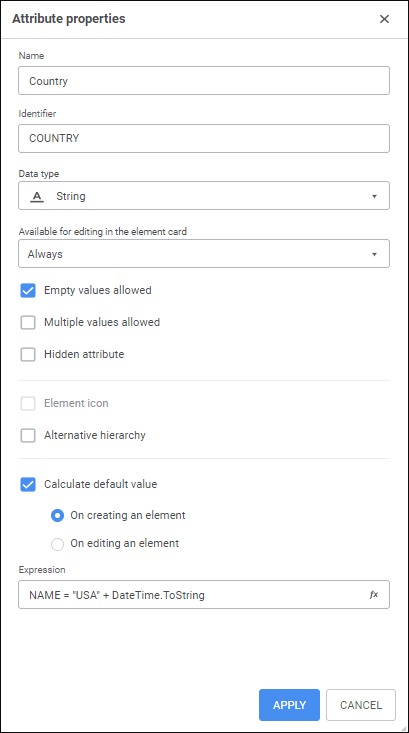
NOTE. System attributes do not allow editing some settings.
Set the parameters:
Name. Enter attribute name.
Identifier. Enter unique attribute identifier. Only Latin characters, numbers and underscores are allowed; spaces are not allowed.
Data Type. Select attribute data type in the drop-down list:
Date and time.
String.
Integer.
Real.
Date.
Logical.
Total Length. Determine the maximum length of attribute value. It is available only for string and real data types.
Decimal Places. Determine the number of decimal places. It is available only for real data type. The specified number of decimal places should be less than the maximum length of attribute value specified in the Total Length parameter.
Available for Editing in the Element Card. In the drop-down list select when attribute value is available for editing in the element card:
Always. Attribute value can always be edited in the element card.
If Visible. It is used by default. Attribute value can be edited in the element card if the attribute is not hidden.
Never. Attribute value cannot be edited in the element card. Regardless of the state of the Hidden Attribute checkbox, the Null Values Allowed checkbox is selected and disabled.
Empty Values Allowed. The checkbox is selected by default. If the checkbox is deselected, each dictionary element must have the value of this attribute. Otherwise this attribute is optional. This option is available if the attribute is not hidden.
Multiple Values Allowed. The checkbox is deselected by default. If the checkbox is selected for the dictionary element, several values of this attribute can be set. The set of values of this attribute is displayed as a string separated by semicolons. To select several attribute values, one can set up a link by this attribute with the other dictionary containing values. When working with data analysis and building reports tools one can save data to dictionaries with multiple attribute values if one specified this dictionary as a data source and cube dimension, on which various reports are created.
NOTE. If the Multiple Values Allowed checkbox is selected, the Alternative Hierarchy checkbox must be deselected because these checkboxes cannot be selected at the same time.
Hidden Attribute. When the checkbox is selected, the attribute is used in dictionary creation but is not displayed in the dictionary. The checkbox is available if the attribute may have empty value. Hidden attributes are highlighted in grey on the Attributes tab. Hidden attributes are not additionally highlighted.
Element Icon. When the checkbox is selected, attribute value determines index of the icon for dictionary element. The checkbox is available if the object is set for repository that contains dimension element icons. If this attribute is selected, an icon, index of which matches the value of this attribute, is displayed next to elements names. This checkbox is available only for integer attributes.
Alternative Hierarchy. The checkbox is deselected by default. If the checkbox is selected, the attribute is used to set up MDM dictionary/composite MDM dictionary's alternative hierarchy.
NOTE. If the Alternative Hierarchy checkbox is selected, the Multiple Values Allowed checkbox must be selected because these checkboxes cannot be selected at the same time.
Calculate Default Value. The checkbox is deselected by default. Set a fixed value or a Fore expression as a default value, using expression editor. Determine when the value is calculated: once on creating an element or every time the element is changed. For correct calculation of default value use the attributes in the expression, which are available at the moment of element creation, for example, the Name (NAME) system attribute or the non-calculated custom attribute. Values of the Key (KEY), Order (ORD), Owner (PARENT) attributes are determined after creating elements.
NOTE. Calculated value cannot be changed on editing dictionary element.
The Attribute Properties dialog box enables the user to edit attribute name and type for all system attributes. One can also change attribute visibility in the Hidden Attribute dictionary for all system attributes except for the Name (NAME) attribute. The Calculate Default Value option is available for the Name (NAME) attribute. In the Expression box set the formula used for creating an element name.
See also:
 Edit button.