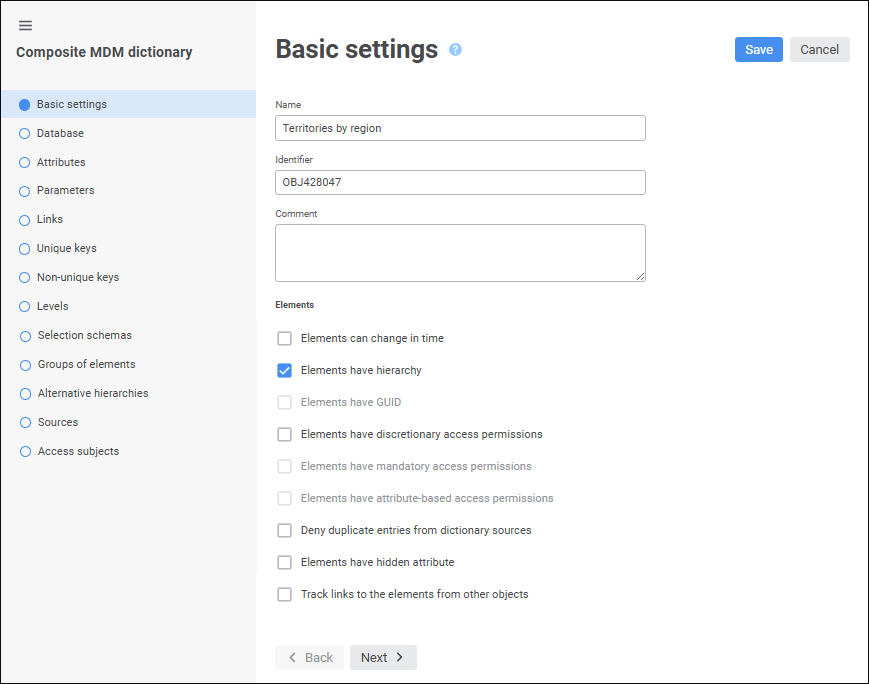
The Basic Settings page is used to specify object name, identifier and comment, and composite MDM dictionary structure is set up:
Set general parameters:
Name. A meaningful string of characters (describing object functionality or its contents). Object name is displayed in the object navigator and in most interface functions. A meaningful name makes it easier to interpret object in the system.
Identifier. A sequence of Latin letters, numbers, and underscore characters starting with a letter. An identifier must be unique for the given repository.
NOTE. Notes or annotations for an object. The box is optional.
Click the Next button to go to the next wizard page.
Determine dictionary structure settings:
 Elements have discretionary access permissions
Elements have attribute-based access permissions
Elements have hidden attribute
Track links to the elements from other objects
Deny duplicate entries from dictionary sources
See also: