In this article:
Selecting Dimension Elements
Dimension element selection is used to select data from the table, based on which visualizers are built.
If dimension elements are selected, the number of selected elements is displayed:
In regular reports in the web application the number of selected elements is displayed as a tooltip on mouseover on the dimension in the Dimensions area on the control panel.
In regular reports in the desktop application express reports and dashboards the number of selected elements is displayed in dimension name on the Selection group of tabs on the side panel.
 Formats displaying the number of selected elements

To change dimension selection, use:
Selection can be changed by means of:
When dimension selection changes, all dependent dimensions are automatically rebuilt and then dimensions depending on them are rebuilt, and so on.
Changing selection in the dimension, for which synchronization is set up, results in the identical selection set for the rest of dimension in the group. In express reports one can synchronize metrics between visualizers on the same sheet.
NOTE. In Foresight Analytics Platform one can set up selection constraints. If constraint is violated, visualizers will not display data, a warning appears on the place of table.
Selection Options
The following operations are available when working with dimension element selection options:
 Settings button located below the dimension name in the Selection group of tabs on the side panel.
Multiple selection and aggregation in fixed dimensions
To change selection by criterion in regular reports and information panels, use the Change Selection dialog box.
Using Selection Schema
Selection Schema is a repository object used in dictionaries to automatically select elements in accordance with predefined rules.
Selection schema will be applied automatically until it is not disabled.
Create a selection schema by selected elements
 icon appears for the dimension on the side panel.
NOTE. The selection schema use is unavailable for combined dimension.
Using Group of Elements
Group of elements is a repository object used in dictionaries to limit the list of available elements.
Create a group of elements by selected elements
NOTE. The group of elements use is unavailable for combined dimension.
Using Alternative Hierarchy
Alternative hierarchy is a hierarchy of any other dictionary linked with the hierarchy of the main dictionary for element mapping or a custom hierarchy created on editing dimensions or adding a new calculated element.
When alternative hierarchy is used, dimension displays elements of alternative dictionary mapped by element indexes.
NOTE. The alternative hierarchy use is unavailable for combined dimension.
Calendar Dimension Element Selection
When working with calendar dimension element selection one can choose selection type in the desktop application: elements or levels.
To set up calendar dimension element selection type, select the type in the drop-down list in the Selection Type column:
In regular reports on the Data Source Structure tab in the Parameters dialog box.
In express reports and dashboards on the Data Source Structure tab in the Structure and Parameters dialog box.
Appearance of the calendar dimension tab on the side panel depends on the selected selection type:
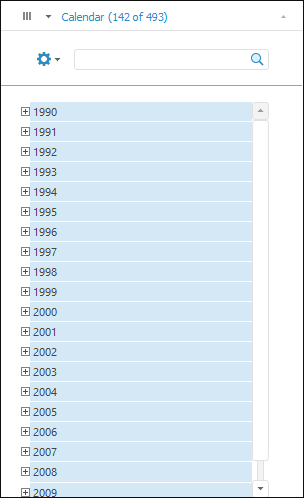
This type is used by default. When working with dimension elements one can use various selection options.
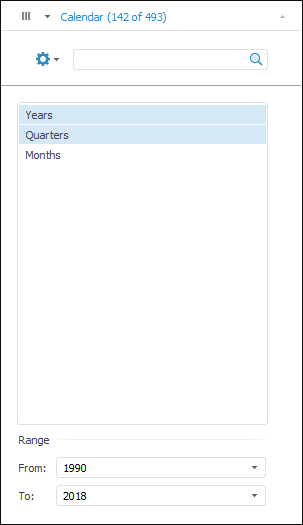
Levels available to select are taken from calendar dictionary. If alternative hierarchy was applied to calendar dimension, the list of levels is formed based on hierarchy levels.
The By Levels Only type is unavailable if:
Calendar dimension was fixed.
NOTE. When a calendar dimension is moved from fixed ones, the By Elements Only type is set for dimension element selection.
Dictionary does not have levels.
Selection schemas and groups of elements are applied to the calendar dimension.
To set selection:
Select level elements:
Advanced element selection:
Edit dimension list:
Multiple element selection is available on the tab.
When selecting a level:
All calendar dimension elements corresponding to this level are selected.
The level corresponding to the first selected element is selected.
Set period limits. Values of period limits are formed as follows:
The first selected element corresponds to period start.
The last selected element corresponds to period end.
In this case the appropriate levels, which were in the selection, are selected.
NOTE. When setting period limits, only selected level elements are available.
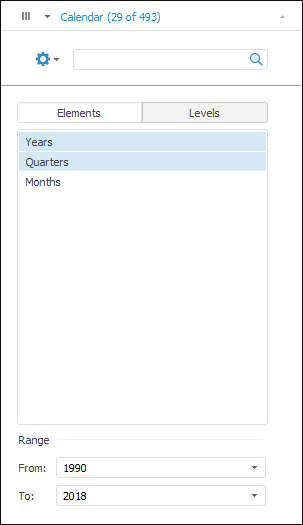
This option supposes that selection types can be toggled: by elements or by levels. Depending on the selected radio button, tab appearance is similar to calendar dimension tabs, for which the By Elements Only or By Levels Only type is set.
Dimension Element Selection Features
In Foresight Analytics Platform one can set up a repository in the way that deselected dimensions will be considered as dimensions with full selection. As a result, visualizers will be built using full dimension selection regardless of the fact that dimension will be completely deselected.
To consider empty dimension selection as full, select the Treat Empty Selection as Full checkbox on the Behavior tab in the Parameters dialog box.
NOTE. This behavior does not affect fixed dimensions with the Metrics role.