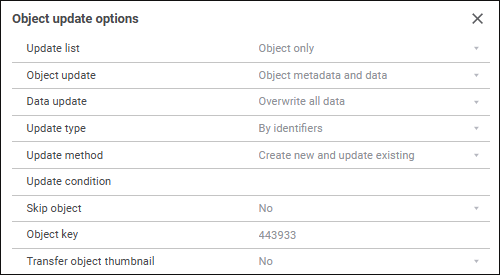
To set up update options of the selected object, use the object update options panel:

When the Update Objects root item is selected on the object update options panel, the common options for all update objects are displayed:
The Update List option is applied to repository objects, special repository objects and their access permissions.
Select the elements to update in the drop-down list:
Object Only. Default value. Only repository objects, special objects and their contents are transferred.
Access Permissions Only. The access permissions to the repository and special objects are transferred.
Object with Access Permissions. The access permissions to the repository objects and special objects and objects themselves are transferred.
NOTE. If transferring of access permissions requires to update them at DBMS level, select the Grant Access Permissions at the DBMS Level checkbox in the update options.
Setting the root element value affects all the update objects. If the Update List option is different for the objects in the update, the value of this element is not displayed for the Update Objects root item.
Select the update type in the drop-down list:
By Keys. Default value. Objects are updated by keys.
By Identifiers. Objects are updated by identifiers depending on their location in the source repository. Different objects with the same identifiers can be contained:
In the business application.
In container objects (assembly, object of custom class, modeling container).
When selecting the update type take into account the following:
Correspondence of the dependent objects not included in the update file is always tracked in the target repository by keys, even if the update file is saved with the By Identifiers update type. Therefore, before saving the update file it is recommended to include all dependent objects in the update. To do this, select the Consists Of context menu item of the object update tree and select all objects in the dialog box that opens.
If the By Identifiers update type is set, and form components have the changed objects, to which they referred, components are updated and reconfigured to the other object during their update.
Select the update method in the drop-down list:
Always Create New Objects.
Create New Objects and Update Existing. Default value.
Update Objects Only.

Pre-cleaning of objects depending by the contents
Determine whether dependent objects are cleaned on update.
Dependent objects should be cleaned when the objects that refer to each other are updated.
NOTE. If the option is enabled, one cannot update separately object data and object metadata for linked objects.
A different set of options is displayed for different types of objects:
The Object Update option is displayed only for the objects, which allow for separate updating of object's data and metadata (table, external table, log, MDM dictionary, composite MDM dictionary).
Select object update type:
Object Data. Only object data is updated.
Object Data and Metadata. Object structure and data are updated.
Object Metadata. Only object structure is updated.
The object update option matches the update method specified in the Add Object to Update dialog box. This option affects the Update Method and the Recreate on Update options.
The option is relevant for tables, external tables, logs, MDM dictionaries, composite MDM dictionaries if The Object Data or Object Data and Metadata items are selected for the Object Update parameter.
Determine the object data update method.
Default. Object data is overwritten.
Overwrite All Data. All object data is overwritten. An updated object is cleaned before the update.
Append Only. New records are added to object data. Existing records are not refreshed.
Change Only. Object data is updated without adding new records.
Update and Change. Object data is updated, new records are added to the data. Records or elements absent in the source object will be left in the updated object.
When setting up this option pay attention to the value set for the primary key.
Determine update type. Options are the same as those specified for a root element. An additional option is also available:
Default. Object is updated by the method specified for the Update Objects root item. Default value.
Determine the object update method. The same options as for a root element are available. The default method is Update Objects Only.
NOTE. An object update method can be selected if the Object Metadata or Object Data and Metadata items are selected for the Object Update option.
Determine the update condition for an object, based on which the object can be excluded from the update during updating.
Set the condition manually.
Determine whether objects are skipped on update:
Yes. The object remains in the update structure. When installing the update this object is not updated. When the Yes value is set for the folder, the confirmation message to change the properties values of the child objects is displayed.
No. Default value. A negative answer does not change the properties values for child objects but sets the No value for the folder.
Object key is displayed in the box. Read-only.
Determine whether user credentials should be prompted if permissions of the current user are not sufficient to insert data to tables on update:
No. Default value. If permissions to enter data are missing, user credentials are not prompted, an error occurs.
Yes. User credentials with permissions to create a table and insert the data in the corresponding database are prompted. The setting is relevant only for inserting data to tables.
Specify table fields, in which data is stored, in the Primary Key box. Based on these fields the system checks if data of the consumer table differs from data of the source table and executes the specified update operation (for example, only add records that are missing based on the primary key).
This parameter is available only for tables and external tables. If the table has a primary key, the field automatically displays identifiers of the fields that are primary keys.
The fields data is separated by a semicolon.
The settings is available for tables and external tables if The Object Metadata or Object Data and Metadata items are selected for the Object Update option, and also for views and procedures.
Determine when the object must be recreated at the DBMS level.
Default. Default value. The object can be recreated only if its structure has been changed.
Always. The object is always recreated.
Do not Recreate. The object is not recreated.
NOTE. If the recreate Tables/Recreate Stored Procedures/Recreate Views checkbox is selected in update process options, and the Do not Recreate option is selected for corresponding object, the object will not be recreated during update installation.
The parameter is available for security subjects.
Determine whether user group membership is saved during the transfer of security subjects between repositories:
No. Default value. The group and its users are transferred between repositories without saving group membership.
Yes. The group and its users are transferred with saving group membership.
The target repository allows for clearing lists of groups, which include security subjects, during the update. For example, if a subject in the source repository is included in the group A and in the target repository - in the group B, it will be included only in the group A after applying update in the target repository. To clear lists of groups, select the Clear Lists of Groups That Include Security Subjects checkbox during the setup of update process parameters.
For details about transferring security subjects with saving group membership see the Transferring Security Subjects with Saving Group Membership subsection.
The parameter determines whether the specified icon of object and preview image that is set using the IMetabaseObjectDescriptor.Screenshot. Available values:
No. Default value. The specified object thumbnail is not transferred during the update.
Yes. The specified object thumbnail is transferred during the update.
The parameter is available if the Allow Displaying of Objects as Icons without Taking into Account Object Access Permissions checkbox is selected in the security manager. When installing update, to set a thumbnail for the object, select the same checkbox in the security manager of the repository to be updated.
The parameter is set for each object in the update.
Features of object update options setup:
When separating administrator roles and depending on the selected method of access control the users may have different available sets of object parameters.
If several objects are selected in the object tree, the update options panel displays only common parameters.
If a parameter value changes for an object with child objects, a request to change the value for all child objects is displayed. If the property is changed for the Update Objects root element, the positive answer changes the property value of all update objects.
See also:
Creating an Update | Setting Up Update Options