 Add Object to Update button on the toolbar. After executing the operation the Search Users and Groups dialog box opens:
To add a security subject to update, select the Security Subject update object type in the drop-down menu of the Add Object to Update button on the toolbar. After executing the operation the Search Users and Groups dialog box opens:
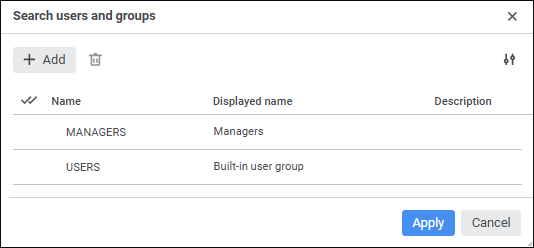
When adding a security subject to the update, the system transfers credentials of group or single user credentials are transferred:
User or group name.
Displayed user name.
SID.
User or group description.
User password.
Attributes. Attributes are updated by identifier as follows:
If attributes have equal identifiers, they are updated.
If the attribute is absent, it is added.
NOTE. When installing the update containing security subjects the user should have the Changing User Permissions, Distributing Roles, Changing Policy privilege. When separating administrator roles and depending on the selected access control method differences in access permissions to update elements and object update options are possible.
To correctly transfer single users to database server, select the Connect User from Server if He Exists on DBMS Level checkbox. In this case, when installing update a new user is not created if he already exists on the server. If the checkbox is deselected, a new user is created on the server. If this user already exists, the corresponding error message is displayed.
To correctly transfer domain users or groups it is recommended to check if LDAP settings are identical in the settings.xml files located in different environments.
To transfer group credentials with its members between repositories:
Add a group of users to update.
Add single users who are members of the group, which should be transferred between repositories.
Set the Transfer Group Membership parameter to Yes for the group or for each user in the group.
After executing the operations, when the update is installed, the group and the users included in the group are transferred with saving group membership. If the target repository does not have a user in the specified group, he will be created with saving group membership.
To transfer users between repositories with saving group membership:
Add single users who are members of the groups contained in the target repository.
Set the Transfer Group Membership parameter to Yes for each user.
After executing the operations, when the update is installed, users are transferred with saving group membership. If the target repository does not have the group which includes the user, the user membership in this group will not be saved. When transferring users, the group which includes the user should be included in the update or in the target repository.
The target repository also allows for clearing lists of groups, which include security subjects, during the update. For example, if a subject in the source repository is included in the group A and in the target repository - in the group B, it will be included only in the group A after applying update in the target repository. To clear lists of groups, select the Clear Lists of Groups That Include Security Subjects checkbox during the setup of update process parameters.
NOTE. To apply access permissions used for members of the group of users, additionally update user permissions in the security manager after installing the update.
See also:
Creating an Update | Adding Access Permissions

 Add security subjects
 Settings button.
 Delete button.