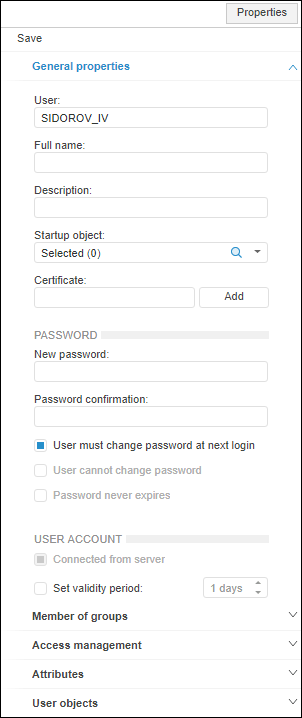
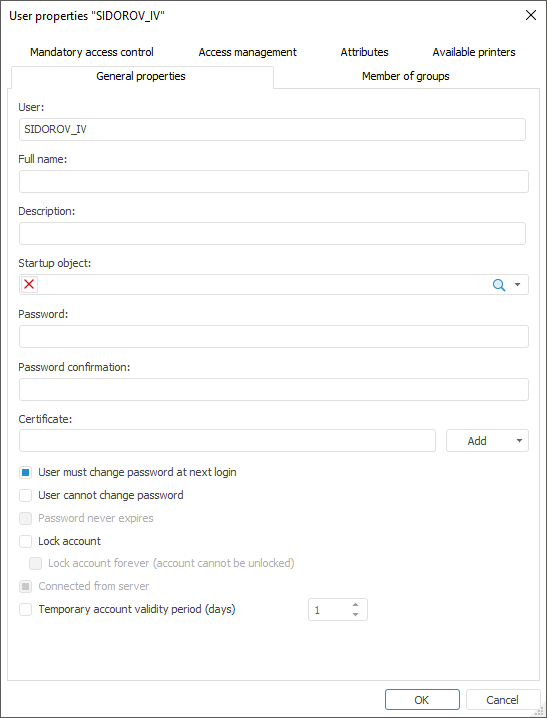
To change parameters of general user properties, use the General Properties tab in the Properties side panel in the web application and in the User Properties dialog box in the desktop application.
NOTE. A password cannot be changed for domain users.
Name. A unique user name among users and user groups that is used on system login. A user name must consist of Latin letters, numbers, characters supported by DBMS that can be used randomly. User names are case insensitive. Creating user accounts with equal names that are different only in case is unavailable.
NOTE. Parameter value is available for editing only when creating a user.
Displayed Name /Full Name. Full name of user. In the web application the specified name is displayed in the object navigator on the side panel. If the name is not specified, the unique user name specified in the Name parameter is displayed.
SID. User identifier. It is generated automatically and is read-only.
NOTE. The parameter is available only in the web application.
Short Name. An additional user short name that is used on granting permissions on the DBMS level.

NOTE. The parameter is displayed only when the short name of domain user added to the Oracle DBMS is specified.
Description. User description is provided at administrator's discretion.
Startup Object. Use search to select the object that automatically starts at user login. An object available as read-only for the current user can be used as a startup object. If the user is no longer allowed to read the object selected as a startup object, this object is no more to open automatically when the user logs in to the system. If you need to open the entire repository when a startup object is selected, hold down the SHIFT key while clicking the OK button in the login dialog box.
NOTE. A repository startup object can be selected in addition to a user startup object. In this case a user startup object has a higher priority than a repository startup object. Startup is available only in the desktop application.
Password. This box is used to enter the password, that is, credentials that authenticate the user on system login. A password may begin with a number, letter or the "_" character and may contain Latin letters (a-z, A-Z), numbers 0-9, characters "_@#$&*%^".
Password Confirmation. Password confirmation is necessary to make sure the password has been typed in correctly.
User must Change Password at Next Login. If this checkbox is selected, the password change dialog box opens when the user is trying to log in to the system. The operation is executed only once when the user logs in to the system after this option was enabled. If administrator roles are separated, the checkbox is automatically selected:
When a new user is created by the application administrator (or the user holding the Creating and Deleting Users privilege).
When user password is changed by the information security administrator (or the user holding the Changing Security Label and Access Control List of Any Object privilege), if the User Cannot Change Password checkbox is deselected for this user.
User cannot Change Password. The user cannot change password, which is set in the security manager. When this checkbox is selected:
In the web application the Tools > Change Password item will be absent in the object navigator's main menu.
In the desktop application selecting the Tools > Change Password item in the object navigator's main menu will result in the error about absence of permissions to change password.
Password Never Expires. When the checkbox is selected, password policy settings for force password change (maximum/minimum password age). When this attribute is used, the User Must Change Password at Next Login checkbox is dimmed.
Certificate. A user's fingerprint of certificate is added, which is presented to the user for authentication in the system. It is used for setting up two-factor authentication. To add a certificate, use commands in the drop-down menu of the Add button.
NOTE. The parameter is available only in Windows OS.

 Locking and account validity period
Lock Account. If the checkbox is selected, the user cannot log in to the system using this account. The users list of the security manager displays locking icon next to names of the locked users:  . The user is locked (this checkbox is automatically selected) if all attempts to enter the password on system login failed.
Lock Account Forever (Account cannot be Unlocked). Selecting the checkbox locks the user permanently, the account cannot be unlocked. Clicking the OK button displays the request to confirm user locking forever:
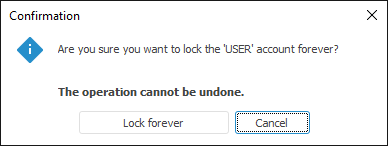
Clicking the Lock Forever button locks the user with no possibility to undo it, clicking the Cancel button returns to user properties editing, the Lock Forever checkbox is not selected.
After the user is locked forever the Lock Account and Lock Forever checkboxes are selected and cannot be edited on opening properties of this user. In the list such a user is marked with a dimmed locking icon  and grey text.
NOTE. In the web application use the  Lock button on the toolbar and the Lock Account item and the Lock Account Forever (Account cannot be Unlocked) item in the drop-down menu of the button.
Connected from Server. This checkbox is available for users with the Creating and Deleting Users privilege only on creating a user account. The checkbox is unavailable if built-in authorization is used in the repository. To connect the existing user on DBMS server and include the user to the list of security subjects of Foresight Analytics Platform, select the checkbox and specify the user name matching with the user name on the server in the User box.
Connecting the existing user includes the following:
It does not check if the the specified user actually exists on the server.
The privileges are distributed only for database system tables.
NOTE. The access of the user to the database and the repository depends on the administrator who added the user on the server.
For example, before creating an account of the user connected from the server, execute the script on the PostgreSQL server to grant privileges to this user:
GRANT CONNECT ON DATABASE TO USER_NAME
If the repository is based on a custom schema that is different from the public default schema, execute script:
GRANT USAGE ON SCHEMA TO USER_NAME
Where:
USER_NAME. User name on the DBMS server.
If repository connection in the web application is executed by means of the external services, BI server work results in creating temporary users (for example, Google service accounts) with the deselected Connected from Server checkbox, which are contained as single records in the repository system table. Physical users of the DBMS are not created. For authorization under such users there must be the individual user of the repository who will be used for impersonation. It is required to save default credentials for this user on BI server.
When the checkbox is selected, the Password and Password Confirmation boxes become unavailable. To change user password, go to the Change User Password section.
Set Validity Period/Temporary Account Validity Period (days). This checkbox is selected to create a temporary account. Validity period can be set once. By the end of the specified period the account is locked forever. This restriction is set for the entire platform. If the restriction is set for a domain user, it does not affect user's work in the domain.
When roles of information security administrator and application administrator are separated:
Application administrator:
Cannot edit all checkboxes, and Password and Password confirmation boxes on viewing properties of an already created user.
Cannot access all checkboxes except for Connect From Server on creating a new user.
Information security administrator cannot edit the Startup Object box on viewing properties of an already created user.
See also:
Creating and Editing User Account | Determining Group Membership