
 Create new resources
Resources are used to translate text into different languages and localize images:
In data entry forms - sheet names, custom buttons, tabs and groups.
To get started, create new or open ready resources.
NOTE. To translate business application menu structure into different languages, use the Business Application Resources ready resource with the APPLICATION_RESOURCES identifier in the Internal Structure of Business Application folder of business application. To translate data entry form elements, use a ready resource included in object.
To develop multilingual application resources, see the Developing Multilingual Applications article.
To use resources in custom class objects, see the Custom Class Description article.
To translate express reports titles into other languages, see the Translating Express Reports Titles article.
The main window of the Resources repository object:
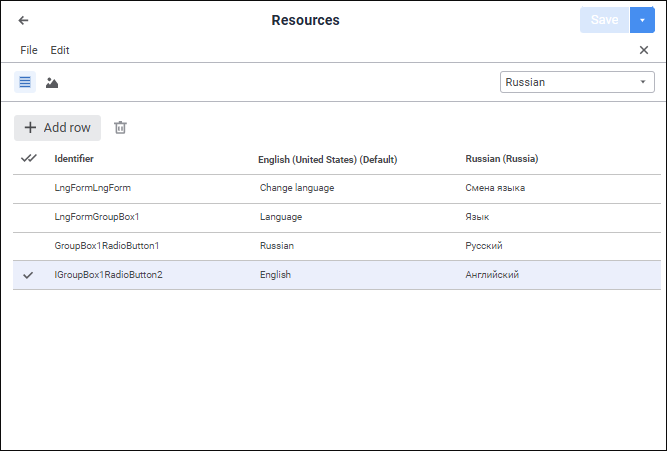
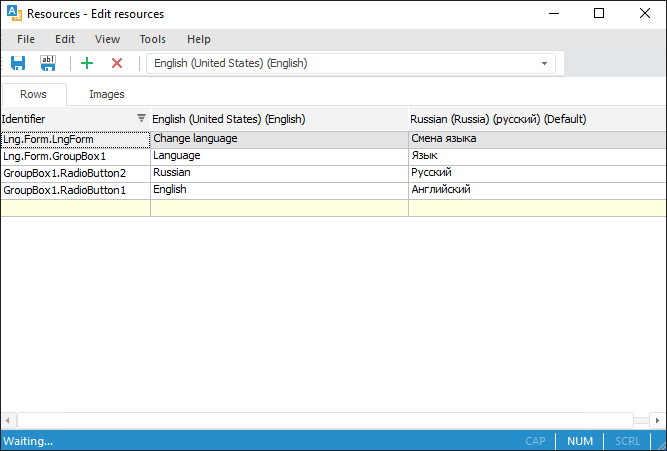
Resources are divided into string and graphic and they are displayed as a list. The following is determined for each resource: identifier, translation for default repository language and translation for current repository language.
Key features:
Find and replace resource. It is available only in the desktop application.
Export resources. It is available only in the desktop application.
Import resources. It is available only in the desktop application.
To use advanced capabilities for working with resources in the desktop application, see the Advanced Capabilities article.
See also:
Setting Up Multilingual Options
 Create button in the main menu and select object type on the
  Edit button in the Open group on the Home ribbon tab.