In this article:
Saving Data on Global Cache Use
Global Cache Management Console
Working with Global Cache
Multidimensional cubes and dictionaries store data in flat relational structures. When working with multidimensional cubes, a data selection query is executed from relational structures, then data selection results should be loaded and built into multidimensional structures. With large volume of data, high data sparsity, a number of conditions during query execution selection, loading and building in multidimensional structures may require a long time. To speed up Foresight Analytics Platform, there is a built-in capability for working with data cache of dictionaries, standard cubes and cube views and virtual cubes. When cache is used, the previously loaded and built multidimensional structure is saved in DBMS and is loaded to RAM on the first work with the object.
Data saved in the special format is loaded to RAM, conversion to matrix is not required because data is already stored in multidimensional format. One query is enough to get the entire matrix and place it in BI server RAM. Specialized multidimensional databases, special files or special data structures in relational DBMS can be used to store multidimensional data.
There are two cache operation modes:
Session or personal cache. When session cache is used, an individual segment is allocated in the application server RAM for each user session. This mode is suitable when within the same session with Foresight Analytics Platform the user uses the same data many times. For example, if a territory dictionary is used in all cubes, after the first use it is loaded to BI server RAM, and SQL queries to database are no longer created. The use of session cache increases the use of RAM because an individual instance of cached dictionary is loaded to RAM for each user. The amount of necessary RAM will be in direct proportion to the number of active sessions of BI server. It is available only in Fore.
Cross-session or common cache. When cross-session cache is used within the same BI server node, a common data matrix or a common dictionary is created for all active sessions. Data changes made by one user will be visible at once to other users. This mode is suitable for data reading but without a complex role model which separates user access to single data fragments.
Both modes can be used to cache data of dictionaries and cubes.
For details about working with global cache in Fore see the Working with Global Cache in Fore section.
Loading Data to Global Cache
Data can be loaded to global cache using the global cache management console. When this cache creation method is used, data can be divided not only by parameters but also cache can be created by a specific cube selection. This method also allows for saving all data to cache.
NOTE. After determining or changing settings in the settings.xml file or in system registry settings, restart the BI server.
Selection of a global cache loading mode depends on the tasks to be solved and data sources structure.
Loading Cached Data to RAM
A cached object is loaded to RAM on the first use of this object. Then, depending on the settings, object data will be available to all users. All further object use will be executed in RAM, and additional queries to DBMS will not be created.
Full Cache
When full cube cache is used, the use of data in any slice results in loading of all cache to RAM, which may take longer time than working without cache, if the selection, by which data should be obtained, is not very large. In this case more memory will be used than without cache because all cube data will be stored in RAM.
If working with data does not assume the use of all data, one can divide data by parameters to save to cache in parts or to set selection on creating cache.
Cache by Parameters
If cache was saved for different parameter values, cache can be loaded to RAM for each parameter in parallel using different indicators.
NOTE. The cache by parameters is only available for parametric cubes.
Saving Data on Global Cache Use
If the data loaded to RAM was changed and saved to source, it will be visible to users until cache is in RAM. If cache was loaded from RAM and loaded to it again, the changed data will not be visible.
As global cache is stored separately from cube and dictionary data, when the source data is changed in source objects, it is not loaded to cache automatically.
To update cache data, "warm-up" cache again using the cache "warm-up" wizard of the global cache management console. Take into account features of saving data for full cache or cache by parameters in multi-user mode:
Full Cache. All the records that are simultaneously changed in different sessions are queued and will be written to a common matrix one by one. This process is controlled by the cache data stream manager. This implementation is determined by the fact that the matrix has a complex internal system of multidimensional data indexing and it cannot be created in parallel for several new values.
Cache by Parameters. A separate local matrix is created for each combination of parameter values in RAM. Values are written to local matrixes in parallel, each stream is written to its own matrix. Use this saving method when data-intensive calculations are executed simultaneously or data is loaded by different scenarios. Data is saved for all scenarios simultaneously, and each of them is located in its own stream to its own local matrix. Different local matrixes can be combined in a virtual cube by means of data virtualization, and reporting tools can be used to visualize the general result and compare matrixes with each other.
Global Cache Management Console
To start the console, select the  Cube Caching item on the side panel of the object navigator. After this the page with the URL in the following format opens in the new browser tab:
http://<IP address or DNS server name>/fp10.x/app/cache.html#repo=<repository identifier>
NOTE. To work with the global cache management console, the repository should contain the Cube Cache extension .
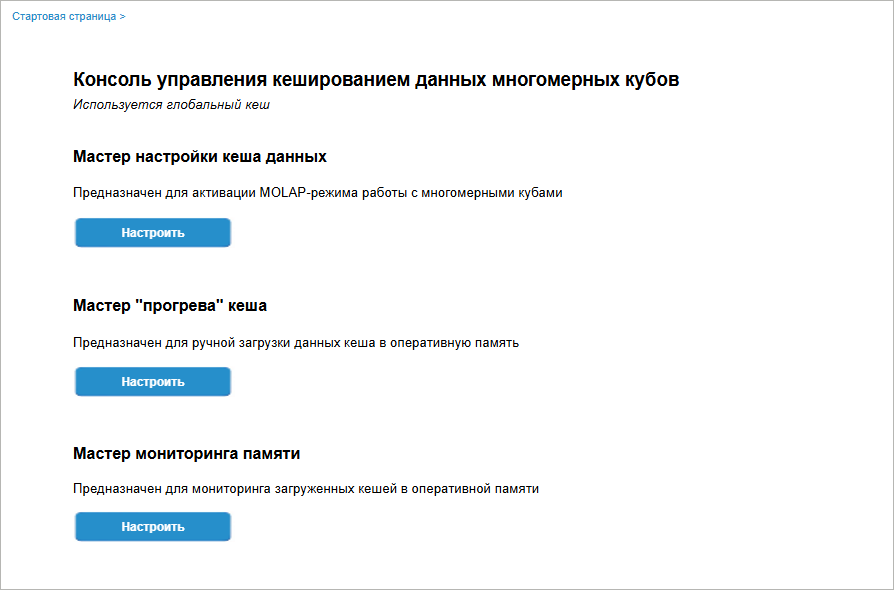
Available settings:
Creating Data Cache
To create data cache and select a cacheable object, click the Set Up button in the cache creation wizard area on the console start page.
After executing the operation the Cache Model tab opens:
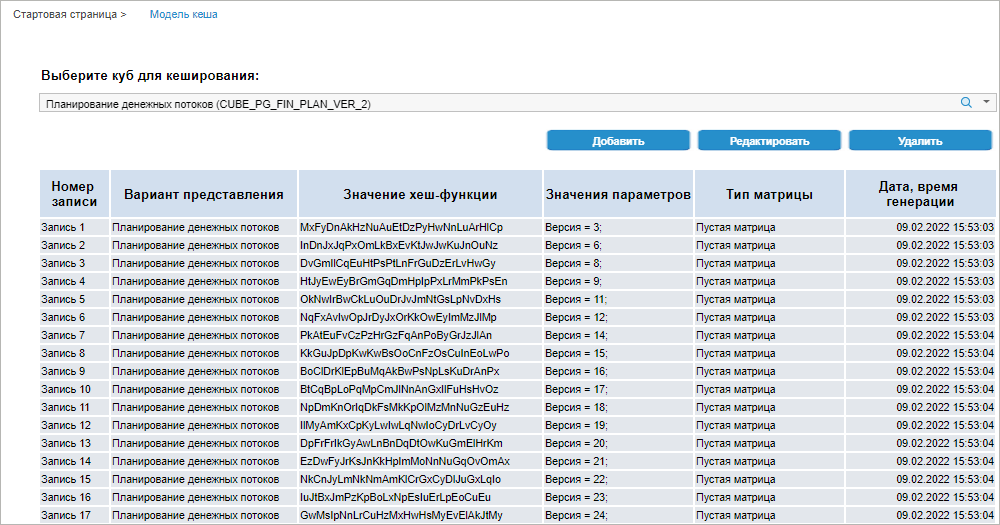
Determine the settings:

 Search button and start entering cube name.

Cache "Warm-up" Wizard
To populate a cache record with data, click the Set Up button in the cache creation wizard area on the console start page.
After executing the operation the Cache Warm-up tab opens:
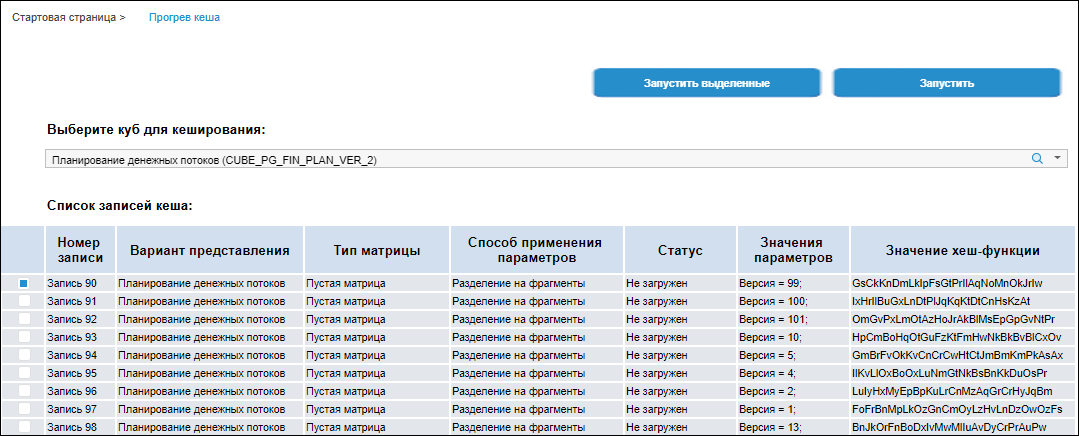
Determine the settings:
 Select cube for cache "warm-up"


Monitoring
To view records loaded to BI server memory, click the Set Up button in the memory monitoring wizard area on the console's start page.

The page will display a list of cache records that are currently loaded to memory. To clear the data matrix of any cache record, select it and click the Clear button. The record remains loaded but the number of points for it will be zero.
If someone works with a record at the same time from application code, and this record is locked for read/write, the Number of Points, Date, Allocated Memory, Used Memory columns will display the text "Record unavailable". Clearing this record will be unavailable.
Memory Use and Performance
Before making a decision whether to use data caching, see work speed and memory use values. The indicators presented below depend on the hardware, DBMS server load, and other conditions.
Memory use depends on the number of dimensions, number of facts, and data type.
Averaged indicators of memory use and performance for cubes with real data type:
Number of records, mln. |
Number of dimensions |
Number of facts |
The first opening without cache, sec. |
The first opening with cache, sec. |
The second opening with "warmed up" cache, sec. |
Memory, Gb |
10 |
5 |
1 |
19.7 |
3.6 |
0 |
0.52 |
10 |
5 |
5 |
52.0 |
31.6 |
0 |
2.3 |
10 |
10 |
1 |
43.2 |
4.6 |
0 |
0.68 |
10 |
10 |
5 |
67.2 |
35.7 |
0.01 |
3.2 |
10 |
18 |
1 |
67 |
9 |
0.01 |
1.2 |
10 |
18 |
5 |
90.3 |
48.4 |
0.01 |
4.8 |
100 |
5 |
1 |
216.6 |
40.4 |
0.01 |
4.7 |
100 |
10 |
1 |
279.4 |
48.2 |
0.01 |
6.5 |
100 |
18 |
1 |
567.6 |
135.4 |
0.01 |
9.3 |
Take into account the effect of cube settings and cube structure on the amount of necessary RAM:
If after data selection the calculations are executed that result in the increased amount of data, for example, matrix aggregation, the amount of necessary RAM will be increased proportionally to the number of new points.
If cube views are used that are built based on standard cubes with cache, and a matrix copy is created over the cache matrix, which takes into account fixation in the cube view, it requires additional RAM. Depending on the cube view structure, one may require to double RAM.
If the system is out of RAM during cache loading:
Delete unused cache objects from RAM by clicking the Clear button in the memory monitoring wizard of the global cache management console.
Divide cache into small fragments using parameters and selection.
Scenarios of Global Cache Use
Use global cache if the following scenario is implemented:
Use of dashboards. The same source data is used, and the amount of this data is rather small (about ten or hundred of million records, role model is not used, and it is not required to enter and save data).
Use of multidimensional calculations with large amount of data. Large amount of data can be obtained or calculated in short time. In this case, cache is used as a buffer, and data from it is copied to the main storage regularly: each night, at weekends or asynchronously after the final confirmation.
Use of different data selections with complex filtering conditions. Filtering conditions in SQL queries strongly depend on business logic and cube structure. The more is the amount of source data and the more complex are query conditions, the slower is the speed of selection. Data cache in Foresight Foresight Analytics Platform has its own system of double indexing, which is good for handling of multidimensional data. That is why data selection for large multidimensional conditions in some cases will be executed in cache quicker than on the DBMS side.
When making a decision whether to use data caching in Foresight Analytics Platform, take into account that:
Data amount in cache will affect the speed of data handling, that is, the time of query execution for a table with one million of records or one billion of records will differ.
Not all data in cache are necessary at the same time. For example, if calculation by scenarios is used or data handling by branches available to the user within its role model.
To be able to work with different data fragments in different time periods, use cache by parameters instead of full cache. To use cache by parameters, determine one or several object parameters and create your own cache fragment for each combination of parameters. "Warm-up" of each such cache fragment is managed separately, and any of them can always be added or removed from the common fragment pool.
Logging of Executed Operations
Data cache management console is used to log operations executed by the user. When the console opens for the first time, log storage tables will be created in the Cube Cache extension in the Service Objects folder. The console should be opened by the user who is a repository administrator.
The following tables are created:
Cache instance log (CACHE_ITEM_TABLE). It contains information about cubes, their display versions, and a set of parameter values, for which cache instances are created.
Cache instance "warm-up" log (CACHE_WARMING_TABLE). It contains information about the list of cache records and the selection used for creating records.
Cache data loading log (CACHE_LOG_TABLE). It contains full information about cache data loading:
Date and time of records registration in the log.
Loading status.
Information about threads and the number of loaded data points.
Information that can be used to identify the user who executed loading.
NOTE. To ensure correct creating of tables, which store cache work log, the repository can be created based on PostgreSQLDBMS, and a default database should be set up in the repository.
By default, all repository users can access tables. If required, the administrator should set up access permissions according to developed system requirements.
Global Cache Constraints
Before making a decision whether to use data caching, see the constraints:
Long time of data matrix "warm-up" at BI server startup when cross-session cache mode is used because all data is loaded to RAM.
Inability to work with cubes with configured functionality:
Absence of support of changing dimension element set: adding/deleting dictionary elements, enabling access permissions for the user or rebuilding parametric dictionary after applying parameters, or in cubes after saving cache.
Absence of support of access permissions separation for dictionary elements and cube data.
When executing data analysis and building reports based on cubes with enabled global cache, using the Analytical Queries (OLAP), Dashboards, Reports, Interactive Data Entry Forms tools, the following functions are unavailable: