 Open the Formatting group of parameters
To set up formatting of table sidehead, heading, rows totals/column totals, corner, data and of single table dimension elements located in columns/rows, use the Formatting group of parameters on the side panel.
 Open the Formatting group of parameters
To open the Formatting group of parameters on the side panel:
Select table element.
Press the  Settings button on the toolbar. The side panel is hidden by default.
Select the required table element type in the drop-down menu of the side panel title.
To open the Formatting group of parameters in the working area:
Select table element.
Select the Formatting context menu item.
Select the required table element type. The following table elements can be selected: heading/sidehead, table dimension elements.
To set up a single table dimension element, select the Formatting > Element context menu item.
Formatting parameters depend on the selected area type:
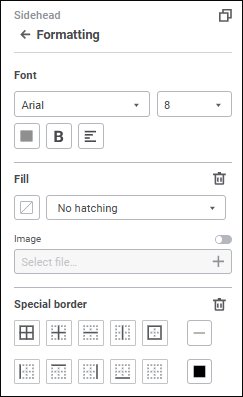
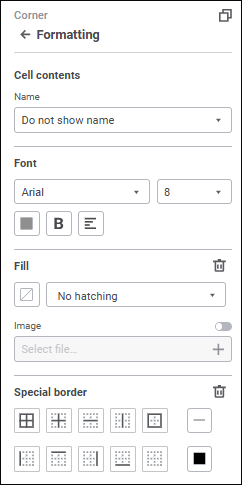
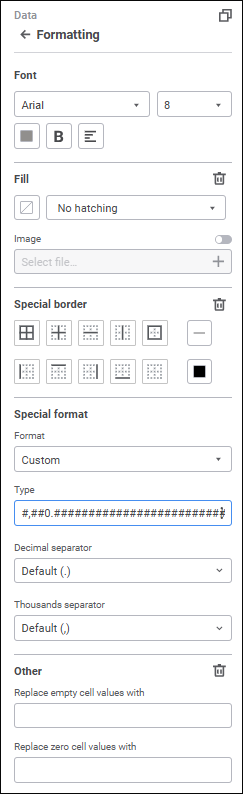
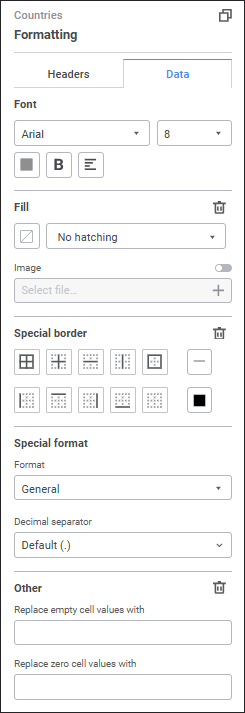
The following settings are available depending on the selected table element:
It is available only for the Corner table element.
To set up table corner contents, select corner contents option in the Formatting group of parameters or in the table corner's context menu:
Do not Show Name. Default value. Table corner is empty, and name is not displayed.
Name from Heading. On the settings panel in the drop-down list select the dimension, which name should be displayed in the table corner.
Name from Sidehead. Default value. On the settings panel in the drop-down list select the dimension, which name should be displayed in the table corner.
Custom Name. On the side panel in the edit box enter the name. When the Name from Heading or Name from Sidehead option is selected, custom name is reset.
After executing the operations the table corner contents is set up.
Features of displaying table corner name:
If table heading or sidehead contains several dimensions, corner cells are merged into one if the Custom Name option is selected. Previous corner names are reset.
If table heading or sidehead contains several dimensions, the name edit box displays name of the first dimension in the list if the Name from Heading or Name from Sidehead option is selected. Table corner will be split into several cells, which names correspond to heading or sidehead dimensions.
If table heading or sidehead contains no dimensions, the corner remains empty if the Name from Heading or Name from Sidehead option is selected.
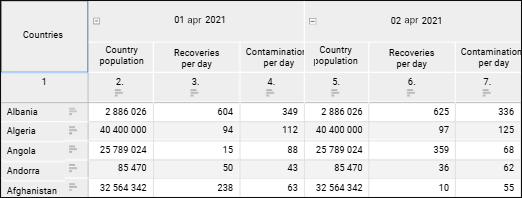
The example of table corner with custom name:
Set font options:
Font. Select one of the available fonts in the drop-down list.
Font Size. Set the required font size. Size is set in points, it can be entered manually or using the keyboard. The range of available values: [6; 36].
Font Color. Select font color in the drop-down palette. One can select standard and custom colors. The palette contains only standard colors by default.
To create a custom color:
Click the  Add Color button. The advanced color palette opens.
Select a color in the advanced color palette, use color picker to select color on a browser page, or set color code in the RGB or HEX format.
After executing the operations the custom color is created and added to the palette.
To delete custom color from the palette, select the Delete item in the selected color's context menu.
NOTE. The maximum possible number of custom colors in the a palette is 23.
Font Style. Select font style in the button's drop-down menu:
B. Bold.
I. Italic.
U. Underline.
When the button is pressed, the corresponding font style is used. Several styles can be used simultaneously, for example, pressed B and I buttons result in bold italic font style.
Text Alignment. Select a text alignment option in the button's drop-down menu:
 . Left.
 . Center.
 . Right.
 . By width.
After executing the operations the specified font options are applied for the selected table element.
To reset the determined settings and restore the default style, click the Reset button.
To set up fill, set the parameters:
Background Color. Select fill option for background in the drop-down menu:
No Fill. Fill is not used by default.
Solid Fill. Go to the One Color tab and select plot area solid fill color in the drop-down palette.
Two-Color Fill. Go to the Two Colors tab and select start and end colors of two-color gradient in the drop-down palette. Specify tilt angle if required.
Hatching. Select hatching option in the drop-down menu:
No Hatching. Hatching is not used by default.
Hatching Types. After hatching type is selected, set hatching color in the drop-down color palette.
Image. To use an image to fill table element:
Toggle the Image switch to active state. The switch is inactive by default, and table element fill is set up using standard options.
Click the Select File button and select the file in the dialog box that opens.
After an image is selected, the file name is displayed in the corresponding box, the table element is filled with the use of the image.
To replace the image, click the Select File button again.
After the image is selected, the following settings are available:
Download. Click the Download button to export the image used as a fill.
Stretch Image. The checkbox is deselected by default, the table element image corresponds to its original size. To fit image into table element, select the checkbox.
To remove the image, click the  Remove button next to the texture name.
After executing the operations, the specified fill settings are applied for the selected table element.
To reset the determined background fill and hatching settings and restore the default style, click the No Color button.
To set a custom color:
Click the Add Color button in the standard color palette and select the color in the advanced color palette.
Select a color in the advanced color palette, use color picker to select color, or set color code in the RGB or HEX format.
After executing the operations the custom color is added to the palette.
NOTE. The maximum possible number of custom colors in the a palette is 23.
To delete custom color from the palette, select the Delete item in the selected color's context menu.
In the order of fill application for table elements, each following point has a higher priority and overlaps the previous point:
Data (lowest priority).
Column totals.
Row totals (highest priority).
To reset the determined fill settings, click the Delete button next to the Fill tab name.
To set up borders:
Select the borders to be displayed:
All borders.
Inner borders.
Horizontal border between cells.
Vertical border between cells.
Outer border of selected element.
Border is set to the left from the selected element.
Border is set to the top from the selected element.
Border is set to the right from the selected element.
Border is set to the bottom from the selected element.
No borders.
Select border style type in the Line button's drop-down menu. The No Borders option is selected by default, and border is not displayed.
Select border color in the drop-down color palette. If required, specify border fill opacity percent. One can select standard and custom colors. The palette contains only standard colors by default.
To set a custom color:
Click the Add Color button in the standard color palette and select the color in the advanced color palette.
Select a color in the advanced color palette, use color picker to select color, or set color code in the RGB or HEX format.
After executing the operations the custom color is added to the palette.
NOTE. The maximum possible number of custom colors in the a palette is 23.
To delete custom color from the palette, select the Delete item in the selected color's context menu.
To reset border line color, click the No Color button.
After executing the operations, the specified border settings are applied for the selected table element.
In the order of special borders application for table elements, each following point has a higher priority and overlaps the previous point:
Entire table (lowest priority).
Corner.
Data.
Row totals.
Column totals.
Sidehead.
Heading (highest priority).
To reset the settings and restore the default style, click the Delete button.
It is available for the Data and Element table elements.
To change data format settings, in the drop-down list select one of the supported data formats. Depending on the selected format, different settings are available:
General. Equal to canceling formatting. The Decimal Separator setting is available when selecting general format. Select separator type in the drop-down list.
Number. Default format. When the Number format is selected, the following settings are available:
Decimal Places. Select the number of displayed decimal places.
Negative Numbers. Select the format of displaying negative numbers.
Thousands Separator. Select the checkbox to apply the thousands separator option. The checkbox is deselected by default.
Decimal Separator. Select separator type in the drop-down list.
Thousands Separator. Select separator type in the drop-down list.
Percentage. When the Percentage format is selected, the following settings are available:
Decimal Places. Select the number of displayed decimal places.
Decimal Separator. Select separator type in the drop-down list.
When the Percentage format is used, number values are multiplied by 100 and the "%" character is added. Values entered into a cell are processed in different ways depending on the way the % character is used. For example, when 40% is entered, the cell displays 40%, but the cell value is 0.4. When 40 is entered, the cell displays 4000%, but the cell value is 40.
Currency. When the Currency format is selected, the following settings are available:
Decimal Places. It sets the number of displayed decimal places.
Symbol. It sets currency symbol.
Negative Numbers. Select format of displaying negative numbers.
Decimal Separator. Select separator type in the drop-down list.
Thousands Separator. Select separator type in the drop-down list.
Date. When the Date format is selected, the Type setting is available. Select date display format in the drop-down list.
Time. When the Time format is selected, the Type setting is available. Select time display format in the drop-down list.
Exponential. This format is used to show a number in exponential format. When the Exponential format is selected, the following settings are available:
Decimal Places. Select the number of displayed decimal places.
Decimal Separator. Select separator type in the drop-down list.
Text. Equal to canceling formatting. Text format is selected by default for the cells containing non-numeric values.
Additional. When the Additional format is selected, the Type setting is available. To automatically convert value, select the preset option:
Zip code.
Telephone number.
Table number.
Custom. It contains code views of all available data formats. When the Custom format is selected, the following settings are available:
Type. To automatically convert value, select the preset option:
Currency. Select currency display format in the drop-down list.
Date and Time. Select time display format in the drop-down list.
Numbers. Select number display format in the drop-down list.
Other. Select other display format in the drop-down list.
Decimal Separator. Select separator type in the drop-down list.
Thousands Separator. Select separator type in the drop-down list.
NOTE. If data format settings were determined for the fields that are used in creating a table, these settings will be displayed in the Special Format group of settings.
It is available only for the Data and Element table elements.
To fill in empty or zero cells, enter text, number, or characters in corresponding boxes.
The values, with which empty cells are filled, including numeric ones, will not be saved in the data source.
To remove filling for empty or zero cells, click the Delete button.
The settings on tabs are available for a single table dimension element:
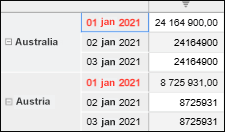
To set up the selected dimension element title, one can use font options, fill settings and border settings described above.
The example of formatting of the selected table dimension element title:
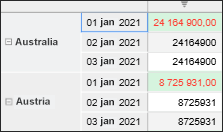
To set up data of the selected dimension element, one can use font options, fill settings, border settings, special format, and other settings described above.
The example of formatting of the selected table dimension element data:
When table sidehead/heading is selected, totals and column/row subtotals are selected too, but formatting style will be applied only to the selected element, that is, for sidehead/heading.
When formatting style is set for row/column totals and subtotals, settings are applied only for data of totals and subtotals.
If subtotals are displayed in the table, formatting specified for totals is applied subtotals. Formatting is applied only for data of subtotals.
See also:
Setting Up Data Visualization | Setting Up the Summary Table Visualizer