In this article:
Selecting Pivot Table Elements
A pivot table consists of several main elements, each of them has its own settings. The settings determined on the settings panel are applied to the selected table element.
When the table element is selected in the drop-down list, the settings panel displays the corresponding item:
Table. If the following is selected: entire column/row, cells of different table elements, a single cell or entire table.
Sidehead. When sidehead is selected.
Heading. When heading is selected.
Corner. When corner is selected.
Data. When one or several data cells is selected.
Row/column totals. When cells, columns or rows with totals are selected.
Selecting Entire Table
To select the entire table, execute one of the operations:
Select the Table item on the settings panel in the drop-down menu.
Select a cell and press CTRL+A.
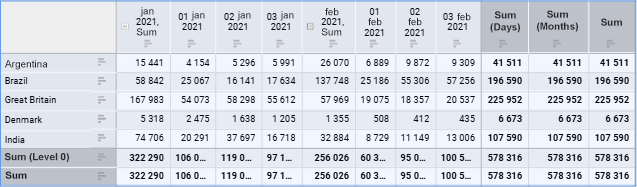
After executing the operations, the entire data table will be selected:
Selecting Data
To select data:
Select the entire table, select the Formatting > Data item in the context menu of any table cell.
Select the Data item on the settings panel in the drop-down menu.
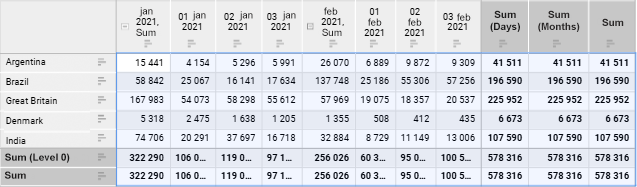
After executing the operation, table data is selected:
Selecting Heading
To select heading, execute one of the operations:
Select the entire table, select the Formatting > Heading item in the context menu of any table cell.
Select the Heading item on the settings panel in the drop-down menu.
After executing the operation, the table heading is selected:
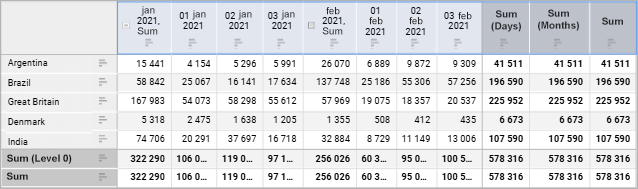
NOTE. When table heading is selected, totals and subtotals are selected too.
Selecting Sidehead
To select sidehead, execute one of the operations:
Select the entire table, select the Formatting > Sidehead item in the context menu of any table cell.
Select the Sidehead item on the settings panel in the drop-down menu.
After executing the operation, the table sidehead is selected:
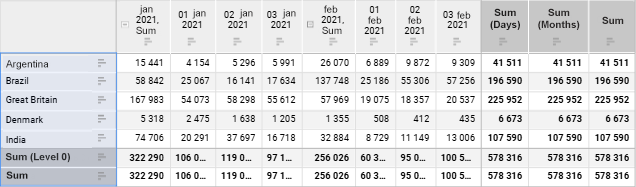
NOTE. When table sidehead is selected, totals and column subtotals are selected too.
Selecting Corner
To select corner, execute one of the operations:
Click the table corner.
Select the entire table, select the Formatting > Corner item in the context menu of any table cell.
Select the Corner item on the settings panel in the drop-down menu.
After executing the operation, the table corner is selected:
Selecting Row or Column Totals
To select row or column totals, execute one of the operations:
Select the entire table, select the Formatting > Row Totals or Formatting > Column Totals item in the context menu of any table cell.
Select the Row Totals or Column Totals item on the settings panel in the drop-down menu.
NOTE. The Row Totals and Column Totals menu items are displayed if displaying of row/column totals is enabled for table.
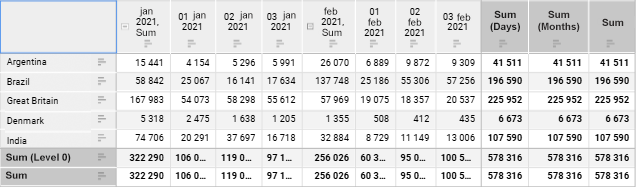
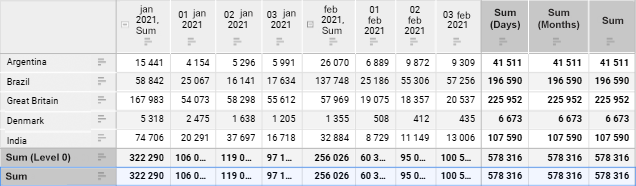
After executing the operation, table row/column totals are selected:
See also:
Setting Up Data Visualization | Setting Up the Summary Table Visualizer