In this article:
Foresight Analytics Platform Authentication
Foresight Analytics Platform provides several authentication methods. Authentication method is selected depending on the required security measures during repository access setup.
User credentials can be checked on DBMS server and/or in Foresight Analytics Platform.
The following basic authentication types are available:
Password. Default value. The user is authenticated by means of specifying user name and password explicitly.
Integrated domain. The user is authenticated by means of specifying domain user name and password (the current OS account).
Domain. The user is authenticated by means of specifying domain, user name and password explicitly.
Availability of basic authentication types depends on the DBMS in use:
| DBMS \ Authentication type | Password | Integrated domain | Domain |
| PostgreSQL |  |
|
|
| Oracle | |
 |
|
| Microsoft SQL Server (ODBC) | |
|
|
| Microsoft SQL Server | |
|
|
Designations:
- authentication type is available in Linux OS and Windows OS.
- authentication type is available only in Windows OS.
There are additional authentication types besides the mentioned ones:
Two-factor authentication. It is used together with password authentication type.
Built-in authorization. It is used together with any basic authentication type. Simultaneous use of built-in authorization with domain or integrated domain authentication is available only when working with PostgreSQL DBMS.
The following authentication types are available besides the basic ones:
External services. It supports the services working via the OAuth 2.0 and OpenID Connect protocols, the services returning JWT token or adding HTTP headers with user information to queries.
Guest login. It is used to learn how to work in the web application.
Password Authentication
The user is authenticated using user name and password explicitly.

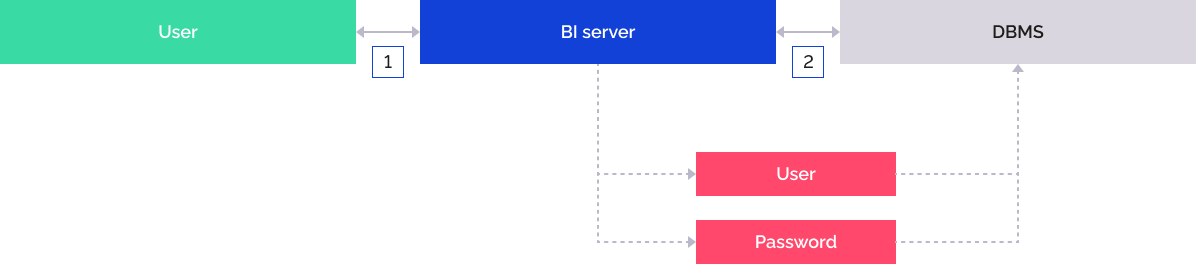
Interaction between system elements when password authentication is used:
The user opens the web application.
The user selects the repository, enters user name and password in the login dialog box.
BI server addresses the DBMS by means of the given credentials.
The user logs in to the system if he is authenticated successfully on the DBMS server.
Password authentication is used by default. If required, set up user password check parameters on the Password Policy tab in the Policies Editor in the security manager.
Integrated Domain Authentication
Integrated domain authentication is similar to standard domain authentication, except the domain user, under whom the operating system is logged in, is used for authorization.
When working with PostgreSQL DBMS, integrated domain authentication is executed using Kerberos authentication. This mechanism can be enabled in the Metabases.xml file.
To work according to Kerberos protocol, install MIT Kerberos on a client computer (not included into software package of Foresight Analytics Platform).
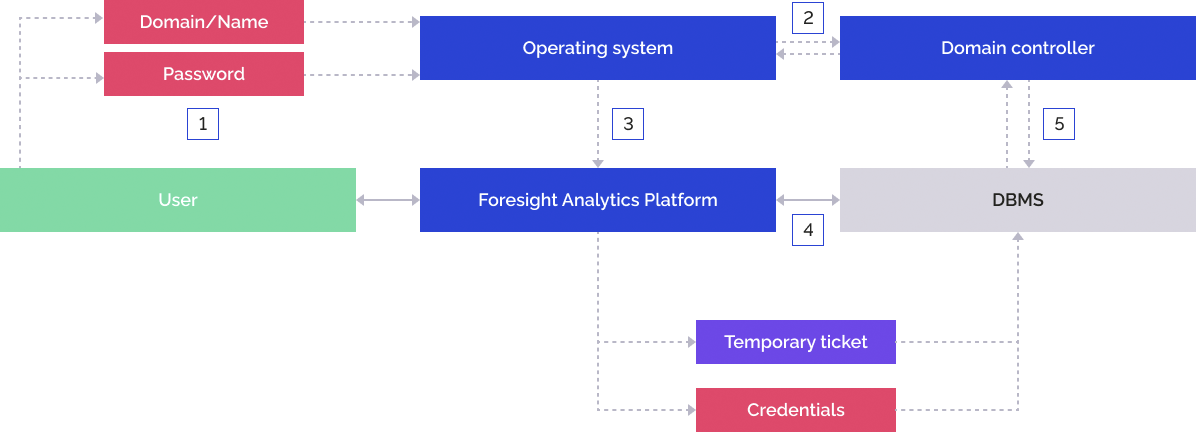
The user enters domain user name and password on the operating system login.
The operating system addresses the domain controller, the domain controller checks correctness of the specified data and returns the temporary ticket to the operating system.
The operating system sends the specified credentials and the temporary ticket to Foresight Analytics Platform. The login dialog box does not show the User Name and Password boxes.
Foresight Analytics Platform sends the credentials and the temporary ticket to the DBMS server.
DBMS addresses the domain controller, the domain controller checks correctness of the specified data and grants Foresight Analytics Platform permission to connect under the domain user by means of a temporary ticket.
To use integrated domain authentication, one should add domain users or groups in the security manager. To set up integrated domain authentication in Linux OS, see the Setting Up Domain/Integrated Domain Authentication in Linux OS section.
Domain Authentication
The user is authenticated by means of specifying domain, user name and password explicitly. The following directory services are supported: Active Directory, OpenLDAP. For details about interaction between Foresight Analytics Platform and domain directory services, see the Working with Directory Services section. Domain authentication is always executed using Kerberos authentication on DBMS side.
Domain authentication is similar to password authentication for the end user, but it facilitates user administration on using domain controllers.
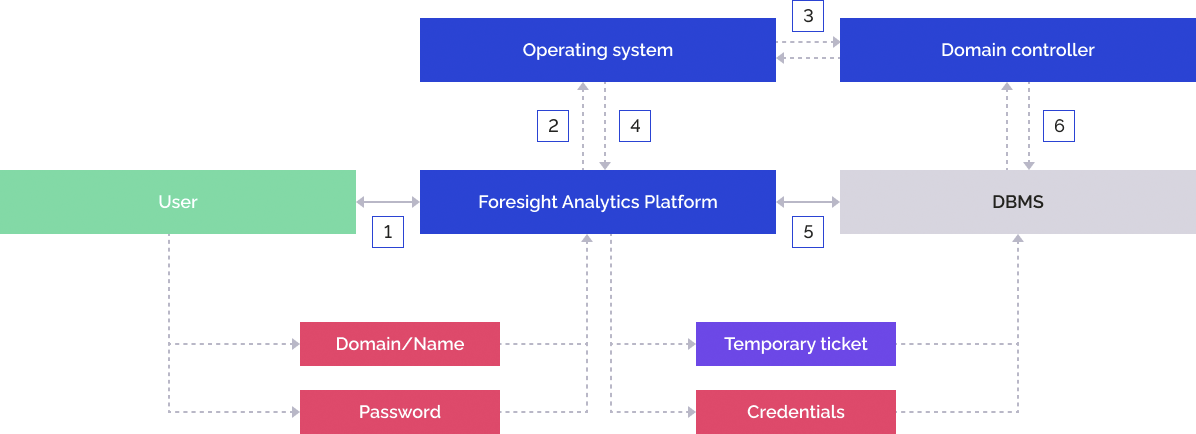
The user enters domain user name in the format: domain\name and password in the login dialog box.
Foresight Analytics Platform sends the specified credentials to the operating system.
The operating system addresses the domain controller, the domain controller checks correctness of the specified data and returns the temporary ticket to the operating system.
The operating system returns the temporary ticket to Foresight Analytics Platform.
Foresight Analytics Platform sends the specified credentials and the temporary ticket to the DBMS server.
DBMS addresses the domain controller, the domain controller checks correctness of the specified data and grants Foresight Analytics Platform permission to connect under the domain user by means of a temporary ticket.
To use domain authentication, one should add domain users or groups in the security manager. To set up domain authentication in Linux OS, see the Setting Up Domain/Integrated Domain Authentication in Linux OS section.
Two-Factor Authentication
The user is authenticated using password authentication type or client certificate.

Interaction between system elements when two-factor authentication is used:
The user opens the web application.
The BI server requests client certificate.
The user selects the client certificate in the browser.
A protected connection between the browser and the BI server is established via the TLS protocol, and the login dialog box opens.
The user selects the repository and enters user name and password in the login dialog box.
The BI server addresses the DBMS by means of the given credentials. If the user is authenticated successfully on the DBMS server, the BI server compares the obtained certificate with the certificate linked to the user in the security manager.
System login is executed if the compared certificates match.
To use two-factor authentication, see the Setting Up Two-Factor Authentication section.
Built-In Authorization
User authorization and DBMS connection are executed using technological account. User permissions are checked at the level of Foresight Analytics Platform. Technological account credentials are stored in encrypted form.
Built-In authorization is used together with any basic authentication type. Simultaneous use of built-in authorization with domain or integrated domain authentication is available only when working with PostgreSQL DBMS.
The user is authenticated using user name and password explicitly.
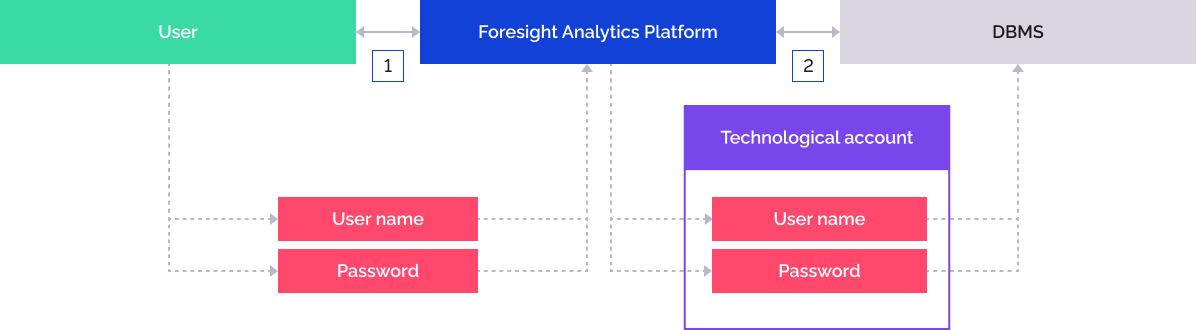
The user enters user name and password in the login dialog box.
Foresight Analytics Platform addresses the DBMS by means of the previously saved technological account.
The user is authenticated by means of specifying domain, user name and password explicitly.
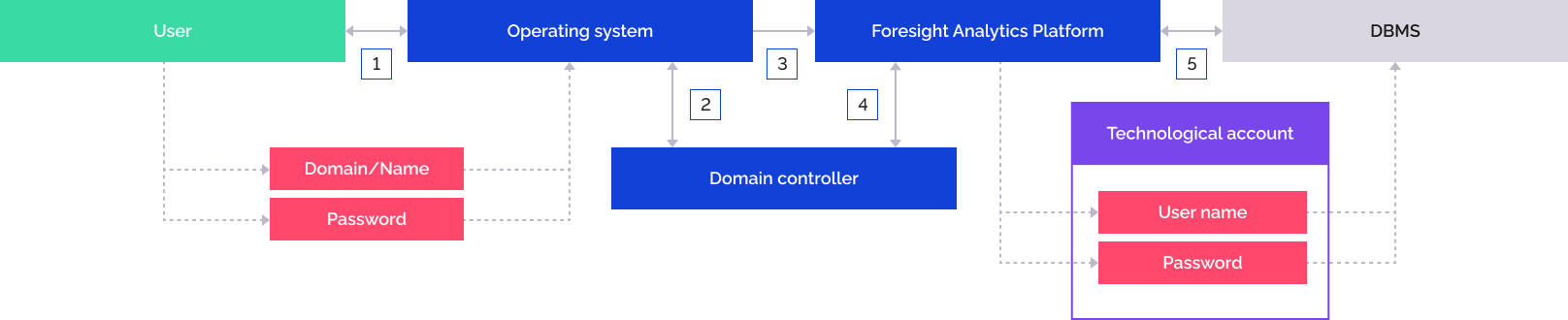
The user enters domain user name and password on the operating system login.
The operating system addresses the domain controller, the domain controller checks correctness of the specified data and returns the temporary ticket to the operating system.
The operating system sends the specified credentials and the temporary ticket to Foresight Analytics Platform. The login dialog box does not show the User Name and Password boxes.
Foresight Analytics Platform addresses the domain controller, the domain controller returns information about the current domain user and his membership in directory service groups.
Foresight Analytics Platform addresses the DBMS by means of the previously saved technological account.
The user is authenticated by means of specifying domain, user name and password explicitly.
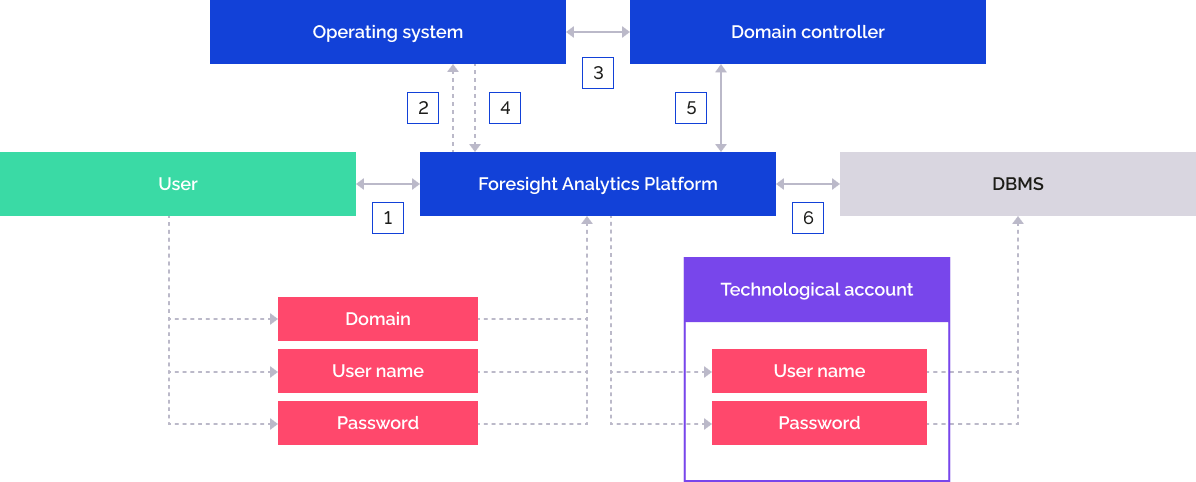
The user enters domain user name in the format: domain\name and password in the login dialog box.
Foresight Analytics Platform sends the specified credentials to the operating system.
The operating system addresses the domain controller, the domain controller checks correctness of the specified data and returns the temporary ticket to the operating system.
The operating system returns the temporary ticket to Foresight Analytics Platform.
Foresight Analytics Platform addresses the domain controller, the domain controller returns information about the current domain user and his membership in directory service groups.
Foresight Analytics Platform addresses the DBMS by means of the previously saved technological account.
To use built-in authorization, see the Setting Up Built-In Authorization section.
External Services
The user is identified and authorized in the repository after the user was authenticated in an external service. In this authorization type DBMS connection is executed using technological account.
The user is authenticated by means of specifying an account of the services that support the OAuth 2.0 or OpenID Connect protocol.
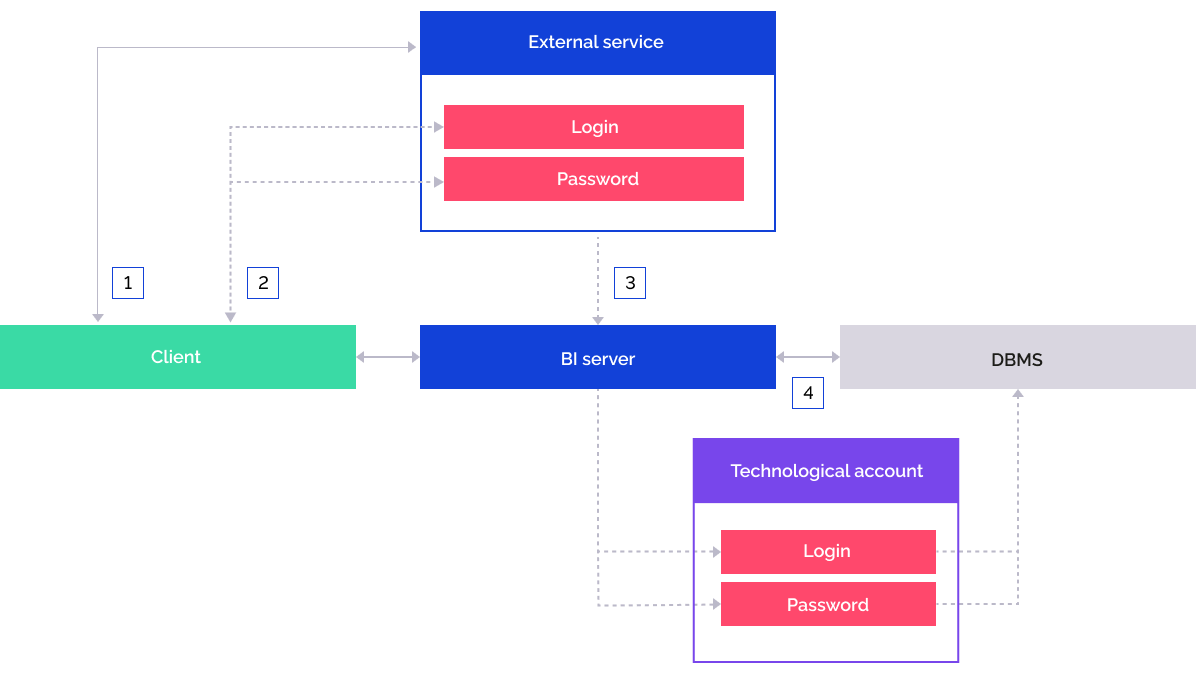
The user selects inn the login dialog box the repository configured to work with an external service.
The user is redirected to an external authorization service where the user enters login and password.
The user is authorized on the external service and BI server gets necessary information about the user.
The BI server addresses the DBMS by means of the previously saved technological account.
When logging in to repository using JWT token, after the user is authenticated in the external service, BI server queries should be added with headers containing JWT tokens with user information. When the repository connection opens, the user information is obtained from the JWT token.
NOTE. Interaction between the external authentication service and the proxy server, which adds headers to queries, is not described in this help and can be implemented at administrator's discretion. Trust between BI server and proxy server, which adds headers to queries, is implemented by checking JWT token signature.
If the external service's user account is contained in the security manager, the repository connection is established and the object navigator opens using this user account.
If the external service's user account is not contained in the security manager, a temporary user is created and added to groups from the list specified in the corresponding attribute of the JWT token. If the attribute containing the list of groups is not set, the temporary user is added to the USERS built-in group.
NOTE. The temporary user cannot be included in the ADMINISTRATORS built-in group.
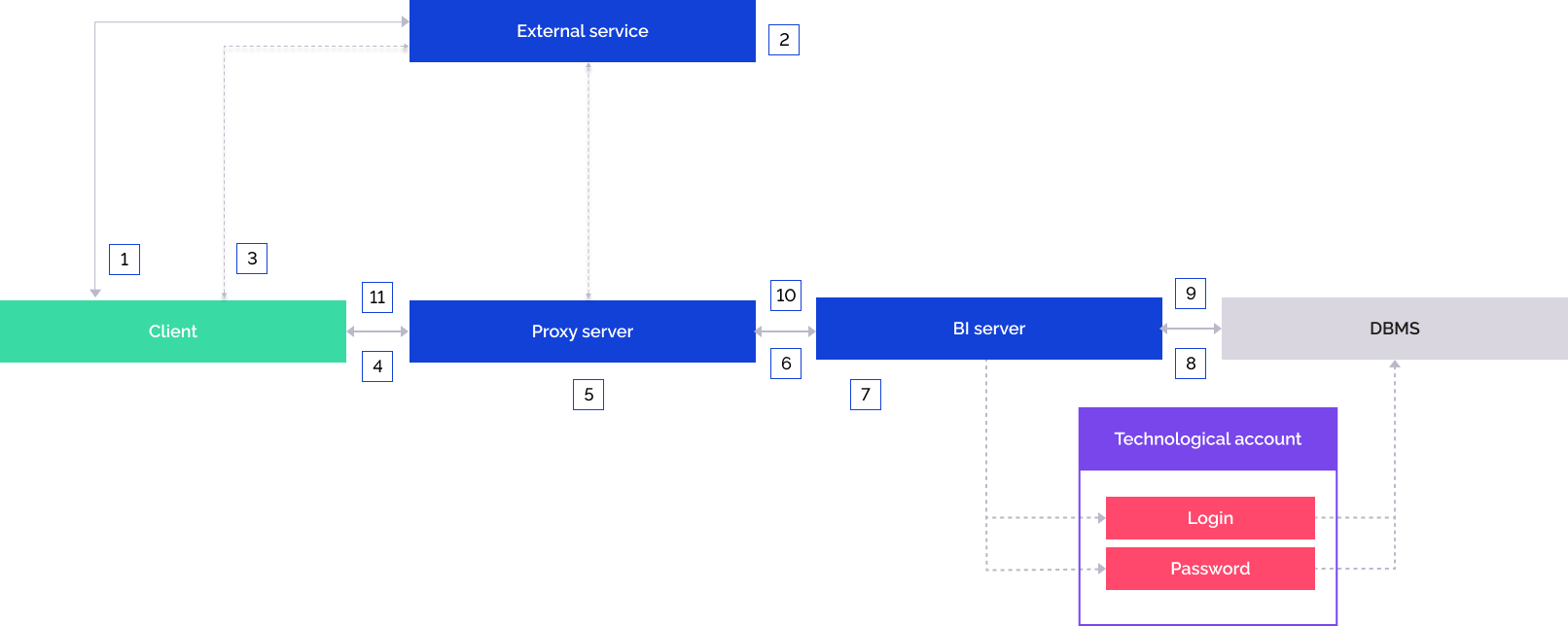
The user opens the external authentication service.
The user is authenticated in the external service.
If the authentication is successful, the external service redirects the user to the web application page and includes repository identifier to the URL.
The web application redirects queries to the proxy server.
Queries are appended with headers containing JWT tokens with user information on the proxy server.
The appended query is sent to the BI server.
The BI server checks JWT token signature. If the check is successful, user information is obtained from JWT token.
The BI server connects to the DBMS using a technological account.
If the external service's user account is contained in the security manager, the repository connection is established and the object navigator opens under this user.
If the external service's user account is not contained in the security manager, a temporary user is created and added to groups from the list specified in the corresponding attribute of the JWT token. If the attribute is not set, the temporary user is added to the USERS built-in group.The repository connection opens.
The web application page is displayed, to which the user was redirected.
When logging in to repository using HTTP headers, after the user is authenticated in the external service, BI server queries should be added with HTTP headers with user information.
An mTLS connection should be set up between the proxy server that establishes BI server connection and adds includes headers to queries and the BI server.
NOTE. Interaction between the external authentication service and the proxy server is not described in this help and can be implemented at administrator's discretion.
Trust between the BI server and the proxy server is established by comparing certificate's digital fingerprint specified in the description of external service settings in the ExtService section of the settings.xml file/in the registry and certificate's digital fingerprint obtained from the proxy server during establishing mTLS connection with the BI server.
If the external service's user account is contained in the security manager, the repository connection is established and the object navigator opens using this user account.
If the external service's user account is not contained in the security manager, a temporary user is created and added to groups from the list specified in the corresponding header. If the header containing the list of groups is not set, the temporary user is added to the USERS built-in group.
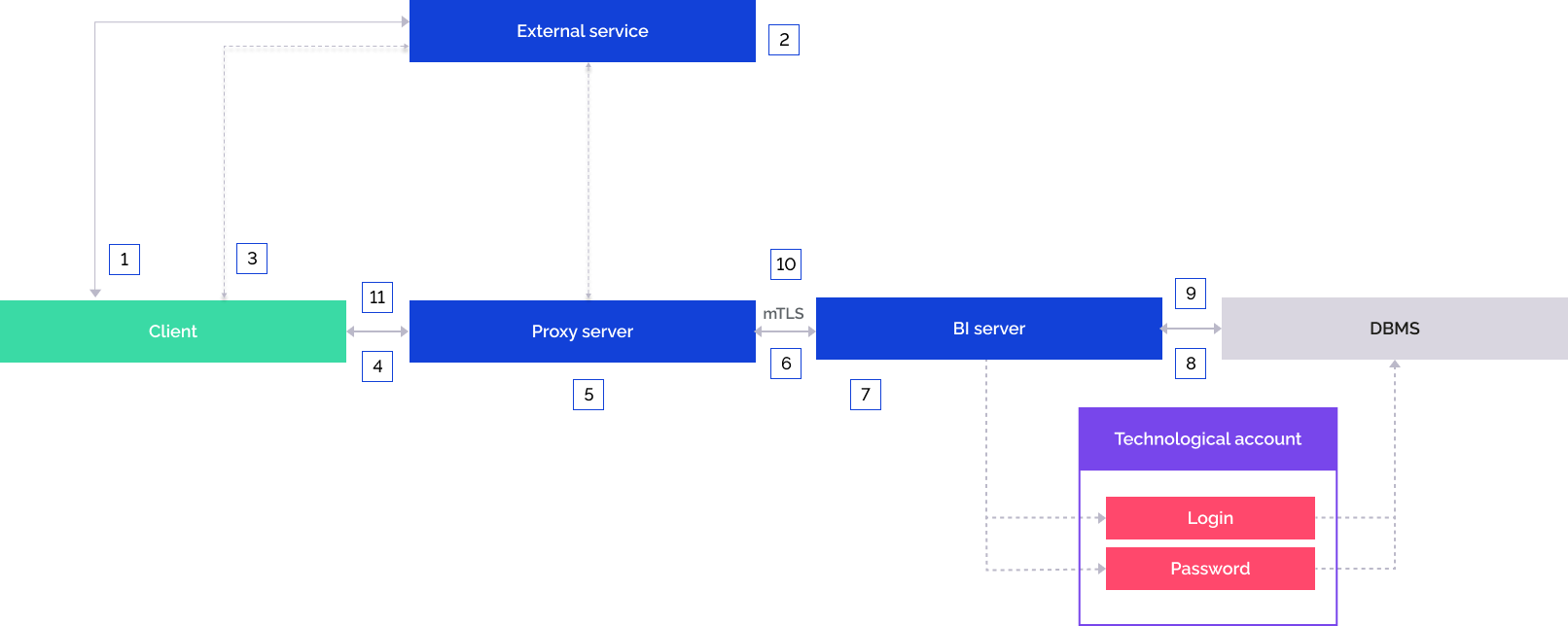
The user opens the external authentication service.
The user is authenticated in the external service.
If the authentication is successful, the external service redirects the user to the web application page and includes repository identifier to the URL.
The web application redirects queries to the proxy server.
Queries are appended with HTTP headers with user information on the proxy server.
The appended query is sent to the BI server. An mTLS connection should be set up in advance between the proxy server and the BI server.
The BI server compares the certificate's digital fingerprint of the proxy server specified in description of external service settings in the ExtService section of the settings.xml file/registry and the digital fingerprint obtained from the proxy server during establishing mTLS connection with the BI server. If the check is successful, user information is obtained from HTTP headers.
The BI server connects to the DBMS using a technological account.
If the external service's user account is contained in the security manager, the repository connection is established and the object navigator opens under this user.
If the external service's user account is not contained in the security manager, a temporary user is created and added to groups from the list specified in the corresponding header. If the header is not set, the temporary user is added to the USERS built-in group.The repository connection opens.
The web application page is displayed, to which the user was redirected.
The use of external services is available only in the web application.
To set up authentication via external services, see the Setting Up Authentication via External Services section.
Guest Login
It is recommended to use guest login:
To get familiar with the web application. The user can log in without entering user credentials and using a previously created guest account.
On integration with IDM (Identity Management) systems to ensure asynchronous messaging via HTTP:
If access control in Foresight Analytics Platform is executed by an external centralized system.
When integrating with data bus (Enterprise Service Bus (ESB) class systems) when creating a highly loaded system architecture.
If guest login is used, it is recommended to limit guest account permissions. The web application should be started in an isolated environment.
The user opens the guest link.
The BI server addresses DBMS by means of the previously entered guest account user name and password.
To use guest login, see the Setting Up Guest Login section.