Navigator Interface Description
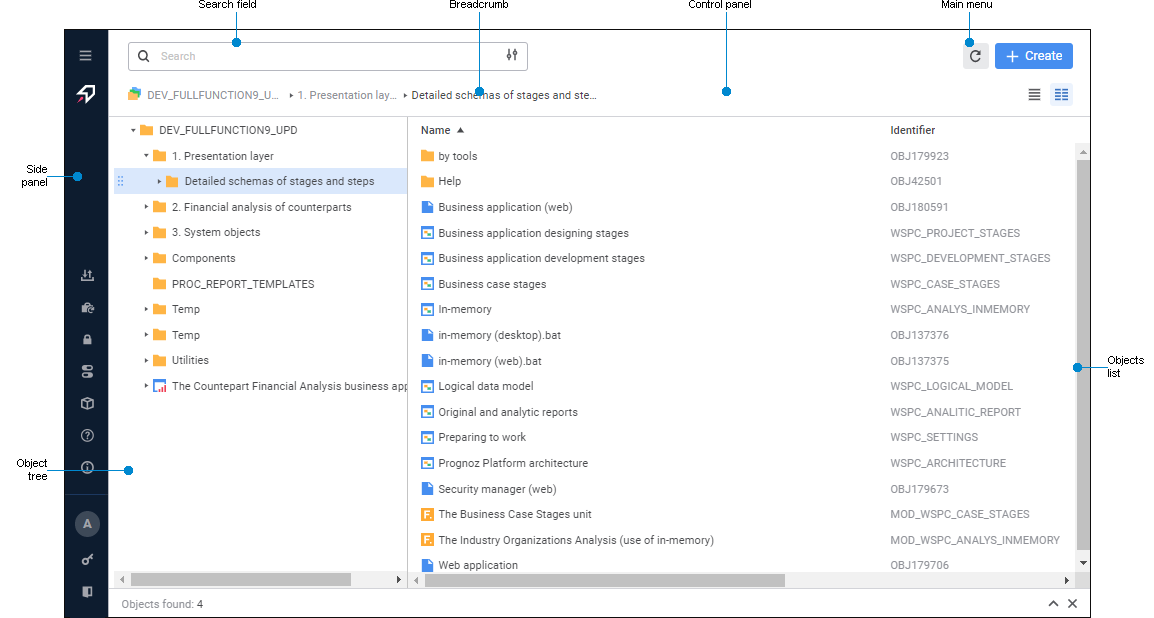
Object navigator is a tool that used to visually present a repository and to work with its objects.
To open the object navigator, start the web application of Foresight Analytics Platform.
The object navigator opens after executing the operation:
When the object navigator opens, the system checks if a default database is set. If a database is not set, it is prompted to create a new database or select the current one as a default database.
 Object navigator interface elements in the web application

 Expand Panel button. To collapse the side panel, click the
 Key features:
Executing operations with objects: create, edit, move, set up access permissions, search for objects.
Forming repository visual structure by means of creating hierarchical structure of folders and object distribution to these folders.
Running data analysis tools and other tools of Foresight Analytics Platform.
Connecting and working in several repositories at a time.
For details about object navigator principles of work, see the Working in Object Navigator section.
Connecting Several Repositories
To connect several repositories, open each repository in a separate browser tab.
After executing the operations, multiple repositories are connected.
Exiting Object Navigator
To exit the object navigator:
Select the
 Exit item on the side panel.
Close the browser tab with the object navigator.
NOTE. When closing a browser tab with the object navigator take into account that finishing a user session depends on BI server timeout settings.