Select the  Image visualizer in the drop-down menu of the
  Insert button on the toolbar and click the slide cell.
Click the slide cell and select the Image visualizer in the drop-down menu.
The Image visualizer is used to create visual elements.
To add a visualizer to the working area:
Select the Image visualizer in the drop-down menu of the Insert button on the toolbar and click the slide cell.
Click the slide cell and select the Image visualizer in the drop-down menu.
To replace the image:
Select the image.
Select the  Select Image item on the popup settings panel.
Select image file in the dialog box that opens.
After executing the operations the image is replaced with the new one.
The following operations are available for the Image visualizer:
The example of image:

To set up an image, use the side panel.
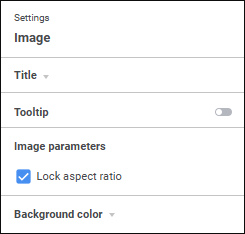
Available display settings:
See also:
Adding Visualizers and Working with Them | Setting Up Data Visualization

 Open the side panel
 Settings button on the