
 Open the group of parameters
The following groups of parameters are used to set up formatting for a random cell range:
Table Style. It allows for applying standard or custom style as a table with alternating formatting of rows and columns.
Predefined Styles. It allows for applying standard cell styles or styles from connected styles table.
The Table Style group of parameters can be used to set formatting of a cell range on a report sheet using standard or custom styles as a table with alternating formatting of rows and columns:

NOTE. The current style is displayed in the Table Style group of parameters if at least one formatting style is applied.
To apply a style to a table, select one of the standard styles in the Table Style group of parameters.
To reset the determined table style settings, click the Clear button. All styles applied to table will be deleted from sheet styles. If styles were not applied, the button is disabled.
NOTE. Table style has a lower priority than fill of single elements.
The Predefined Styles group of parameters allows for:
Connecting a styles table to an information panel and applying its styles to the selected cell range on a report sheet:
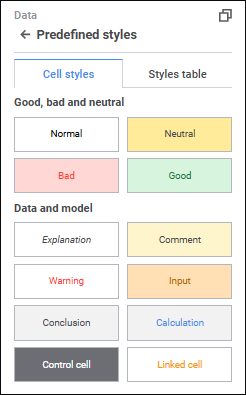
To apply a cell style to the selected cell range, select one of the standard styles.
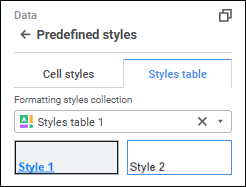
To apply a style from the styles table:
In the Formatting Styles Collection drop-down list select the styles table. The selected styles table is connected to the information panel. The group of parameters displays styles from the connected styles table.
NOTE. Only one styles table can be applied to one information panel.
Select the required style.
After executing the operations the styles table is connected to the information panel, and the selected style from the table is applied to the selected cell range.
To disconnect the styles table from the report, click the  Clear button.
See also:
Setting Up Data Visualization | Setting Up the Summary Table Visualizer | Styles Table
 Settings button on the