
 To open the dialog box
The value editors for controls are used to simplify input or selection of values.
Use the Display Settings dialog box to set up the control editor.
When setting up information panel parameters, click the  button in the Display Settings column in the Parameters dialog box.
When setting up controls click the Editor Parameters button in the Controlled Parameter group of settings on the settings panel.
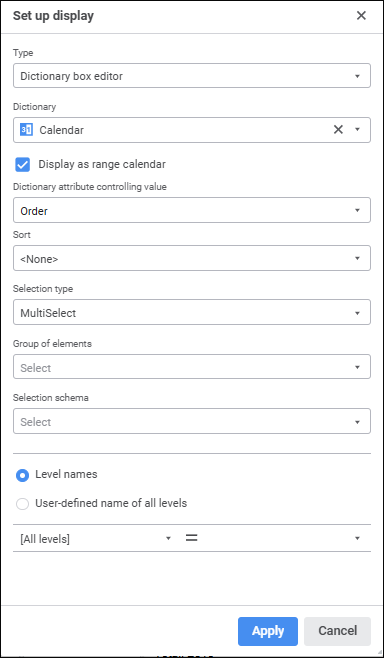
NOTE. The set of displayed parameters depends on the selected editor type.
Editor types supported in Foresight Analytics Platform:
The editor shows a set of available values as an hierarchical list:
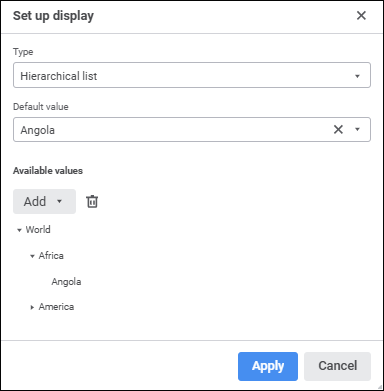
Set editor parameters:
Default Value. Set a default value. This value must be included into a set of values specified in the list of available values.
Available Values. This box is used to create a tree of available values.
To add a node, select the Add Element item in the drop-down menu of the Add button. Enter node name in the dialog box that opens. The node is added to the first level if this is the first added element, or to the same level with the selected element.
To add a child element to the selected element, select the Add Subelement item in the drop-down menu of the Add button. In the added box enter element name.
To rename the element, select the Rename item in the drop-down menu of the  Settings button.
To delete the selected element, click the  Delete button or select the Delete item in the drop-down menu of the Settings button.
A radio button or a checkbox sets a logical value:
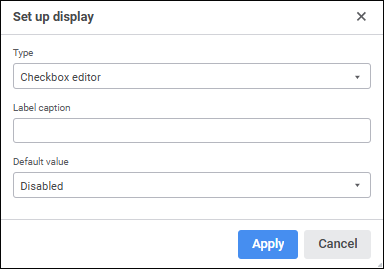
If the radio button is selected, the value is True; if the radio button is deselected, the value is False.
Set editor parameters:
Label Caption. Determine checkbox label.
Default Value. Determine a default checkbox state: selected or deselected.
The string editor enables the user to display and set text value in a one-line edit box:
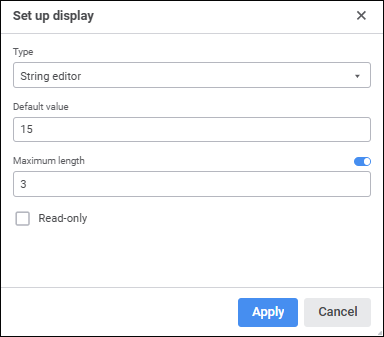
Set editor parameters:
Default Value. Determine the editor value to be displayed by default. A string may contain up to 2 GB of data. String text is not enclosed in quotation marks.
Maximum Length. Activate the box using the switch and set the maximum number of characters that can be entered in the editor box.
Read-Only. If the checkbox is selected, the value cannot be edited.
The masked string editor enables the user to limit the range of characters that can be entered and to determine format (or template) of the entered value:
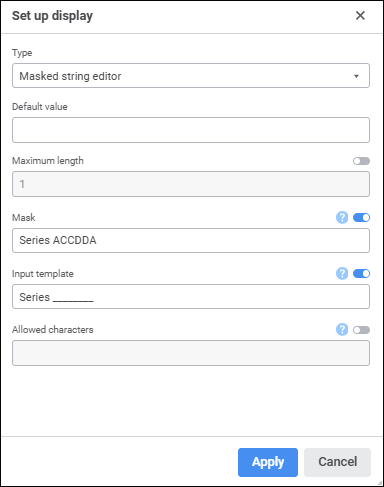
This type of editor can be used to enter phone numbers, postal and other codes, identifiers, and so on.
An input mask enables the user to insert digits, letters, or other characters automatically, such as when you want parentheses around the zip code or a hyphen inside the telephone number.
Set editor parameters:
Default Value. Set a default value. A string may contain up to 2 GB of data corresponding to mask. String text is not enclosed in quotation marks.
Maximum Length. Activate the box using the switch and set the number of characters that can be entered in the editor box.
Mask. Activate the box using the switch and set a mask for the edit box. A mask should include characters that determine entering a character into selected position, and it may also include automatically displayed text. To include text constants, characters and spaces into a mask, enter them into the required position:
| Mask symbol | Description |
| a/A | Letters and digits are allowed to be inserted into this position. |
| d/D | Only digits are allowed to be inserted into this position. |
| c/C | Only letters are allowed to be inserted into this position. |
For example, the Series AACCDD mask allows (but does not require from the user) for six characters to be entered. The first two symbols may be any letter or digit; the second two symbols are letters only, and the third two symbols are digits only. The Series text is also automatically displayed.
Input Template. Activate the box using the switch and set the template that will be used to enter data to the editor. A template should include underscore characters (_) on positions, to which various characters are entered, and text constants if there are any in the mask.
Allowed Characters. Activate the box using the switch and set the number of characters that can be entered in the edit box. For example, if "AK23" is set:
Only digits 2 or 3 are allowed to be inserted into the positions allowing to enter digits.
Only letters A or K are allowed to be inserted into the positions allowing to enter letters.
Only digits 2 or 3 and letters A or K are allowed to be inserted into the positions allowing to enter digits and letters.
The dictionary box editor enables the user to show and set values using a drop-down list with dictionary elements:
Set editor parameters:
Dictionary. In the drop-down list select a dictionary, which elements will be displayed in the editor. To quickly select an object, enter object's name/identifier/key in the search box depending on display settings. Search is executed automatically while the searched text is entered into the search string. The list will display the objects, which names/identifiers/keys contain the entered text.
To set up displaying of repository objects in the list, click the Display Object button and select display option in the drop-down menu:
Name. Objects are displayed with their names. Default option.
Identifier. Objects are displayed with their identifiers.
Key. Objects are displayed with their keys.
Several options can be selected. Identifier and key will be specified in brackets.
Display as Range Calendar. Select the checkbox if it is required to connect a calendar with configurable date range. The checkbox is available if a calendar dictionary is selected in the Dictionary box and the MultiSelect or MultiSelectStandart selection type is selected.
Dictionary Attribute Controlling Value. Use the drop-down list to select a dictionary attribute that will be used to transfer a value to parameter. For example, the dictionary displays element names, and parameter takes integer values. In this case the parameter will need to take values of the Key attribute. The Key attribute is used by default.
The selected attribute should have a unique index. It is necessary to restore selection.
Sort. In the drop-down list select the option for sorting dictionary elements by name:
<No>. Dictionary elements are not sorted.
Ascending. Dictionary elements are sorted in ascending and alphabetical order or by text values of numbers.
Descending. Dictionary elements are sorted in descending and alphabetical order or by text values of numbers.
Selection Type. Select the type of dictionary elements' selection in the drop-down list:
SingleSelect. Single selection: only one element can be selected.
SingleSelectNullable. Single selection with the ability to set empty value.
MultiSelect. Multiple selection.
Click the element to invert its selection.
Clicking the element while holding down the SHIFT key deselects all elements and selects elements (except the collapsed ones), positioned between the focused element and the clicked one.
Clicking the element while holding down the CTRL key deselects or deselects the element and all dependent elements. When the context menu is opened in the element area, the element is focused but not selected.
MultiSelectStandart. Multiple selection. Clicking an element selects only selected element.
To select multiple elements, hold down the SHIFT or CTRL keys while clicking elements.
Clicking the element while holding down the SHIFT key deselects all elements and selects elements (except the collapsed ones), positioned between the focused element and the clicked one.
Clicking the element while holding down the CTRL key deselects or deselects the element.
None. The selection type is not specified, the MultiSelect selection type is used by default.
Group of Elements. In the drop-down list select a group of elements of dictionary.
Selection Schema. In the drop-down list select a selection schema of dictionary elements.
Level Names. Set names for levels in the drop-down list. Select the radio button to show dictionary attributes or custom name:
To display dictionary attributes that will be used when creating level names, specify:
Level. In the drop-down list select a level, for which name is set up.
Name. In the drop-down list select the attribute that determines name.
The name specified for the [all] element of the Level field is applied to all levels, except those, which have a special name.
NOTE. The Name attribute is used by default for all levels.
To show custom level names, determine:
Custom Name. In the field determine the name that will be displayed for all levels in the drop-down list. If user name is set, displaying of dictionary elements cannot be set up.
Insert Attribute. In the drop-down menu of the Settings button select the attribute that will be added to the name.
NOTE. When custom element names are displayed, search by list elements is unavailable.
The time editor enables the user to display and set time values:
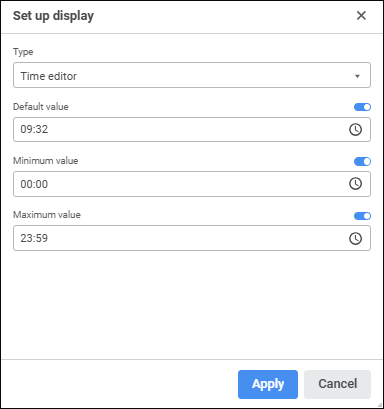
Set editor parameters:
Default Value. Activate the box using the switch and determine the time to be displayed in the editor by default. This value must be in the range of available values determined for the editor. If the range of available values for editor is not set, the value must be in the range from 0:00 to 23:59.
Minimum Value. Activate the box using the switch and determine the minimum allowed time value.
Maximum Value. Activate the box using the switch and determine the maximum allowed time value.
The date editor enables the user to display and set date values:
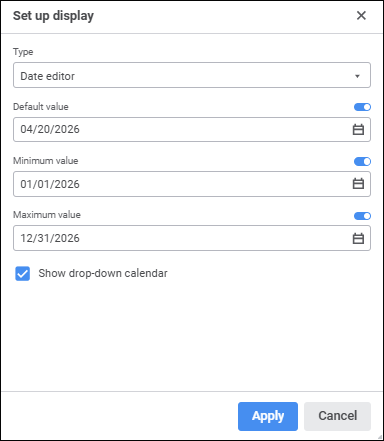
Set editor parameters:
Default Value. Activate the box using the switch and determine the date to be displayed in the default editor. This value must be in the range of available values determined for the editor. If the range of available values for editor is not set, the value must be in the range from 01.01.1600 to 31.12.3000.
Minimum Value. Activate the box using the switch and determine the minimum allowed date.
Maximum Value. Activate the box using the switch and determine the maximum allowed date.
Show Drop-Down Calendar. Select the checkbox to display the calendar opening button for visual selection a date in the editor.
The date and time editor combines parameters of date editor and time editor:
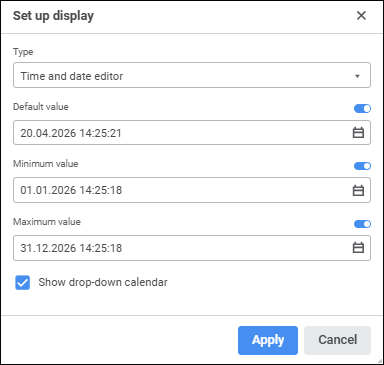
Set editor parameters:
Default Value. Activate the box using the switch and determine the time and date to be displayed in the editor by default. The value must be in the range of available values determined for the editor. If the range of available values for the editor is not set, the value must be in the range from 01.01.1600 00:00 to 31.12.3000 23:59.
Minimum Value. Activate the box using the switch and determine the minimum allowed time and date value.
Maximum Value. Activate the box using the switch and determine the maximum allowed time and date value.
Show Drop-Down Calendar. Select the checkbox to display the calendar opening button for visual selection a date in the editor.
The decimal editor enables the user to determine decimal type values using an edit box with scrollbars:
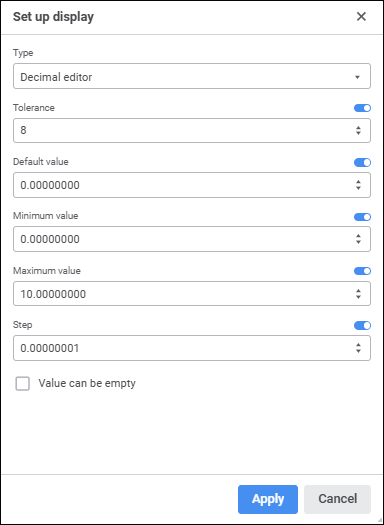
Set editor parameters:
Tolerance. Determine the number of decimal places. This value must be in the range of available values [0, 28]. The number contains 14 decimal places by default.
Default Value. Determine the editor value to be displayed by default. This value must be in the range of available values [-179228162514264337593543950335; 179228162514264337593543950335].
Minimum Value. Determine minimum available value.
Maximum Value. Determine maximum available value.
Step. Determine a step on increasing or decreasing a number using the scroll buttons in the value editor.
Value Can Be Empty. Select the checkbox to display an empty value in the value editor. If the checkbox is deselected, the default value is displayed.
The editor enables the user to display and set identifier values:
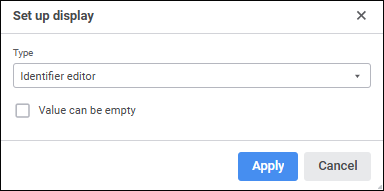
Set editor parameters:
Value Can Be Empty. The checkbox is deselected by default. If the checkbox is selected, identifier value can be empty.
When creating identifiers, follow the rules:
Identifier should consist of only Latin letters, numbers and underline character.
The first symbol should be letter or underline symbol.
Lower-case and upper-case letters are considered as equal.
Maximum length of identifier is 255 symbols.
Like a radio button, the Boolean values editor has only two positions: True and False, but the position is selected in a drop-down list:
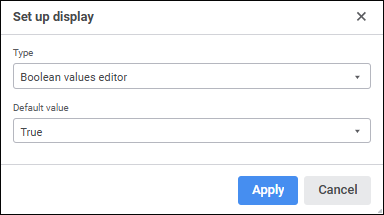
Set editor parameters:
Default Value. Select the default value in the True or False drop-down list. If the value is not specified, a default value False is displayed in the box.
The integer editor enables the user to determine integer values using edit box with scrollbars:
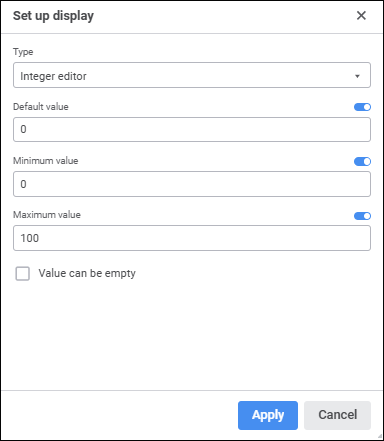
Set editor parameters:
Default Value. Activate the box using the switch and determine the value to be displayed in the default editor. This value must be in the range of available values determined for the editor. If the range of available values for the editor is not set, the value must be in the range [-2147483648; 2147483647].
Minimum Value. Activate the box using the switch and determine the minimum allowed value.
Maximum Value. Activate the box using the switch and determine the maximum allowed value.
Value Can Be Empty. Select the checkbox to be able to keep the box empty.
The list enables the user to set a value from the predefined list of values:
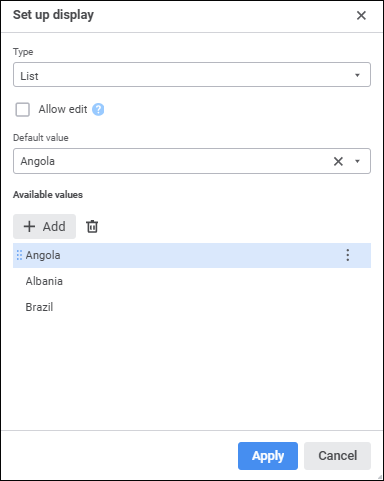
Set editor parameters:
Default Value. Set a default value. This value must be included into a set of values specified in the list of available values.
Allow Input. If the checkbox is selected, the value that is not available in the drop-down list can be entered into the editor box.
Available Values. This field is used to create a list of predefined values.
To add a value, click the Add button. In the displayed box enter a value.
To rename the element, select the Rename item in the drop-down menu of the Settings button.
To delete the selected element, click the Delete button or select the Delete item in the drop-down menu of the Settings button.
Calendars with configurable data range are available only when the following conditions are satisfied:
The Integer data type is set for the parameter.
The Dictionary Box Editor edit type is selected in the Set Up Display dialog box, a calendar with a configurable date range is specified as a dictionary.
NOTE. Calendar is available for the calendar dictionaries, which have direct order of dictionary elements, and do not use shift and/or conversion of names of dictionary elements.
The MultiSelect or MultiSelectStandart selection type is selected in the Set Up Display dialog box.
The Display as Range Calendar checkbox is selected in the Set Up Display dialog box.
After executing the operations the special box with period start and end dates is displayed:

To set a date range:
Open the calendar by clicking the  Open Calendar button:
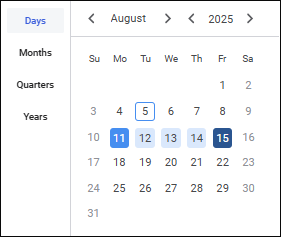
Select the calendar dictionary level to work with. For example: days, months, quarters, or years. One can work only with the levels that were determined in calendar dictionary. Calendar grid values change according to the selected calendar dictionary level.
NOTE. The date range in the box depends on the selected level with selected elements.
Select period start and end dates.
To reset the date range, click the  Clear button.
See also: