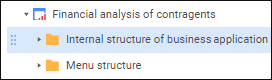
An internal structure of business application can be created in the Internal Structure of Business Application folder, which is created by default when creating a business application. The folder with internal structure of business application is used to store all user and service application objects:
IMPORTANT. Identifier of the Internal Structure of Business Application folder is set by default and should not be changed.
To create an internal structure of business application in the object navigator:
Open the business application for view.
Select the Internal Structure of Business Application folder and create a structure of nested folders.
Add objects to internal structure of business application using one of the methods:
Create new objects in the Internal Structure of Business Application folder.
Move existing objects from the repository to the Internal Structure of Business Application folder using the Copy and Paste context menu items or drag the objects to folders.
NOTE. On transfer of multifunctional objects, for example, dashboards, express reports and others, move all sources and objects in use in them to internal structure of business application.
Create external JS and CSS files as documents in the Internal Structure of Business Application > Web Version Files folder. External JS files are used to connect custom JS-functions, CSS files are used to set up advanced formatting of the business application.
The array of URL addresses or relative paths to external JS and CSS files can also be specified in the config.json file:
Location of external JS files is specified in the externalJs field in the file root for all business applications or in the externalJs field for a specified business application.
Location of external CSS files is specified in the externalCss field for a specific business application. Formatting for all business applications can be defined in the custom.css file when setting up a custom theme of the designer of business applications.
Priority of applying external JS and CSS files:
The files specified in the externalJs/externalCSS field for a specific business application.
The files specified in the externalJs field in the root of the config.json file. The custom.css file created during the setup of custom theme of the designer of business applications.
The files located in the Internal Structure of Business Application > Files for Web Version folder in the object navigator.
Internal structure of business application can contain the following objects:
After creating the internal structure open the business application for edit and set up displaying of the navigation bar.
See also:
Building Business Application | Setting Up Layout and Formatting