The setup of server process runtime is executed using:
The Task Scheduler tool of Foresight Analytics Platform.
To set up server execution:
Open the business process administration wizard. On the Scheduler page select the Server Execution and set up required parameters.
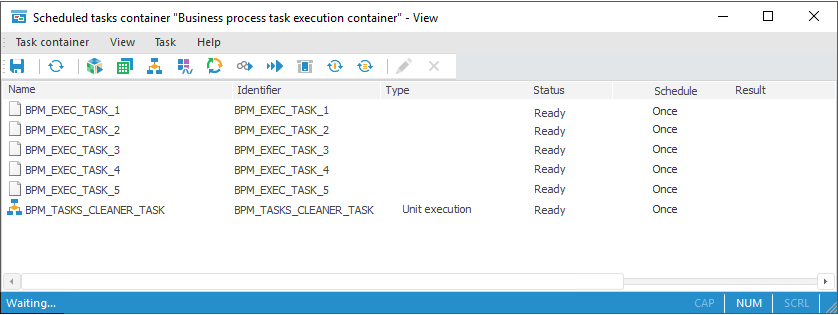
In the object navigator, run scheduled tasks container with the BPM_EXECUTOR_CONTAINER identifier:
NOTE. If scheduled tasks container with the BPM_EXECUTOR_CONTAINER identifier is absent or empty, select the Initiate Task Container item on the Debug page of the Parameters Setup and Business Processes Administration dialog box in the desktop application.
Create a configuration file for task scheduler by selecting the Task Container > Save Settings for Scheduler main menu item and place the created file:
In the /opt/foresight/fp10.x-biserver/etc folder in Linux OS.
Next to the scheduler executable file on server in Windows OS.
Set up task scheduler start as a service. If the system uses a Windows-based server, the task scheduler can be started manually using the Scheduler.exe file from the folder with installed Foresight Analytics Platform.
IMPORTANT. When several task schedulers are started on different computers or virtual machines, make sure that scheduled tasks container is set up to start only in one task scheduler. If one task scheduler has settings for starting several containers, these containers should be started within the same database.
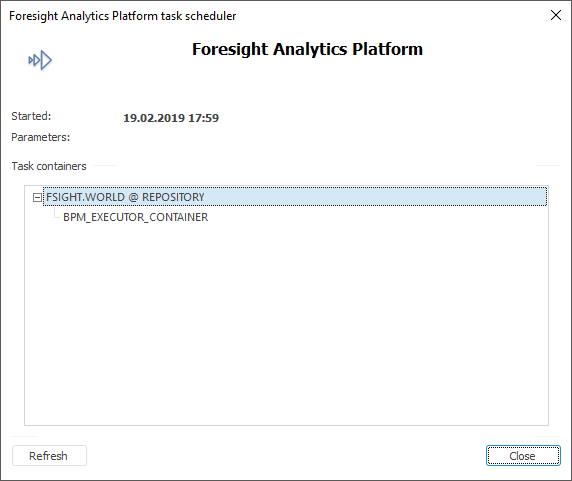
As a result, a new task scheduler instance is started that is configured to the Scheduler.xml configuration file. Check that the task scheduler dialog box displays a server, a repository, which processes will be executed on server, and a container with the BPM_EXECUTOR_CONTAINER identifier:
NOTE. Linux OS does not support visual interface to view tasks.
After executing the operations, the server process execution will be set up. To provide security and autonomous execution, it is recommended to set task scheduler as OS service.
See also:
Starting Process | Administrating Business Processes | Setting Up Business Processes Scheduler