 System Requirements for License Server
License server is used to activate Foresight Analytics Platform using network license. License server controls the number of simultaneously working users, ensures flexible and easy administration. A license is sent as a lservrc file without extension and is placed on the license server in the local network.
TIP. Starting from the version 10.8, it is recommended to use Guardant. In the newer versions of Foresight Analytics Platform RMS support will be discontinued.
To activate Foresight Analytics Platform, connect the computer with installed license server to the same network with:
The server where BI server is installed.
The client computers, at which users work with the desktop application.
If required, install the licensing service to speed up work with license server.
For details about RMS see the software official documentation.
 System Requirements for License Server
Recommended system requirements are specified in the Sentinel RMS official documentation:
Startup, stop and setup of the license server requires administrator permissions.
NOTE. It is not recommended to use a virtual machine to install a license server.
A license server can work in VPN networks, but this feature is not officially supported. If there are any problems with working in VPN networks, execute the following actions:
Enable packet fragmentation in the firewall.
Change MTU value on the license back end, firstly set 1500 bytes, then 8000 bytes.
Principle of license server work
A license server works on UDP protocol, opens the 5093 port for the "client-server" communication. The "server-server" communication is used in case of license server cascade, that is, Redundant Licensing.
To change a license server port, at its startup use the port <port number> parameter, or use the system environment variable LSPORT on the license server workstation.
A client determines license server location by a broadcast request. The client directly sends further requests to the server.
To avoid broadcast requests, select one of the solutions:
Specify name of the workstation, at which a license server is installed, in license search settings.
Create the LSHOST or LSFORCEHOST system environment variable at a client.
License server installation and activation in Windows
To install a license server in Windows OS, execute the following actions:
Start Sentinel RMS License Manager Installer.
NOTE. It is recommended to install Sentinel RMS License Manager with default settings.
By default, the license server is installed as a Sentinel RMS License Manager service to the Windows OS folder: C:\Program Files (x86)\Common Files\SafeNet Sentinel\Sentinel RMS License Manager\WinNT.
The Sentinel RMS License Manager service automatically starts after installation, and on each further workstation startup. Check if the service is installed in the Administration > Services section on the Windows control panel.
TIP. The Services section can be quickly accessed by executing the services.msc command in the command line.
Get computer locking code and send a request to get a network license by the email support@fsight.ru. A license is sent in the response email.
Place the obtained license to the folder with installed license server. Make sure that the license file is named "lservrc" without extension. If the current license needs to be updated, replace the lservrc license file in this folder with the new one.
Restart Sentinel RMS License Manager.
Installation and activation of license server in Linux
To install license server on Linux OS, execute the following operations:
Create the /opt/lserv directory on the server in the local network to install license server and copy the files to it:
echoid. The utility to get computer locking code. The utility is included in Foresight Analytics Platform and is located in the /opt/foresight/fp10.x-biserver/bin folder.
lserv (lserv64). License server.
lsinit. The utility for initializing licensing subsystem. The utility is included in Foresight Analytics Platform and is located in the /opt/foresight/fp10.x-biserver/bin folder.
lsmon. The utility that is used to check license server performance.
NOTE. To get the files, contact technical support by sending a request to support@fsight.ru or use technical support services, which are available after registration at the website.
Get computer locking code and send a request to get a network license by the email support@fsight.ru. A license is sent in the response email.
Place the obtained license in the created directory with the lserv application. Make sure that the license file is named "lservrc" without extension. If the current license needs to be updated, replace the lservrc license file in this directory with the new one.
Make the license server (lserv) executable by executing the command:
Go to the subdirectory /opt/lserv.
Start the license server as the root user:
On startup, the license server checks if there is a license file in the currently opened directory. If the current directory differs from the directory, which contains lserv, specify the path to the license file using the -s parameter as follows:
For example:
Starting license server may return the "Command not found" error if the server is started on a 64-bit operating system version. In this case install the set of 32-bit libraries:
Debian-based distributions:
RedHat-based distributions:
Set up automatic licensing service startup on computer startup:
Create the lserv.service service:
Set service parameters:
Restart the systemd process:
Start the lserv.service service:
Add the lserv.service service to Linux OS startup scripts:
Update license on license server
To update a license on the license server, execute the following operations:
Replace the lservrc license file with the new one:
In Windows OS the lservrc license file is located in the license server installation folder. The license server is installed to the Windows OS folder by default: C:\Program Files (x86)\Common Files\SafeNet Sentinel\Sentinel RMS License Manager\WinNT.
In Linux OS the lservrc license file is located in the folder with the lserv application.
In Windows OS restart Sentinel RMS License Manager. In Linux OS restart the lserv application under the root user.
After this a new license is used.
Merge licenses, add new features
Use a common license server for Prognoz Platform and Foresight Analytics Platform.
To do this, merge license files for different platform versions into one file by executing the following operations:
Open license files in a text editor, copy their contents to one file and save and name it "lservrc" without extension.
Replace the lservrc license file with the merged one:
In Windows OS the lservrc license file is located in the license server installation folder. The license server is installed to the Windows OS folder by default: C:\Program Files (x86)\Common Files\SafeNet Sentinel\Sentinel RMS License Manager\WinNT.
In Linux OS the lservrc license file is located in the folder with the lserv application.
In Windows OS restart Sentinel RMS License Manager. In Linux OS restart the lserv application under the root user.
After this the merged license is used.
To add activation codes for additional features to the current license, execute the following operations:
Open the lservrc license file at the license server in a text editor, add lines for additional licenses and save the file.
The lservrc license file is located in the license server installation folder. Default license server install paths are given above.
In Windows OS restart Sentinel RMS License Manager. In Linux OS restart the lserv application under the root user.
After this the updated license is used.
Check license server health in Windows
The Windows lsmon.exe utility is used to check correctness of license server work.
The utility returns the information:
About the current license at the license server.
About users connected to the server.
About errors if the license server is incorrectly installed, is not running, or cannot check out a license.
The utility is started in the command line mode, allowing to use parameters:
The "Server-host" parameter determines, which license server must be tested, the "filename" parameter determines the file, to which information received from the license server is saved. If the utility is started without parameters, license server is searched by means of a broadcast request.
Output information into the file if multiple users are connected to the license server. The example of command:
If the utility returns information about license server functioning issues, check if the below conditions are satisfied:
License server 9.7.2 is installed (Sentinel RMS License Manager).
A license is generated exactly with computer locking code, for this check a license server locking code.
The license file is located in the folder with installed license server.
The license file is named "lservrc" without extension.
Sentinel RMS License Manager is restarted after the license file is updated.
License server health is checked on the computer located in the same subnetwork with the license server, broadcast requests are allowed in the network, required ports are opened.
Check license server health in Linux
The lsmon utility is used to check license server health in Linux OS.
The utility returns the information:
About the current license at the license server.
About users connected to the server.
About errors if the license server is incorrectly installed, is not running, or cannot check out a license.
To be able to work with the utility, make it executable by executing the command in the console:
To start the utility, execute the command in the console:
The "Server-host" parameter determines, which license server must be tested, the "filename" parameter determines the file path where information received from the license server is saved. It is recommended to output information into the file if multiple users are connected to the license server. If the utility is started without parameters, license server is searched by means of a broadcast request.
The example of command:
The file will be created next to the lsmon utility.
If the utility returns information about license server functioning issues, check if the below conditions are satisfied:
License server 9.7.2 is installed.
A license is generated exactly with computer locking code, for this check a license server locking code.
The license file is located in the folder with installed license server (lserv).
The license file is named "lservrc" without extension.
The license server (lserv) is running under the root user.
The license server (lserv) is restarted after the license file is updated.
License server health is checked on the computer located in the same subnetwork with the license server, broadcast requests are allowed in the network, required ports are opened.
Use of LSHOST/LSFORCEHOST system variables and the registry for license search setup
To avoid broadcast network requests when searching for a license, and when the license server and clients are located in different subnetworks, use:
LSFORCEHOST system variable. If the LSFORCEHOST variable is set, the application requests a license only from one license server, which name is specified in the variable value. If this server is not found, a message is displayed that license is unavailable. If one license server is used, it is recommended to use the LSFORCEHOST variable. To search for a stand-alone license, set NO-NET value in the variable. If this license is not found, an appropriate message is displayed.
The LSFORCEHOST variable overlaps value of the LSHOST variable and license server settings determined via the registry.
LSHOST system variable. Specify a list of workstation names in the LSHOST system variable values, which are requested on by one whether they contain a license server. Workstation names are separated with ~ character without spaces. If the specified servers are not found, a stand-alone license is searched.
To search only for a stand-alone license, set NO-NET value in the variable. If a stand-alone license is not found, license server is searched by means of a broadcast network request.
IMPORTANT. Earlier versions of Prognoz Platform 8.0 and 7, and also PROGNOZ 5 used semicolon to separate workstation names in LSHOST. To provide simultaneous work of older (Prognoz Platform 8.0, 7.2, 7.0 and PROGNOZ 5) and newer (Prognoz Platform 8.2, 8.1 and Foresight Analytics Platform):
1. Set license server names in LSHOST separated with semicolon and without spaces.
2. Set license server names via the registry.
Setting license server names via the registry. The registry enables the user to set a list of license servers that are requested one by one whether they contain licenses. Create string parameters named ServerName<N> in the License section in the registry, where N is a license server number, for example: ServerName1, ServerName2, and so on. Specify license server name in the parameter value. License server settings are searched in the registry one by one at:
[HKEY_CURRENT_USER\Software\Foresight\Foresight Analytics Platform\10.0\10.10\License].
[HKEY_CURRENT_USER\Software\Foresight\Foresight Analytics Platform\10.0\License].
[HKEY_LOCAL_MACHINE\SOFTWARE\Foresight\Foresight Analytics Platform\10.0\10.10\License].
[HKEY_LOCAL_MACHINE\SOFTWARE\Wow6432Node\Foresight\Foresight Analytics Platform\10.0\10.10\License].
If the specified license servers are not found, they are searched by means of a broadcast network request.
License server setup via the registry has higher priority than the LSHOST variable value.
NOTE. In Linux OS, registry settings are stored in the registry.reg file. The file location depends on, which registry key is selected for settings export. For details see the Installing Web Application on Linux OS article.
License search settings determined via system variables and registry have higher priority than the Automatically option in the License Search Settings dialog box.
IMPORTANT. For correct license search at BI server use one of the options:
1. Determine license search settings in the License Search Settings dialog box and select the Anyone Who Uses This Computer radio button because BI server process may be started under other users. If the Only For Me radio button is selected, it may cause application activation issues when starting under different users.
2. Determine license search settings by means of the LSHOST and LSFORCEHOST system variables or via the registry.
Execute the following operations in Windows OS to create the LSHOST and LSFORCEHOST variables:
Open advanced system settings using the Start button context menu: System > Advanced System Settings.
On the Advanced tab in the System Properties dialog box click the Environment Variables button.
In the System Variables section of the Environment Variables dialog box click the Create button.
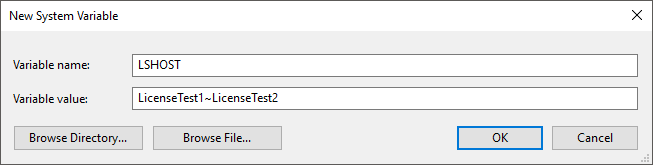
After executing the operations set variable name and value in the New System Variable dialog box, for example:
In Linux OS the LSFORCEHOST and LSHOST variables are specified at the operating system level in the /etc/environment file. Settings are applied after restarting BI server or restarting the operating system.
The example of the LSHOST variable when license servers are used:
export LSHOST=LicenseTest1~LicenseTest2
where LicenseTest1 and LicenseTest2 - license server names.
The example of setting the LSFORCEHOST variable when a stand-alone license is used:
export LSFORCEHOST=NO-NET
NOTE. If it is required to set the variables that differ from the operating system level variables for BI server, specify them in the file /opt/foresight/fp10.x-biserver/etc/envvars.
Reserve licenses for specified users at license server
Specific features reservation is required in case if license with a limit on the number of users is in use on license server.
Reservation of features guarantees access to functionality for specific users. The users will be always provided with free concurrent sessions for the specified features.
To determine a list of users and features that are reserved at the license server, execute the following operations:
Start the WlsGrmgr.exe utility:
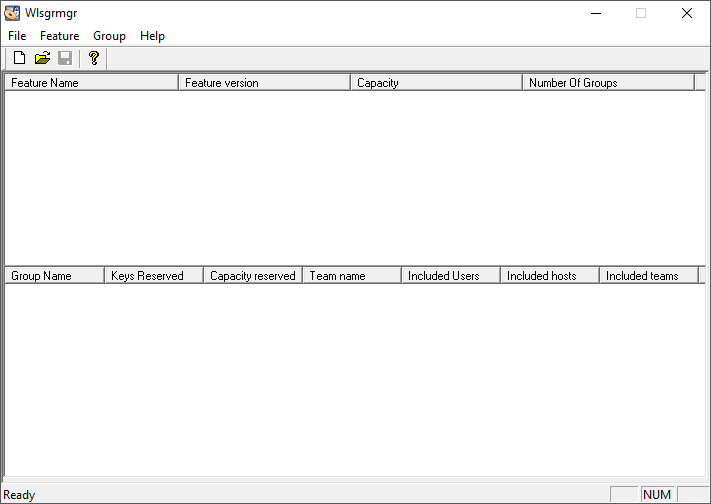
Create a new reservation file by selecting the main menu item: File > New.
Open the feature reservation wizard by selecting the main menu item: Feature > Add.
Set reservation options in the Feature Version Capacity dialog box:
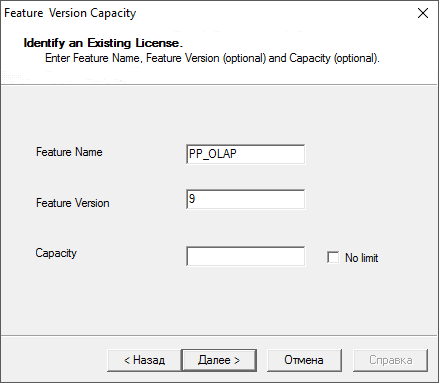
Fill in mandatory boxes:
Feature Name. Determine name of reserved feature.
Feature Version. Determine the value "9" - version of Foresight Analytics Platform.
The Capacity and No limit parameters should stay unchanged.
To continue, click the Next button.
Set options for a group of users in the Group dialog box:
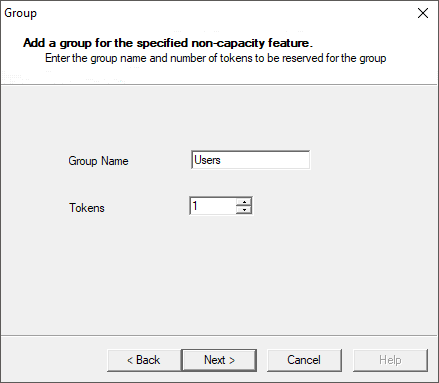
To reserve concurrent sessions for specific feature, determine a group of users where one or several users can be included:
If there is one user in the group, the reserved concurrent session for the feature guarantees access to functionality for the user.
If there are several users in the group and one concurrent session for feature is reserved, this concurrent session can be used only by one user from the group.
If there are several users in the group and more than one concurrent session for feature is reserved, any user from the group can take all concurrent sessions, for example, open several repositories, and other group users cannot be guaranteed with the access to functionality.
Fill in the boxes:
Group Name. Set name of group of users in English.
Tokens. Set the number of reserved concurrent sessions for feature for group of users.
To continue, click the Next button.
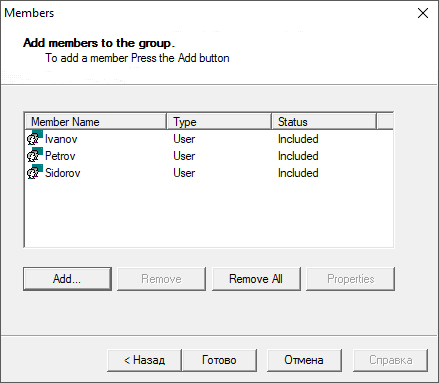
Click the Add button in the Members dialog box to add user names to the group:
The Member dialog box opens:
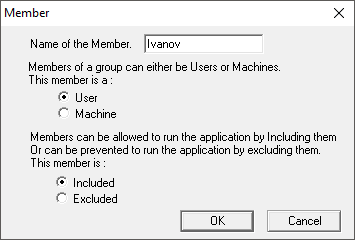
Enter user name who is used to log in to repository in the Name of the Member box.
On entering user name, consider the authentication type in use. If domain authentication type is used, specify name of domain user without domain. If password authentication type is used, specify DBMS user name.
Do not change radio buttons selection.
NOTE. User names in groups for one feature should not match.
Click the OK button in the Member dialog box.
Click the Finish button in the Members dialog box after all user names have been added.
Repeat actions from the step 3 to add reservation of several features.
Save the reservation file using the File > Save As main menu item under the lsreserv name in the folder with installed Windows OS license server: C:\Program Files (x86)\Common Files\SafeNet Sentinel\Sentinel RMS License Manager\WinNT.
Restart Sentinel RMS License Manager.
After executing the operations, the license server will use the lservrc license file and additionally reserve licenses according to the settings specified in the lsreserv file.
For a group consisting of one user, the access to functionality by reserved concurrent session will be guaranteed. In the group including several users, all reserved concurrent sessions can be taken by the first connected user, then other group users will not be guaranteed with the access to functionality.
To reserve specific features in Linux OS:
Create reservation file using any text editor or save it with the lsreserv name without extension.
Determine file contents in the following format:
Where:
Feature. The name of reserved feature.
FeatureVersion. Value of version of Foresight Analytics Platform license - "9".
GroupName. Group name.
TokensCount. The number of reserved licenses for a group of users.
UserName. User name. Depending on the number of users, use the space to divide user names, for example: UserName1 UserName2 UserName3.
Repeat step 2 to add reservation for several features.
Add an empty string after license reservation.
Save the lsreserv file with the lserv application.
Restart the lserv application under the root user.
The example of reservation file:
See also:
Foresight Analytics Platform Activation | Licensing Service and Features of Its Use