
 To open the group of parameters
Quick and advanced setup is available for general page settings of data entry form.
NOTE. Parameters for quick and advanced setup are different.
To determine general page settings in the advanced mode, use the Page group of parameters on the side panel:
To open the group of parameters
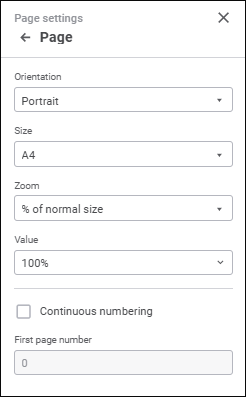
Set the parameters:
Orientation. Select page orientation option in the drop-down list:
Portrait.
Landscape.
Size. Select page size in the drop-down list. The drop-down list contains predefined paper size options, for example, A4, A5, and so on.
Scale. Select page scale option in the drop-down list:
Percent of Actual Size. Select scale value as percent of actual size in the Value drop-down list.
Place on Sheets. Enter the number of sheets to limit by print page width and/or height in the Page(s) Wide By and Tall boxes: If the user sets a value in one box only and leaves the other blank, the number of printed sheets is limited only in the specified direction.
Numbering. Select the Continuous Numbering checkbox for continuous numbering of sheet pages. Custom page numbering is used for sheets with deselected checkbox. Page numbers with the selected checkbox are recalculated deselecting the checkbox of the page.
In the First Page Number box specify the number, with which sheet pages numbering starts. Parameter value is considered for each report sheet even if continuous numbering is used. To apply continuous numbering to several sheet pages, set value in the First Page Number box for the first report sheet, for which the Continuous Numbering checkbox is selected. The rest of the sheets with the selected Continuous Numbering checkbox enter the 0 value in the First Page Number box.
NOTE. This numbering parameter affects only headers/footers with the "&[Page]" tag. Continuous numbering cannot be applied to headers/footers with the tags "&[Pages]", "&[Sheet.Page]" and "&[Sheet.Pages]".
After executing the operations the general page settings are determined for print.
See also:
Setting Up Data Entry Form for Printing
 Print button on the Home toolbar tab.
 Page Settings button at the top right corner.