In this article:
Changing and Saving Data if File Cache is Used
Logging of Executed Operations
Advanced Data Processing Methods and Modes
Working with File Cache
If file cache is used in Foresight Analytics Platform, the required data set is stored on the hard disk, and information is loaded in fragments to RAM as needed (depending on user requests).
File cache supports multithreaded and multi-user work due to optimized parallel loading on processors and ensures data correctness during multiple calls to the same cache. During the multi-user work, the memory contains only one instance of cached data, and data access is separated between user sessions.
For details about working with file cache in Fore see the Working with File Cache in Fore section.
Loading Data to File Cache
Data can be loaded to file cache using the multidimensional cube data caching management console.
All necessary data is loaded (cached) beforehand from database to a hard disk file (file cache).
When creating cache, the following data can be saved:
All cube data.
Data by specific cube selection.
Selection of data loading option depends in the tasks to be solved and data source structure. For example, creating cache by specific cube selection data is relevant if it is known that DBMS synchronization is executed by a limited set of source data. Creating cache records by partial selection will be a more convenient option if the cube is parametric, and parameter value limits in some way the cube data set. In most cases of working with relatively small cubes, a more convenient option will be creating a cache by full selection.
Data samples are loaded from the file cache to RAM as needed, upon reaching the specified memory limit the newer data samples replace the non-used ones. The system ensures that the volume of RAM occupied with the file cache will not exceed the specified limit regardless of the volume of cached data. If restrictions for the volume of available RAM are too hard, it may slow down performance, particularly during data caching, although system operation will not be affected.
The hybrid cache use mode is set by cube caching by the specified selection. In this case, cached data will be quickly retrieved from the cache, and the rest of the data will be retrieved using regular SQL queries. This will reduce the volume of cached data and implement separate storing of "hot" and "cold" data.
Changing and Saving Data if File Cache is Used
File cache data changes when changed data is saved to the cube, in this case data is written to the SQL source and to the file cache. If required, the system can be set up to skip saving data to the SQL source. In this case, the cache operates with maximum performance for both read and write operations, and data synchronization with the SQL source is executed manually via the console.
When data is changed and saved by means of Foresight Analytics Platform, all information is updated automatically both in the file cache and in database tables according to the settings.
If data in the source table, based on which the cached cube is created, has been changed outside the system, for example, by direct data population via SQL, one can update cache explicitly via the IInMemManager.UpdateBySelection call from a Fore unit or via the scheduler. In this case the selection, based on which the data will be updated, is specified. For example, one can update data for the last day by specifying the corresponding calendar dimension element.
When data is being saved to file cache, stored aggregates and rollups linked with the cached cube are automatically recalculated incrementally. In this case, only the aggregates that do not depend on the changed cells are updated. When the stored aggregates are accessed from reports, they always provide the latest data.
Data Aggregation
File cache supports data aggregation for cubes with hierarchical dimensions. Aggregation should be set up on the Aggregation page in the standard cube wizard.
To set an aggregate calculation mode with the use of file cache, set up values of the AggrType parameter in one of the ways:
If a specific aggregate calculation mode is used for all repository cubes with file cache, the parameters is set in the settings.xml file or in the system registry of the server.
If a custom aggregation mode is used for a specific cube, the parameter is set in the data caching management console.
File cache allows for several methods of hierarchical aggregation calculation:
Aggregation upon request. To enable aggregation, set the AggrType=request parameter. The system can calculate aggregates upon request on each use. File cache uses high-performance aggregation calculation algorithms but this caching of large volume of data using this aggregation method may take a long time.
Full stored aggregation. To enable aggregation, set the AggrType=full parameter. The method is used by default. The system can fully precalculate aggregates, that is, calculate, store and actualize all cube hierarchy aggregate data. Opening the cube does not result in delays in aggregates calculation because they are taken as ready-to-use from the cache. When source cube data changes, only the required cube data fragment is recalculated, ensuring high speed of aggregate cache actualization. Note that large data volumes will result in significant disk space usage, and the initial calculation of the full set of aggregates will take a long time. This is because aggregate volume increases as a Cartesian product of the number of cube dimension elements.
Partially stored aggregation. The system can precalculate and store part of the aggregates while calculating the rest of aggregates upon request on each use. This allows for adjusting the degree of aggregate storage, enabling the selection of an optimal scheme for storing and processing aggregated data.
To set up stored aggregate levels, set value of the StoredLevels parameter.
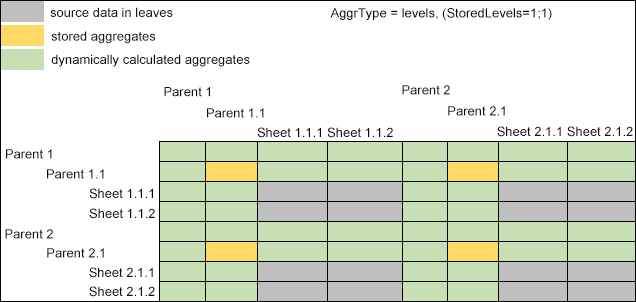
When the StoredLevels parameter is set to 1;1, which corresponds to the value of the AggrType=levels parameter, file cache will store aggregates from the first, third, and the following levels of cube hierarchical dimensions, counting from leaf elements, while aggregates from the second, fourth, and the following levels will be calculated upon request:
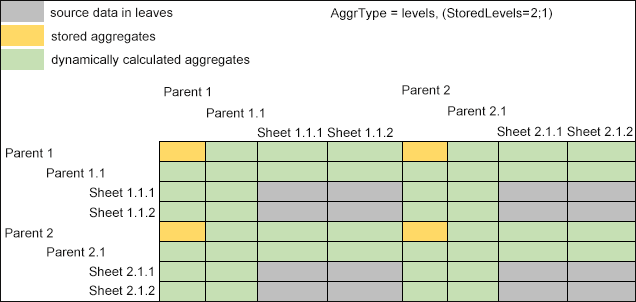
When the StoredLevels parameter is set to 2;1, file cache will store aggregates from the second, fourth, and the following levels of cube hierarchical dimensions, counting from leaf elements, while aggregates from the first, third, and the following levels will be calculated upon request:
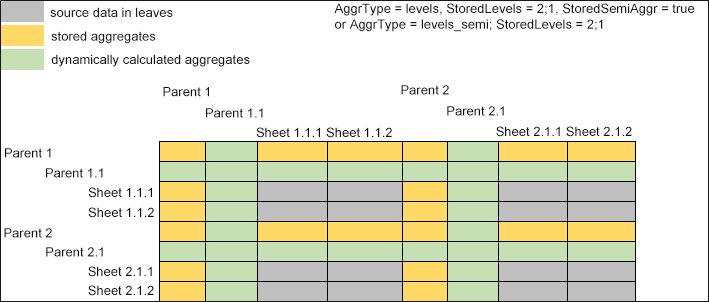
If it is required to additionally store values of semi-aggregate points, in which one part of aggregated dimensions belongs to hierarchy levels, and another part belongs to leaf elements, set the AggrType=levels_semi parameter or set the StoredSemiAggr=true parameter along with the StoredLevels parameter:
Partially stored aggregation modes will work only if the following restrictions are observed:
The Sum aggregation method is used.
Aggregation level settings are equal throughout all levels and dimensions.
Only basic aggregation mechanism is used.
If these restrictions are observed, a specific high-performance aggregation mode is used, which significantly increases data processing even without the use of partially stored calculation method.
Physically calculated and stored in file cache aggregated are stored not in the source table but in single data files that are matched the source files in the request execution result. Therefore, one can open the cube with different aggregation options, for example, with the use of alternative hierarchies.
Variable Cache
If aggregation by the specified selection is set up in the cube, aggregate values depend on the specified selection during aggregation that is why they cannot be precalculated for the entire cube, but only for each particular use. If stored aggregation mode is set up, stored aggregation will be calculated for each specified selection and written as files that will be used on next use. The same applies to rollup calculation: they are also calculated for the fixed dimension based selection. This part of cache in the selection is variable and can be destroyed and rebuilt by the system during aggregate calculation without loss of functionality.
When reporting tools are used very intensively, volume of variable cache may become too large. To limit the disk space allocated for variable caches, use the CacheLimitMb parameter. This parameter can be used to set maximum allowed volume of variable cache and upon reaching this limit the system deletes the least recently used cached based on their last use by the selection.
File Cache Management Console
To start the console, select the  Cube Caching item on the side panel of the object navigator. After this the page with the URL in the following format opens in the new browser tab:
http://<IP address or DNS server name>/fp10.x/app/cache.html#repo=<repository identifier>
NOTE. To work with the file cache management console, the repository should have the Cube Cache extension installed.
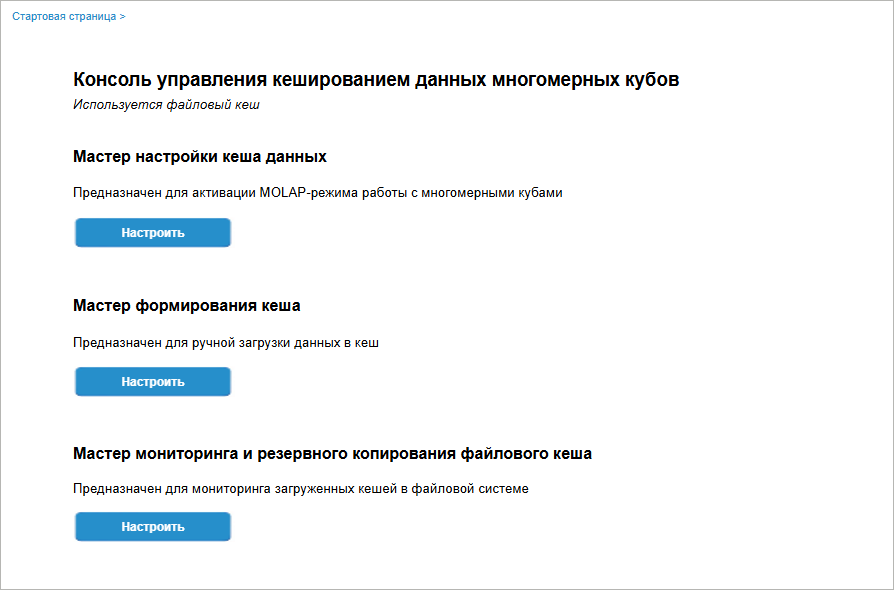
Available wizards:
To start working with the wizard, click the Set Up button on the console start page. After executing the operation the page of the corresponding wizard opens.
Data Cache Setup Wizard
The data cache setup wizard is used to select a caching object, set up file cache parameters and set up write parameters.
To start working with the data cache setup wizard, click the Set Up button on the console start page for the corresponding wizard. After executing the operation the Cache Model page opens:
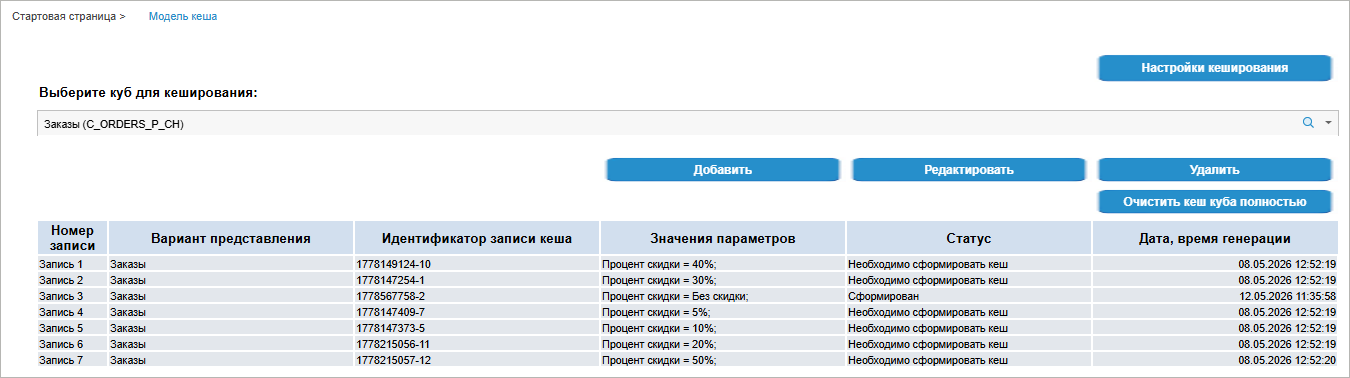
Available operations:
 View file cache system settings


 Search button and start entering cube name.


Cache Creation Wizard
The data cache creation wizard is used to load data to cache.
To start working with the data cache creation wizard, click the Set Up button on the console start page for the corresponding wizard. After executing the operation the Create Cache page opens:
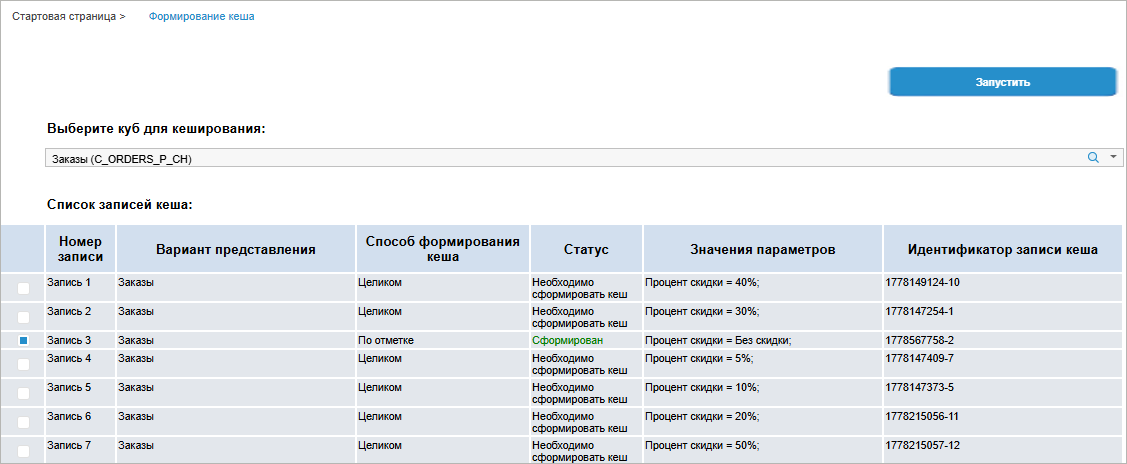
Available operations:


File Cache Monitoring and Backup Wizard
The file cache monitoring and backup wizard is used to track all cache records, clear and load cache data to DBMS.
To start working with the file cache monitoring and backup wizard, click the Set Up button on the console start page for the corresponding wizard. After executing the operation the Monitoring and Backup page opens:
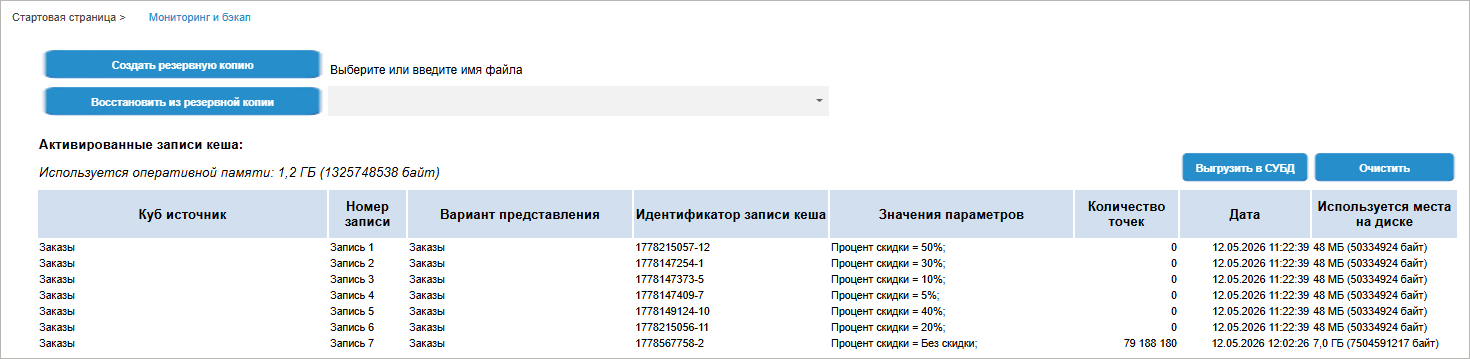
The page will display the Activated Cache Records table with cache records, which are currently loaded to the file system, and the number of used RAM.
Available operations:
Logging of Executed Operations
Data cache management console is used to log operations executed by the user. When the console opens for the first time, log storage tables will be created in the Cube Cache extension in the Service Objects folder. The console should be opened by the user who is a repository administrator.
The following tables are created:
Cache instance log (CACHE_ITEM_TABLE). It contains information about cubes, their display versions, and a set of parameter values, for which cache instances are created.
Cache instance "warm-up" log (CACHE_WARMING_TABLE). It contains information about the list of cache records and the selection used for creating records.
Cache data loading log (CACHE_LOG_TABLE). It contains full information about cache data loading:
Date and time of records registration in the log.
Loading status.
Information about threads and the number of loaded data points.
Information that can be used to identify the user who executed loading.
NOTE. To ensure correct creating of tables, which store cache work log, the repository can be created based on PostgreSQLDBMS, and a default database should be set up in the repository.
By default, all repository users can access tables. If required, the administrator should set up access permissions according to developed system requirements.
Advanced Data Processing Methods and Modes
When using file cache on a MOLAP server, one can use various data processing methods and analytical tools:
Associative Dimension Analysis
It allows for executing queries that calculate the dimension selection elements, for the cached matrix contains data that is not yet displayed. The associative analysis is aimed at determining links between dimensions for efficient selection of records from large data volume. The associative analysis is used in information panels and regular reports To enable associative analysis, set the AllowAssoc parameter to true in the multidimensional cube data caching management console for a specific cube or in the settings.xml file or system registry for a server. If the associative analysis is not enabled via the parameter but the query is being executed to apply it, necessary data will be built before handling the query with a certain time delay.
Dynamic Aggregation
It allows for data aggregation using special selections. Selections are set in a special dictionary attribute. This dictionary attribute can set the following dynamic operations during aggregation of the child level to the parent one:
+ - values are added to the aggregate.
- - values are subtracted from the aggregate.
~ – values are not taken into account in the aggregate.
F[number] – values are multiplied by the specified weight coefficient that is a positive number. For example, the F1.5 value will result in increasing of the value as much as 1.5 times.
N – skip handling of the entire level.
One should specify in cube settings which dictionary attribute will be used to determine operations. Dynamic aggregation is set using the DynAggrAttr parameter in the multidimensional cube data caching management fo a specific cube or in the settings.xml file or system registry for a server.
Partial Cache
It allows for retrieving part of data from file cache by selection and the rest of the data - from SQL source. Opening selection is analyzed every time the cube is used: if the selection is included in cached data, only cached data is used; if the selection is not included in cached data, the selection is built and requested from a standard cube, and data is stored in a temporary table. To enable partial cache, limit cube selection in the multidimensional cube data caching management console for a specific cube.
Partial cache can be used to limit a cube by parameters, that is, partial cache is built by teh selection corresponding to specified cube parameters. In this case one can disable additional requesting of data from SQL source by specifying the PartialRestricted=true setting parameter in the multidimensional cube data caching management console for a specific cube or in the settings.xml file or system registry for a server.
Additive Cache
It allows caching cube data incrementally on demand by selection, every time the data is accessed, rather than all at once. When the cached cube is being opened, the system remembers with which selection the cube was opened, and if the opening selection is greater than the previously requested one, necessary data is requested from the source. Cube cache is empty by default. To enable additive cache, set the AdditiveCache parameter to force in the multidimensional cube data caching management console for a specific cube or in the settings.xml file or system registry for a server. Additive cache is enabled by default for cubes with controlling dimensions and alternative hierarchies.
Stored Rollups
They allow for storing aggregated data resulting from aggregation of fixed dimensions. Stored rollups speed up working with large volume of data in reporting tools. When the system accesses data for the first time by the specified fixed selection, data is calculated, next time the system accesses data, it uses the already built stored rollup. To enable and set up stored rollups, set the ConvType parameter to simple to create rollups by the sent selection, or to extend to create rollups by the full selection of non-fixed dimensions in the multidimensional cube data caching management console for a specific cube or in the settings.xml file or system registry for a server. To speed up rollup work, enable columnar data view by setting the Columnar parameter to true. Stored rollup data belongs to variable cache.
Quick ROLAP Data Aggregation
One can apply a combined ROLAP and MOLAP mode when source data is not cached but stored in a quick DBMS with columnar architecture. In this case data is retrieved very quickly from such a source, particularly excluding dimension kernel, and quick algorithms of the MOLAP subsystem are applied for aggregation by hierarchy levels. To use this data processing method, set the InMemAggr parameter in the multidimensional cube data caching management console for a specific cube or in the settings.xml file or system registry for a server. Set the parameter to all for all cubes or specify identifiers of specific cubes.
In this case, after data is retrieved from ROLAP, MOLAP aggregation will be applied to the data. In this case cube data must not be cached.
Shared Access
Shared cache mechanism provides shared cluster work of InMemory MOLAP servers based on common data. To enable shared access, set the SharedAccess parameter to true in the settings.xml file or system registry for a server. As a result, cache files in all processes that use them open in shared access mode: In this case the system uses file lockings and special indication to make sure that data that was changed in one process is timely updated in other processes that use this data.
To enable shared work with common data for several InMemory MOLAP servers, create a common file resource stored on the network disk via the NFS protocol, allow InMemory MOLAP servers full access to this resource and specify corresponding remote directory as the path to data by setting the DataDir parameter in the settings.xml file or system registry for a server.
Features of Support of Various Platform Tools
File cache supports various objects of Foresight Analytics Platform.
Cube View
File cache supports cube views that are built based on a standard cube. In this case no data is cached or remembered again, that is, all data transformations, particularly, reducing of the number of dimensions or fixing of selection is executed algorithmically using cached multidimensional data. The same method is applied to cube view chains: not only a cached standard cube but also another cube view can be used as data source.
Alternative Hierarchies
Applying alternative hierarchy for a cube requires recalculation of aggregates based on the same source data. If cube source data was cached in file cache, and one of the stored aggregation calculation methods was set, the first use of alternative hierarchy will result in creating stored aggregates, which will take time but next time they will be used without delays. One can precalculate aggregates based on alternative hierarchies, for example, by creating and opening express reports using corresponding data. Note that the system will use additive cache by default to use alternative hierarchies. This occurs because alternative hierarchy may include dimension elements that are absent from the main cube view; consequently, the additive cache mode is required to request additional data for these elements.
Duplicates in Alternative Hierarchies
File cache supports the use of duplicates of dimension elements when the hierarchy contains two dictionary elements with the same key included in different hierarchy levels. This ensures correct processing both during calculation of aggregate values and data iteration of this matrix. Note that physically duplicated cells are stored in cache only once, and their values are distributed across coordinate duplicates virtually without physical copying.
Information Panels
To optimize the work of information panels when working in columnar DBMS, the system may exclude dimensions and apply grouping functions for ROLAP at SQL level. When file caching is applied in a data source, this mode may be required in MOLAP. Dimension exclusion is implemented via creating and applying stored rollups to a cached source data matrix. Full selection is determined for excluded dimensions, after which matrix size is reduced, and corresponding values are recalculated. Upon a repeated request to exclude dimensions, the stored rollups will be quickly reused without recalculation. If the cube contains such a hierarchical aggregation, it will be calculated "on the go" above the calculated rollup.
Cubes with Unbound Dimensions
An unbound dimension is a cube dimension that was not bound with any object during cube setup, and it makes a Cartesian product for all data points. That means that from a user perspective, it looks as though the data points in the cube actually multiply by the number of elements in the unbound dimension or their Cartesian product. When file caching is used in such a cube, a special virtualization schema is implemented for the unbound dimension, that is, the cache itself stores a reduced set of real dimensions, while phantom coordinates are constructed "on the go". Therefore, only the minimum necessary data is cached, and the rest of the data is calculated based on the cached data when needed.
File Cache Work Constraints
There are the following file cache work constraints:
Measurement units specified in the cube are not supported.
Fact dimension aggregation is not supported.
It is prohibited to cache cube aggregate output.
Information panels, in case of dimension exclusion, must have the equal aggregation function by all dimensions.
Version history, attachments, and comments are not cached. Work with this functionality is executed via additional queries to SQL source, data is available only when accessing via BI server.
The use of stored rollups based on partial or additive cache is not supported, including above the partially cached aggregates.
It is prohibited to cache dictionaries if they have active ABAC access permissions.
Associative analysis constraints:
It is required to use fully stored aggregation when working with associative analysis.
A data source for associative analysis is a standard cube.
Associative analysis may detect data of the cells that were deleted from the cube. To register cell deletion, one should enable the AllowAssoc=full mode in the multidimensional cube data caching management console for a specific cube or in the settings.xml file or system registry for a server. When these settings are used, calculation may take longer time.