Select the  Parameters item on the side panel in the object navigator. The Global Variables page opens:
To connect a repository created in FlyBI, to the web application of Foresight Analytics Platform:
Recreate a service user with the credentials, which were used on repository creation in FlyBI, using the PP.Util utility. The application is located in the folder with installed BI server: /opt/foresight/fp10.x-biserver/bin. To start the application, use the PP.Util_start.sh script with the following parameters:
sudo ./PP.Util_start.sh /create_audit_user metabase_id login password audit_login audit_password db_login db_password
Where:
metabase_id. Repository identifier. Mandatory parameter.
login. Owner name for the ADMIN schema for repository connection. Mandatory parameter.
password. Owner password for the ADMIN schema for repository connection. Mandatory parameter.
audit_login. Name of created service user. Mandatory parameter.
NOTE. The P4AUDIT service user name is reserved by the system and cannot be used.
audit_password. Password of created service user. Mandatory parameter.
db_login. Name of the database who has privileges to create DBMS users. Optional parameter. If user name is not specified, it will be asked in interactive mode.
db_password. Name of the database user who has privileges to create DBMS users. Optional parameter. If the password is not specified, it will be requested in interactive mode.
For example:
sudo ./PP.Util_start.sh /create_audit_user REPOSITORY_ID FLYBI FLYBI USER_SERVICE USER_SERVICE
The specified credentials of the repository owner and service user are used by default on executing the CreateRepo.sh script in FlyBI.
Save service user credentials:
sudo ./PP.Util_start.sh /save_audit_creds "SERVER_DATABASE|TYPE" login [password]
Where:
SERVER_DATABASE. IP address or alias of the registered database server. Mandatory parameter.
TYPE. Type of driver in use. Mandatory parameter. Available values: POSTGRES, MSSQL, ORCL.
login. Service user name. Mandatory parameter, it is case sensitive.
password. Service user password. Optional parameter, it is case sensitive. If the password is not specified, it will be requested in interactive mode.
For example:
sudo ./PP.Util_start.sh /save_audit_creds "127.0.0.1|POSTGRES" USER_SERVICE USER_SERVICE
After executing the operations service user credentials are saved in the settings.xml file located at: /opt/foresight/fp10.x-biserver/etc.
Set up repository access in the Set Up Repository Connection dialog box or using the Metabases.xml file located at: /opt/foresight/fp10.x-biserver/etc.
NOTE. When setting up repository connection on each client computer or the computer with installed BI server, IP address or server alias should match with the server specified in the SERVER_DATABASE parameter on saving service user credentials.
After executing the operations the repository is connected to work in the web application.
Features of synchronization between the FlyBI project navigator and the object navigator of Foresight Analytics Platform:
The object navigator contains the service folders:
USER_FILE_DATA. The folder is located in the object navigator root and contains child folders corresponding to names of the users, whose credentials were used to create objects in FlyBI.
USER_SOURCES_<user name>. The folder is located in the corresponding user folder and contains databases used for creating data models.
USER_TABLES_<user name>. The folder is located in corresponding user folder and contains objects based on used databases: tables, queries.
General databases. The folder is located in the USER_FILE_DATA folder and contains databases added as preconfigured connections in FlyBI.
Projects are converted to information panels.
Data models are included in information panels and are not converted to separate objects.
The security manager in FlyBI is identical to the security manager in Foresight Analytics Platform.
To work with ClickHouse DBMS, see the Setting Up ClickHouse section and add the EXTRACT_DB global variable:
Select the Parameters item on the side panel in the object navigator. The Global Variables page opens:
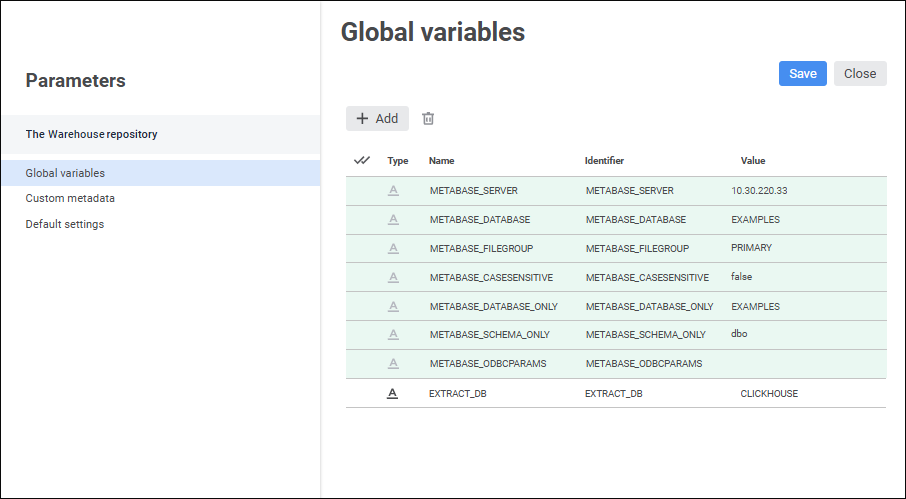
Click the  Add button and set global variable parameters in the columns:
Type. Select string type for a variable in the drop-down list.
Name. Enter variable name: EXTRACT_DB.
Identifier. Enter variable identifier: EXTRACT_DB.
Value. Enter identifier of the database that will be used by default to connect to ClickHouse DBMS and to store data. for example, CLICKHOUSE. The database with the CLICKHOUSE identifier is used in FlyBI by default.
Click the Save and Close buttons.
After executing the operations the EXTRACT_DB global variable is added.
If the security manager already contains the special user for working with the DBMS, execute the operations:
Save user credentials using the PP.Util utility:
sudo ./PP.Util_start.sh /save_creds metabase_id /DEC login [password]
Where:
metabase_id. Repository identifier.
login. User name. Mandatory parameter, it is case sensitive.
password. User password. Optional parameter, it is case sensitive. If the password is not specified, it will be requested in interactive mode.
For example:
sudo ./PP.Util_start.sh /save_creds REPOSITORY_ID /DEC USER_EXTRACT USER_EXTRACT_PASSWORD
After executing the operation the user credentials are saved to the Metabases.xml file.
See also:
Creating and Managing Metadata Repositories