LegendText: String;
The LegendText property determines label of a legend item.
Use JSON or the setLegendText method to set the property value, and the getLegendText method to get the property value.
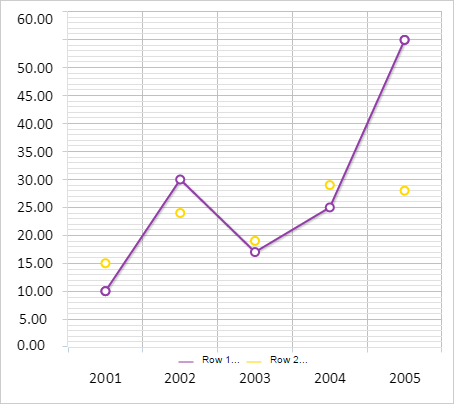
Executing the example requires that the HTML page contains the Chart component named chart (see Example of Creating a Line Chart). Render a legend for a line chart, set labels for the legend item and allowed text length:
// Renders a chart legend
function drawLegend() {
    var legend = chart.getLegend();
    var legendItems = [];
    for (var i in chart.getSeries()) {
        var serie = chart.getSeries()[i];
        // Determine legend item label
        var text = serie.getLegendText();
        if (text.length  serie.getLegendTextWidth()) {
            text = text.slice(0, serie.getLegendTextWidth());
            text += "...";
        }
        // Create a legend item
        var item = {
            BorderColor: serie.getColor(),
            Color: serie.getColor(),
            Marker: "Line",
            MarkerBorderColor: serie.getColor(),
            Text: text
        };
        // Add item to legend
        legendItems.push(item);
    };
    // Set legend items
    legend.setItems(legendItems);
    var plotBorders = chart.getPlotBorders();
    // Create a legend area
    var freeArea = new PP.Rect({
        Left: plotBorders.X,
        Top: plotBorders.Y + 50,
        Width: plotBorders.W,
        Height: plotBorders.H
    });
    // Render legend
    legend.draw(freeArea, "chart");
}

// Display legend
chart.getLegend().setIsVisible(true);
chart.redraw(false);

// Set legend text for chart series
for (var i in chart.getSeries()) {
    var serie = chart.getSeries()[i];
    serie.setLegendText(serie.getCustomData() + ": " + serie.getName());
    serie.setLegendTextWidth(5);
}
// Render legend
drawLegend();
After executing the example chart legend is displayed. Labels sets for its items are truncated to five letters:
See also: