Custom functions and methods can be used to enhance expression capabilities due to the use of custom calculation methods. Custom functions are available for use:
In the expression editor.
In the function wizard in the Reports tool.
In the formula editor in the Calculation Algorithms group.
Custom functions are not connected to the tools by default. They should be entered manually each time to be used. Foresight Analytics Platform enables the user to connect custom functions to system functions in all tools defined above.
NOTE. Connecting custom functions is available for the users included in the ADMINISTRATORS tool.
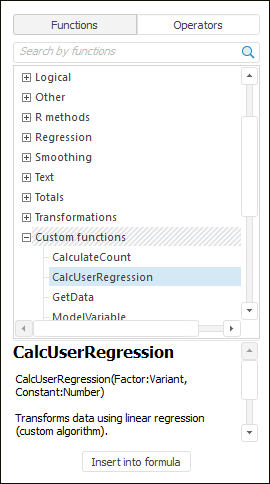
For example, in the expression editor custom functions are displayed on the functions panel in the Custom Functions category:
To connect custom functions, use the Methods tab in the Custom Metadata section of the Parameters dialog box. All methods added on this tab will be connected to the custom functions section in the Foresight Analytics Platform tools.
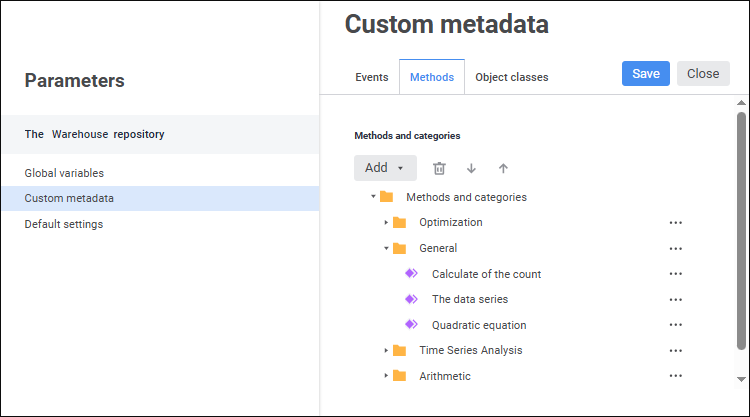
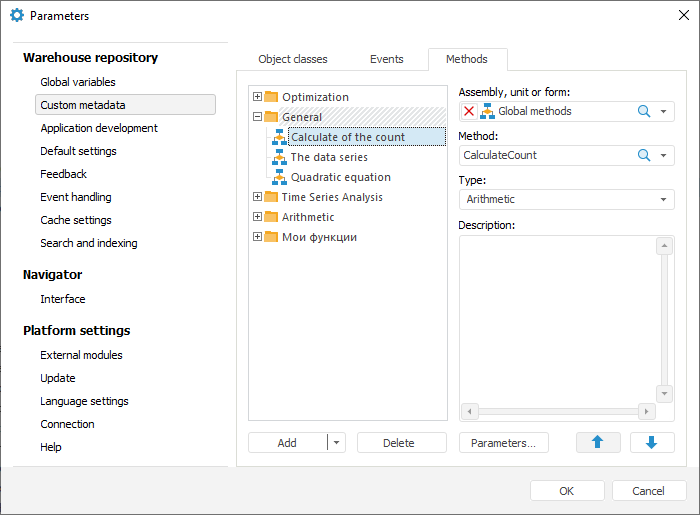
The Methods tab contains custom functions grouped by folders. Folders are categories that are used to arrange and group functions.
Requirements to custom functions:
Functions must be written in the Fore language, must have the Public identifier and must be saved in the current repository as a form, Fore unit, or Fore assembly.
If calculation uses data series or modeling variables, they should be of the ITimeSeries type. To get values calculated by the function, the data of the ITimeSeries type should also be used.
NOTE. A custom function should have a unique name. If after a unit or assembly is selected that contains a function, which name matches with any function or system method or function added before, an exception is thrown. The use of such a unit or assembly will be unavailable.
 Set up method or category order
Functions and methods can be used as a custom function.
Custom method syntax:
Sub MyFunc(Factor1, Factor2: ITimeSeries; Var Output: ITimeSeries; Coef1: Double; Coef2: Double);
Begin
...
End Sub MyFunc;
Method parameters:
Factor1, Factor2. Data.
Output. Data that will be changed and returned in calculation results.
Coef1, Coef2. Parameters with real values.
Custom function syntax:
Function MyFunc(Input, Input1: ITimeSeries; Coef: Double): ITimeSeries;
Var
Output: ITimeSeries;
Begin
...
Return Output;
End Function MyFunc;
Function parameters:
Input, Input1. Data.
Coef. Parameter with a real value.
Output. Variable that returns function calculation result.
See also:
Creating Formulas and Expressions

 Parameters item on the side panel of the
  Actions button next to the method and select the Settings item. The Method Settings dialog box opens:


 Delete button.