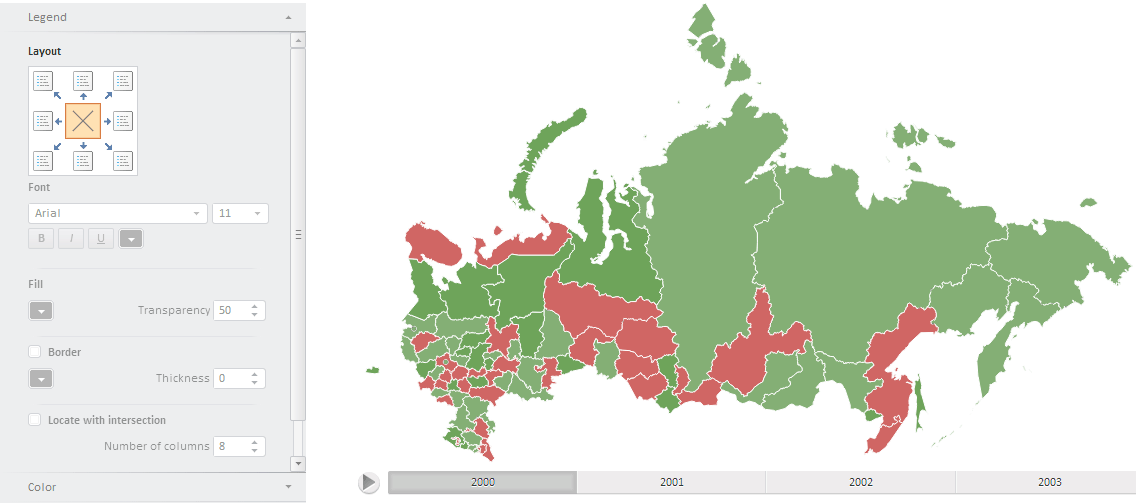
To execute this example, create an HTML page and perform the following operations:
1. In the HEAD tag add links to the following JS and CSS files: PP.css, PP.js, PP.MapMaster.js, PP.MapChart.js, and resources.ru.js.
2. Add links to:
An SVG file containing topobase (for example, Russia.svg).
XML file that contains map settings (data for the settings should have JSON format).
3. In the SCRIPT tag add a code to create MapMaster and EaxMapBoxcomponents.
    //Create a variable that will contain a map
    var map, legend;
    function createMap(mapData) {
        PP.resourceManager.setRootResourcesFolder("../resources/"); //path to resources folder
        if (map) map.dispose();
        var mapContent = document.getElementById("map-content");
        //get JSON settings of the map
        var settings = JSON.parse(mapData);
        //select topobase
        settings.MapChart.Topobase = "Topobase/SVG/Russia.svg";//Path to the topobase
        settings.MapChart.ParentNode = document.getElementById("Map");
        //Path to images folder
        settings.MapChart.ImagePath = "build/img/";
        //create a map
        map = new PP.MapChart(settings.MapChart ? settings.MapChart : settings);
        master = new PP.Ui.MapMaster({
            ParentNode: "mapM", //DOM node that will contain the chart wizard
            Height: 500,
            Width: 310,
            ImagePath: "build/img/",
            DataView: map
        });
        window.onresize();
    }
    //request to get the file containing JSON settings of the map
    var Request = new PP.Ajax(
    {
        Url: "Json/MapXmlExample_RU.xml?d",//Path to the file with map settings
        Success: function (sender, args) {
            createMap(args.ResponseText);
            Request.dispose();
        }
    });
    Request.send();
    //Function that refreshes map sizes
    function updateSize() {
        if (map) {
            map.setHeight(document.documentElement.clientHeight - 60);
            map.setWidth(document.documentElement.clientWidth);
        }
    }
    var idTime;
    //function that sets map size in accordance with window size
    window.onresize = function () {
        if (idTime) clearTimeout(idTime);
        idTime = setTimeout(updateSize, 100);
    }
4. In the BODY tag add the following code:
<body onselectstart="return false" class="PPNoSelect" onload="onReady()">
    <table style="width: 100%">
        <tr>
            <td valign="top" width="350" id="mapM">
            </td>
            <td valign="top" id="Map">
            </td>
        </tr>
    </table>
</body>
After executing the example the page will contain the MapChart component and a wizard for its setup:
See also: