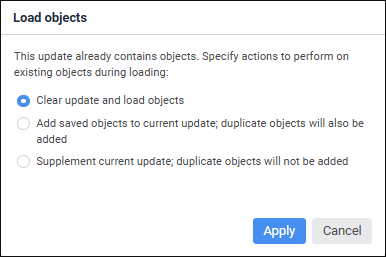
If the update structure contains objects while opening ready update, the Load Objects dialog box opens:
Select one of the radio buttons:
Clear Update and Load Objects. The current update objects will be replaced with the objects contained in the update to be opened.
Add Saved Objects to Current Update. Objects contained in the update to be opened will be added to the current update objects. If objects match, they will be duplicated.
Supplement Current Update. Objects contained in the update to be opened will be added to the current update objects. If objects match, the current objects will be replaced with the objects from the update.
NOTE. When separating administrator roles and depending on the selected method of access control the update file can be opened only if it contains elements available for the user. If they are missing, the update file is not opened.
See also:
Working with Ready Update | Installing Update