
 To open the group of parameters
Quick and advanced setup is available for report page fields.
NOTE. Parameters for quick and advanced setup are different.
To set up page fields in the advanced mode, use the Fields group of parameters on the side panel:
To open the group of parameters
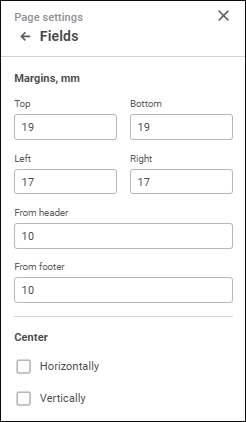
Set the parameters:
Margins, mm. Enter margins in the value boxes:
Top, Bottom, Left, Right. Set the distance to printed page edge.
From Header, From Footer. Set the distance between header and page top and between footer and page bottom in millimeters. This distance should be less than the size of the top and bottom margins, respectively.
Center. Select the method, according to which objects will be centered on the sheet:
Horizontally. Select the checkbox to center report sheet objects horizontally.
Vertically. Select the checkbox to center report sheet objects vertically.
After executing the operations page fields are set up for printing.
See also:
Setting Up Pixel-Perfect Report
 Print button on the Home toolbar tab.
 Page Settings button at the top right corner.