 element of the inverse matrix is shown.
MInverse(Values)
Values. Cell range containing a two-dimensional numeric array with equal number of rows and columns.
NOTE. To define the range, specify the addresses of the upper left and the lower right cells where the matrix is located.
It returns an inverse matrix for the specified matrix.
The function returns the array that is why it should be inserted as an array formula. If you enter the formula into a single cell, the element of the inverse matrix is shown.
The MInverse function returns an error value if:
Any of the array cells is empty or contains text.
The array does not have an equal number of rows and columns.
Source square matrix cannot be inverted. The determinant of such a matrix is zero.
The source matrix (see above) and its matrix inverse (see below) look as follows:
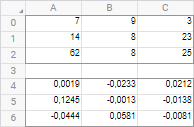
| Formula | Result | Description |
| =MInverse(A0:C2) | See the image. | The matrix inverse of the above given matrix. |
The formula in this example should be entered as an array formula. To do this:
Enter the formula to the cell.
Select a range with the size equal to size of the source matrix, starting with the cell that contains formula.
Press F2 and then CTRL+SHIFT+ENTER.
If the formula is not entered as an array formula, the value of inverse matrix is displayed.
See also:
Function Wizard │ Mathematical Functions │ MDeterm │ MMult