Units dictionary
When working with a time series database all series data is specified in certain units used by the users. If it is intended to work with series presented in different measurement units, one can set up automatic scaling of series values.
Measurement units configured in time series database behave differently when used in the tools:
NOTE. Units cannot be scaled if data caching is enabled.
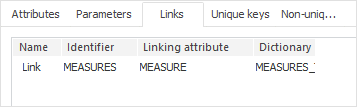
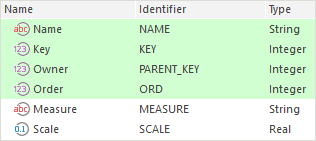
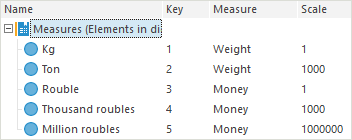
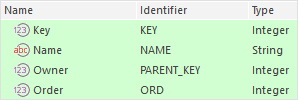
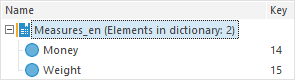
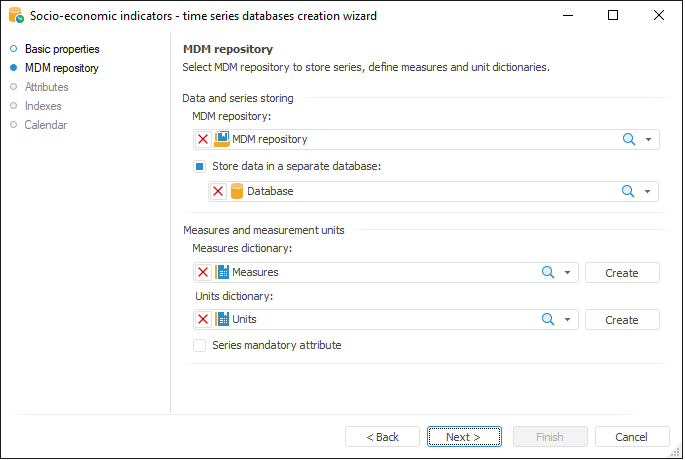
It is required to create two MDM dictionaries to work with measurement units: measures dictionary and units dictionary. Dictionaries with the required structure can be created on the MDM Repository page of the time series database wizard.
The Time Series Analysis tool enables the user to set measurement units for each series separately. After selecting the measurement unit that is used to display data, the scale of the selected measurement unit is applied to series data.
NOTE. Measurement units cannot be set up for groups of series, calculated series and their child series.
To scale measurement units of a separate series:
Select the Measurement Units item in the series' context menu and select a measurement unit in the drop-down list.
Select the series and select the Edit Measurement Unit checkbox on the Basic tab in the Series group of tabs.
NOTE. The displayed measurement unit can be changed by setting the Measurement Unit series attribute .
By default, the Measurement Unit attribute is hidden. To show this attribute:
Select the Series Mandatory Attribute checkbox on the MDM Repository page in the time series database wizard.
NOTE. If the Series Mandatory Attribute checkbox is selected, scaling of units in the Analytical Queries (OLAP) and Reports tools is unavailable.
Deselect the Hidden Attribute checkbox for the Measurement Units attribute on the Attributes page in the time series database wizard.
TIP. If attribute of measurement units is not hidden, one can set up displaying of the current measurement unit in the series header. To do this, use the View tab located in the Data group of tabs of the side panel.
The Analytical Queries (OLAP) and Reports tools enable the user to set measurement units for the whole express report sheet or regular report slice. After selecting the measurement unit that is used to display data, the scale of the selected measurement unit is applied to all data of the sheet or slice.
To set the displayed measurement unit, click the  Scale Units button located:
Analytical Queries (OLAP). On the Data ribbon tab.
Reports:
On the Slice ribbon tab. The tab is available after selecting a data slice on the side panel.
On the Data Sources and Data Slices panel.
Select the required measurement unit in the drop-down list.
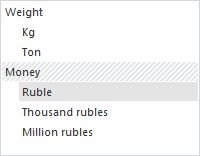
NOTE. Measurement units scaling will be unavailable if the Series mandatory Attribute checkbox is selected on the MDM Repository page in the time series database wizard. Units dictionary is presented as a separate dimension without automatic scaling of data to all measurement units.
See also: