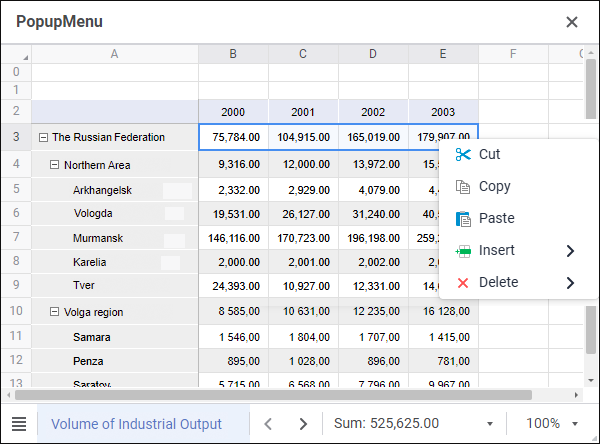
The PopupMenu component is a context menu that can be opened above visual components.
The component is non-visual. After the component is added to the form, use the Active Components panel to work with the component. Select the component and set up required properties in the object inspector. To remove the component from the form, use the corresponding context menu item on the Active Components panel.
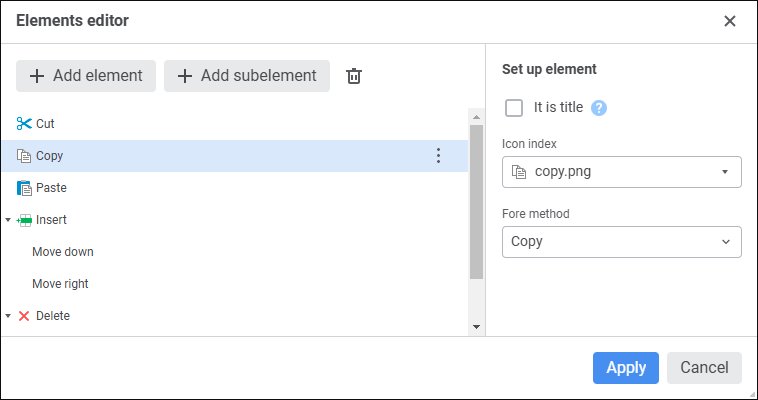
To create context menu commands, open the element editor using the command on the Active Components panel or the items property in the object inspector. Create the required menu hierarchy using the Add Element and Add Subelement buttons. Each element corresponds to a single context menu command. Determine elements' text, icon and the Fore method that will be executed on command selection. The list of icons should be loaded to the imageCollection collection of the web form. The list of Fore methods is created based on the methods implemented in form class.
If the It is Title checkbox is selected for the element, it will be displayed in bold in the context menu. Titles do not have an icon and Fore method and are used to visually group various command sets.
Specify the created PopupMenu component as a value of the popupMenu property for the visual component, which context menu will be opened.
Properties and events that are available in the web form design mode.
name. Component name.
items. The collection of elements that implement context menu items.
The component has the onPopup event that occurs on selecting any context menu item.
See also: