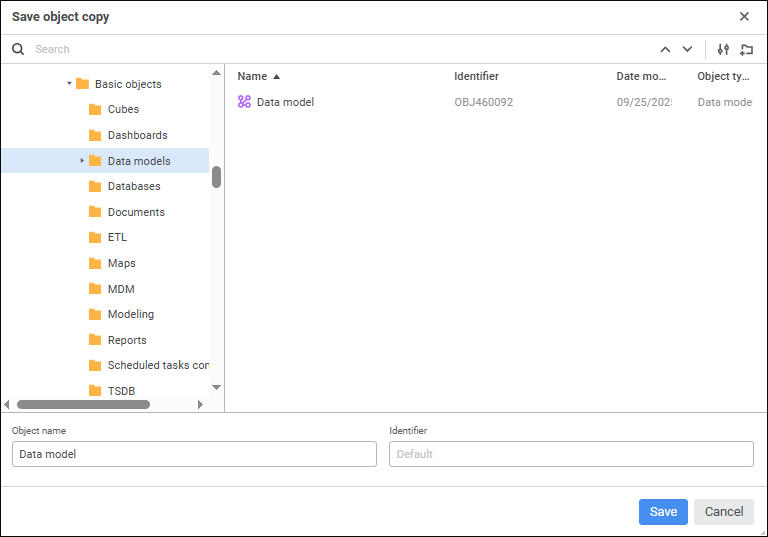
To create a data model copy, select the Save As item in the drop-down menu of the Save button in the main menu. The Save Object Copy dialog box opens:
To save data model copy:
Select where to save the data model in the object tree.
Click the  Create Folder button to add a new folder and set its name.
Find the existing data model to select where to save its copy or to copy its name. To quickly select the existing data model, enter its name/identifier/key in the search box, depending on the selected object search options, and press the ENTER key. Navigate between the search results using the buttons:
 Find Previous - to select the previous search result.
 Find Next or press the ENTER key - to select the next search result.
To set up search, click the  Search Options button and select search option in the drop-down menu:
Object search option:
Find by Names. The checkbox is selected by default. Search is executed by object names.
Find by Identifiers. The checkbox is selected by default. Search is executed by object identifiers.
Find by Keys. The checkbox is selected by default. Search is executed by object keys.
Match Case. Search is case sensitive. For example, if the search box contains the word "Object", the objects, which names and/or identifiers contain the words "object" and "OBJECT" are not displayed in search results.
Match Whole Word. Search is executed only by objects, which names and/or identifiers contain the text fully or partially matching the text in the search box.
Object Name. Enter name of data model copy. The current data model name is selected by default.
Identifier. Enter unique identifier of data model copy. The identifier may consist of only Latin letters, numbers and underline character and should not start with a number.
When the Object Name and Identifier boxes are empty, object name and identifier of the data model are set automatically.
When creating a data model copy, a new data model is created in the repository, which immediately opens for work.
If an object with the identifier specified in the Save Object Copy dialog box already exists, an attempt to create a data model copy returns the action confirmation dialog box. Confirm replacing of the existing object with the data model copy.
See also:
Creating a Data Model | Building Data Model