To install the designer of business applications back end on IIS web server in Windows OS:
Make sure that the following conditions are satisfied:
BI server and IIS web server are installed.
Internet connection is available.
The designer of business applications back end is installed under the user who has local computer administrator permissions.
Create a folder that will store designer of business applications back end files, for example, C:\Program Files (x86)\Foresight\Designer of Business Application 10.x Web Server.
Unpack the dba.zip archive to the create folder.
NOTE. The dba.zip archive is not included in the software package of Foresight Analytics Platform software package. To get the archive, contact technical support by sending a request to support@fsight.ru or use technical support services, which are available after registration at the website.
Add an application pool in the IIS Manager:
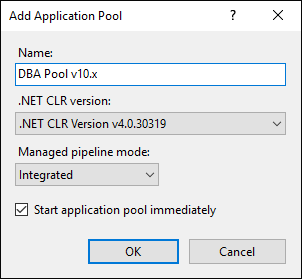
Select the Add Application Pool item in the context menu of the Application Pools section in the Connection tree. The Add Application Pool dialog box opens:
Set application pool name as DBA Pool v10.x and click the OK button.
After executing the operations the DBA Pool v10.x application pool is added in the IIS Manager.
Add a virtual directory in the IIS Manager:
Select the Add Application item in the context menu of the Default Web Site default web node in the Connections tree. The Add Application dialog box opens:
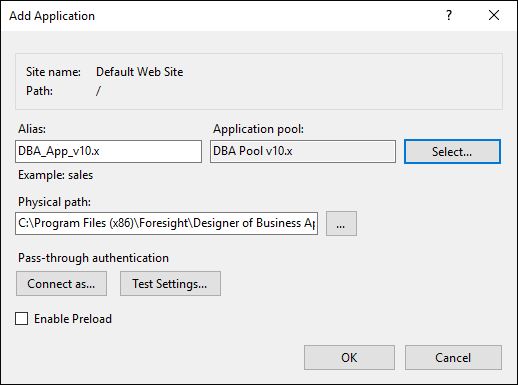
Set the parameters:
Alias. Set virtual directory name as DBA_App_v10.x.
Application Pool. Click the Select button and select the DBA Pool v10.x pool.
Physical Path. Specify the path to designer of business applications back end files: C:\Program Files (x86)\Foresight\Designer of Business Application 10.x Web Server.
Click the OK button.
After executing the operations the DBA_App_v10.x virtual directory is added in the IIS Manager.
After executing the operations, the designer of business applications back end is installed.
See also:
Designer of Business Applications Back End | Setting Up Configuration of Designer of Business Applications | Opening Business Application