Font: IGxFont;
The Font property determines territory info font parameters.
Executing the example requires a form with the following components: the Button component named Button1, the MapBox component named MapBox1, and the UiMap component named UiMap1. UiMap1 is a data source for MapBox1. The map must be connected to the UiMap1 component.
The example is a handler of the OnClick event for the Button1 component.
Add links to the Drawing, ExtCtrls, Forms, and Map system assemblies.
Sub Button1OnClick(Sender: Object; Args: IMouseEventArgs);
Var
Map: IMap;
TerrI: IMapTerritoryInfo;
Font: IGxFont;
Color: IGxColor;
Pen: IGxPen;
Begin
// Determine a map
Map := UiMap1.Map;
TerrI := New DxMapTerritoryInfo.Create;
Map.View.TerritoryInfo := TerrI;
// Determine the layer, on which territory info is displayed
TerrI.Layer := Map.Layers.FindByName("Regions");
// Set maximum number of elements in territory info
TerrI.MaxItemCount := 5;
// Set distance between identifier and name of territory info element
TerrI.MarkerCellPadding := 5;
// Set parameters of territory info borders
Color := GxColor.FromName("Blue");
Pen := New GxPen.CreateSolid(Color);
TerrI.BorderPen := Pen;
// Set territory info font
Font := New GxFont.Create("Arial", 10, 3 As GxFontStyle);
// F := New GxFont.Create("Courier New", 10, 2 As GxFontStyle);
TerrI.Font := Font;
// Set territory info font color
Color := GxColor.FromName("Red");
TerrI.FontColor := Color;
// Check if territory info has been changed
If TerrI.IsDirty Then
Debug.WriteLine("Territory info has been changed");
Else
Debug.WriteLine("Territory info has not been changed");
End If;
End Sub Button1OnClick;
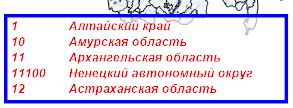
After executing the example the settings are applied for the territory info:
The territory info will display not more than five elements.
Distance between identifier and name of territory info element is equal to five.
The territory info border color will change to blue.
Territory info font will change to Arial, size - 10, font style - bold italic.
The territory info font color will change to red.
See also: