LabelFormat: IMapLegendLabelFormat;
The LabelFormat property returns legend label format parameters.
Executing the example requires a form with the following components: the Button component named Button1, the MapBox component named MapBox1, and the UiMap component named UiMap1. UiMap1 is a data source for MapBox1. The UiMap1 component must have a connected map that contains a map indicator only.
The example is a handler of the OnClick event for the Button1 component.
Add links to the Drawing, ExtCtrls, Forms, and Map system assemblies.
Sub Button1OnClick(Sender: Object; Args: IMouseEventArgs);
Var
Map: IMap;
Layer: IMapLayer;
Legend: IMapLegend;
Label: IMapLegendLabelFormat;
Begin
Map := UiMap1.Map;
Legend := New DxMapLegend.Create As IMapLegend;
Map.View.Legend := Legend;
Legend.Visible := True;
// Stop legend rendering
Legend.BeginUpdate;
// Find layer by name
Layer := Map.Layers.FindByName("Regions");
// Determine the indicator, for which legend is displayed
Legend.Visual := Layer.Visuals.Item(0);
// Set whether the Equal element is displayed
Legend.IncludeEquals:=True;
// Set label format
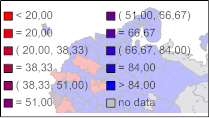
Label := Legend.LabelFormat;
// Set format of row for the Less label
Label.Less := "< %value";
// Set format of row for the Equal label
Label.Equal := "= %value";
// Set format of row for the Between label
Label.Between := "( %min, %max)";
// Set format of row for the Greater label
Label.Greater := "> %value";
// Set format of row для подписи «Пусто»
Label.NoData := "no data";
// Resume legend rendering
Legend.EndUpdate;
End Sub Button1OnClick;
After executing the example the legend is displayed for the map indicator. The legend label format is changed:
See also: