Fill: IMapVisualFillProperty;
The Fill property returns indicator hatching parameters.
Executing the example requires a form with the following components: the Button component named Button1, the MapBox component named MapBox1, and the UiMap component named UiMap1. UiMap1 is a data source for MapBox1. The map must be connected to the UiMap1 component. The VisualDataAdapter class, that creates a dynamic data source, must also be implemented. The class example is contained in the IMapVisual.DataAdapter property description.
The example is a handler of the OnClick event for the Button1 component.
Add links to the Drawing, ExtCtrls, Forms, and Map system assemblies.
Sub Button1OnClick(Sender: Object; Args: IMouseEventArgs);
Var
Map: IMap;
Layer: IMapLayer;
AreaVisual: IMapAreaVisual;
Fill: IMapVisualFillProperty;
Color: IMapVisualColorProperty;
Scale: IMapFillScale;
Begin
Map := UiMap1.Map;
Layer := Map.Layers.FindByName("Regions");
AreaVisual := Layer.Visuals.AddAreaVisual;
AreaVisual.DataAdapter := New VisualDataAdapter.Create As IMapDynamicDataAdapter;
Fill := AreaVisual.Fill;
Fill.DataAdapter := AreaVisual.DataAdapter;
Scale := Fill.Scale;
Scale.Count := 1;
Scale.AutoCalculable := True;
Scale.Fill(0, MapScaleSettingImpact.Greater) := GxHatchStyle.Cross;
Scale.Fill(0, MapScaleSettingImpact.Less) := GxHatchStyle.DarkUpwardDiagonal;
Fill.Dependent := True;
Color := AreaVisual.FillColor;
Color.Values.Count := 1;
Color.Values.Item(0) := GxColor.FromName("Blue");
Map.Refresh;
End Sub Button1OnClick;
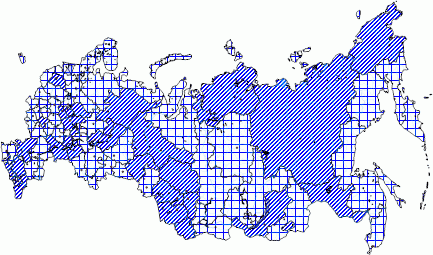
After executing the example the map indicator, which is hatched in blue, and is determined by the scale, is added to the Regions layer:
See also: