General Principles of Programming Using the BPM Assembly
The BPM assembly is used to work with theBusiness Process Management extension. Programming using this assembly consists in sequent setting up of processes, staring them for execution, working with steps in the running process instance, monitoring and getting process execution results.
Before getting started with calculation algorithm:
Make sure that the there is installed Business Process Management extension.
In the development environment add links to the BPM system assembly and the Business Processes. Kernel custom assembly, which is contained in the Business Processes component:
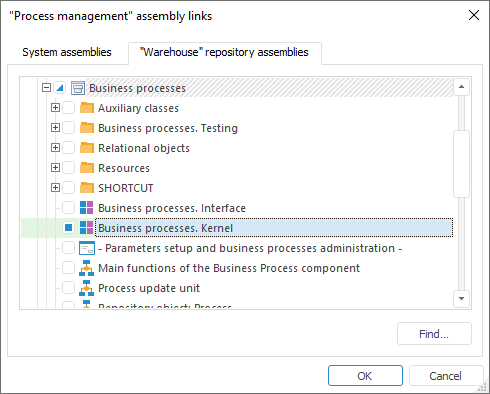
After executing the specified operations the interfaces/classes/enumerations required for working with processes from application code are available.
Getting Started with Processes
Working with repository processes is executed via the BProcessCollectionClass application class, which is accessed by means of the BProcessCollection function. The class and function are implemented in the Business Processes. Kernel connected assembly. Class properties and methods can be used to get process structure described by the IBProcess interface.
The example of getting process structure and opening process for edit:
Sub UserProc;
Var
Mb: IMetabase;
MObj: IMetabaseObjectDescriptor;
Process: IBProcess;
Begin
Mb := MetabaseClass.Active;
MObj := Mb.ItemById("PROCESS");
// Get process structure
Process := BProcessCollection.ByKey(MObj.Key);
// Open process for edit
Process := BProcessCollection.EditByKey(MObj.Key);
//...
End Sub UserProc;
Create a new process
To create a new process:
Add a link to the Repository Communication Unit custom unit contained in the Designer of Business Applications > General Components component:
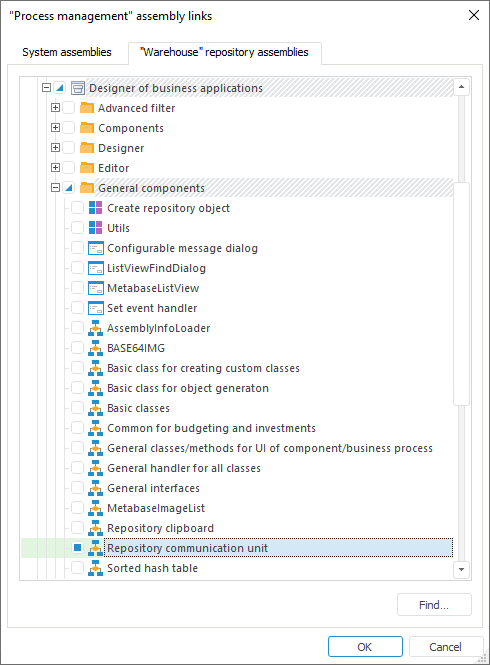
Get a custom class for processes from the connected unit using the GetCustomClassByEnum function; send element of the BPClasses.Process enumeration as a parameter. The identifier of the obtained class will be used to create new objects:
Sub CreateProcess;
Var
Mb: IMetabase;
ProcClsId: integer;
CrInfo: IMetabaseObjectCreateInfo;
Begin
Mb := Metabaseclass.Active;
// Get object class - Process
ProcClsId := GetMetabaseHelper.GetCustomClassByEnum(BPClasses.Process).ClassId;
// Create a new process
CrInfo := Mb.CreateCreateInfo;
CrInfo.ClassId := ProcClsId;
CrInfo.Parent := Mb.ItemById("F_BPM");
CrInfo.Permanent := True;
Mb.CreateObject(CrInfo).Edit;
End Sub CreateProcess;
See also:
About the BPM Assembly | BPM Assembly Interfaces | BPM Assembly Interfaces