Values: Array;
The Values property determines an array of cylinder axis values.
Use JSON or the setValues method to set the property value and the getValues method to get the property value.
To execute the example, the HTML page must contain the Cylinder component named cylinder (see Example of Creating the Cylinder Component). Hide tick marks and set new labels for cylinder axis:
// Get cylinder axis
var axis = cylinder.getAxis();
// Hide cylinder tick marks
axis.setShowMajorTicks(False);
axis.setShowMinorTicks(False);
// Set axis values
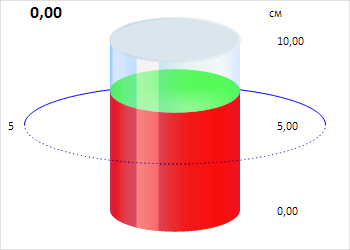
axis.setValues([0, 5, 10]);
// Get axis tick mark labels
var calcLabels = axis.autoCalcLabels();
console.log("Axis tick mark labels: %s", calcLabels.toString());
After executing the example, tick marks are hidden, and new labels for cylinder axis are set:
The browser console displays axis tick mark labels:
Axis tick mark labels: 0,00,5,00,10,00
See also: