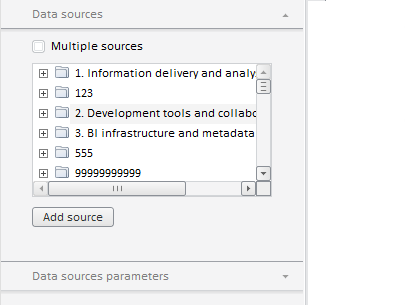
The EaxPropertyBar component is a properties panel for an express report.
The getControl method can be used to change properties of the PP.Ui. NavigationBar basic component.
The EaxPropertyBar component can look as follows:
Example of EaxPropertyBar and ChartBox Components Collocation
| Constructor name | Brief description | |
 |
EaxPropertyBar | The EaxPropertyBar constructor creates an instance of the EaxPropertyBar component. |
| Property name | Brief description | |
 |
DataView | The DataView property determines the data view to be linked with the express report sidebar. |
|
DimViewMode | The DimViewMode property sets display mode for the dimension panel. |
|
Service | The Service property determines a service for working with express report side panel. |
|
Source | The Source property determines a data source for express report properties panel. |
| Method name | Brief description | |
|
clearDims | The clearDims method removes all dimensions. |
|
getAnalysisPanel | The getAnalysisPanel method returns analysis panel. |
|
getBubbleChartMaster | The getBubbleChartMaster method returns wizard for the Bubble Chart express report object. |
|
getBubbleTreeMaster | The getBubbleTreeMaster method returns bubble tree setup wizard. |
|
getChartMaster | The getChartMaster method returns chart wizard. |
|
getDataPanel | The getDataPanel method returns analysis panel. |
|
getDataSourceParamsPanel | The getDataSourceParamsPanel method returns the panel where the users can set up data source parameters. |
|
getDataSourcesPanel | The getDataSourcesPanel method returns the Data Sources panel. |
|
getDimBarMasterView | The getDimBarMasterView method returns the selection wizard. |
|
getDimBarViewPanel | The getDimBarViewPanel method returns the Controls panel. |
|
getGaugeMaster | The getGaugeMaster method returns speedometer setup wizard. |
|
getMapMaster | The getMapMaster method returns the map wizard. |
|
getMode | The getMode method returns wizards' display mode. |
|
getOptions | The getOptions method returns data source metadata. |
|
getTableViewPanel | The getTableViewPanel method returns the View tab on the express report property panel. |
|
getTitlePanel | The getTitlePanel method returns the Title title setup panel. |
|
getTotalsPanel | The getTotalsPanel method returns the totals panel for the table. |
|
getTreeMapMaster | The getTreeMapMaster method returns wizard for tree map setup. |
|
hideAllMasters | The hideAllMasters method hides all wizards. |
|
loadFile | The loadFile file loads scenario file. |
|
refreshAll | The refreshAll method refreshes all panels in wizards. |
|
refreshDimHighlighting | The refreshDimHighlighting method refreshes highlighting of dimension elements. |
|
refreshDimSelections | The refreshDimSelections method refreshes selection in the specified dimensions. |
|
setPropertyValue | The setPropertyValue method controls availability of the Transform Data and Show As Ranks groups on the Data tab of the express report properties panel. |
|
showBubbleChartMaster | The showBubbleChartMaster method shows bubble chart setup wizard. |
|
showBubbleTreeMaster | The showBubbleTreeMaster method shows bubble tree setup wizard. |
|
showChartMaster | The showChartMaster method shows chart wizard. |
|
showMapMaster | The showMapMaster method shows map setup wizard. |
|
showTreeMapMaster | The showTreeMapMaster method shows tree map wizard. |
| Event name | Brief description | |
 |
MetadataChanged | The MetadataChanged event occurs after changing metadata on the express report properties panel. |
|
PropertyChanged | The PropertyChanged event occurs after selecting an item in context menu of the express report properties panel. |
|
RequestMetadata | The RequestMetadata event occurs on requesting report metadata to draw a component. |
| Method name | Brief description | |
|
addClassToTitles | The addClassToTitles method sets an additional style class to titles of all wizard tabs except for the first one. |
|
addMaster | The addMaster method adds a child wizard. |
|
addMasterPanel | The addMasterPanel method adds a wizard panel. |
|
addNavItem | The addNavItem method adds a control to the wizard. |
|
beginUpdate | The beginUpdate method starts wizard update. |
|
clearItems | The clearItems method clears the list of panels. |
|
endUpdate | The endUpdate method finishes wizard update. |
|
expandFirstItem | The expandFirstItem method expands the first visible tab if the wizard is visible. |
|
getActiveGroupName | The getActiveGroupName method returns the name of the currently shown group of contextual panels. |
|
getActivePanel | The getActiveItem method returns the active panel tab of wizard. |
|
getItem | The getItem method returns a wizard panel by its type or sequence number in the list of panels. |
|
getItems | The getItems method returns array of wizard panels. |
|
hideGroup | The hideGroup method hides tab groups by their names. |
|
refresh | The refresh method refreshes all wizard panels. |
|
refreshGroup | The refreshGroup method refreshes panels that belong to a specific group. |
|
removeMaster | The removeMaster method removes child wizard. |
|
removeMasterPanel | The removeMasterPanel method removes wizard panel. |
|
removePanelsByGroup | The removePanelsByGroup method removes panels by name of the group, to which they belong. |
|
showGroup | The showGroup method shows tab groups by their name. |
|
showOnlyGroup | The showOnlyGroup method shows only specified groups and hides all the other groups. |
| Method name | Brief description | |
|
getControl | The getControl method returns the basic control that inherits from PP.Ui.Control. |
| Property name | Brief description | |
|
Anchors | The Anchors property determines position of the component placed within container. |
|
Animation | The Animation property determines component animation parameters. |
|
Bottom | The Bottom property determines a bottom margin if a component is placed inside LayoutPanel. |
|
Content | The Content property determines component contents. |
|
ContextMenu | The ContextMenu property determines a component's context menu. |
|
Data | The Data property is used to store any custom data. |
|
Enabled | The Enabled property determines whether a component can be used. |
|
Height | The Height property determines component height. |
|
IsRTL | The IsRTL property determines whether component elements are aligned to the right. |
|
IsVisible | The IsVisible property determines whether a component is displayed. |
|
Left | The Left property determines a left margin if a component is placed inside GridPanel. |
|
Opacity | The Opacity property determines component transparency. |
|
Parent | The Parent property determines a parent component of a control. |
|
ParentNode | The ParentNode property determines a parent DOM node. |
|
ResourceKey | The ResourceKey property determines a component resource key. |
|
Right | The Right property determines a right margin if a component is placed inside LayoutPanel. |
|
Rotate | The Rotate property determines a component rotation angle. |
|
ShowToolTip | The ShowToolTip property determines whether a tooltip of the component can be displayed. |
|
Style | The Style property determines a component style. |
|
TabIndex | The TabIndex property determines the order of the control element passing inside the container. |
|
Tag | The Tag property determines a JSON object associated with the component. |
|
ToolTip | The ToolTip property determines text of component tooltip. |
|
Top | The Top property determines a top margin if a component is placed inside GridPanel. |
|
Value | The Value property determines a component value. |
|
Width | The Width property determines component width. |
| Method name | Brief description | |
|
The addClass method adds a CSS class to the component. | |
|
addEventHandler | The addEventHandler method adds an event handler to a DOM node. |
|
The addStateClass method adds a CSS class to the component and removes the previous CSS class. | |
|
The addToNode method adds a component to the specified node. | |
|
bindEvents | The bindEvents method subscribes an element to all available events. |
|
The getAnchorFlags method returns JSON object that contains settings of the current component's position. | |
|
The getClass method returns the current CSS classes of the component. | |
|
The getCssStyle method returns style for the specified node. | |
|
The getDomNode method returns main DOM node of the component. | |
|
The getFocused method determines whether the component is focused. | |
|
getIsBinded | The getIsBinded method returns whether an element is subscribed to all DOM node events. |
|
The hide method hides a control. | |
|
The hideToolTip method clears tooltip timeout and hides the tooltip if it is shown. | |
|
refreshStyle | The refreshStyle method refreshes element CSS styles. |
|
The removeClass method removes CSS class from the component. | |
|
removeEventHandler | The removeEventHandler method removes event handler from DOM node. |
|
removeFromDOM | The removeFromDOM method removes node from the DOM structure. |
|
The removeStateClasses method removes CSS classes of the component. | |
|
The setDraggable method determines whether a component can be dragged on the HTML page. | |
|
The setFocus method sets the component focus. | |
|
The setIsHovered method sets up component displaying only on mouseover. | |
|
The setSize method establishes the sizes of the component. | |
|
The show method displays a control. | |
|
unBindEvents | The unBindEvents method unsubscribes an element from all standard events. |
|
The updatePosition method updates size and position when absolute positioning based on the current parameters is used. | |
|
The updateSize method updates the component size on changing the size of the container that contains the component. |
| Event name | Brief description | |
|
Drag | The Drag event occurs on clicking and holding the mouse button. |
|
DragEnd | The DragEnd event occurs when dragging the component finishes. |
|
DragStart | The DragStart event occurs when dragging the component starts. |
|
OnContextMenu | The OnContextMenu event occurs on calling context menu of the component. |
|
SizeChanged | The SizeChanged event occurs after the component is resized. |
|
SizeChanging | The SizeChanging event occurs during component resize. |
| Property name | Brief description | |
|
The Id property determines a repository object identifier. |
| Method name | Brief description | |
|
clone | The clone method creates an object copy. |
|
dispose | The dispose method deletes the component. |
|
getHashCode | The getHashCode method returns hash code of repository object. |
|
getId | The getId method returns repository object identifier. |
|
getSettings | The getSettings method returns repository object settings. |
|
getTypeName | The getTypeName method returns the name of the object type without the namespace, to which it belongs. |
|
isEqual | The isEqual method determines whether the specified object is equal to the current repository object. |
|
isLive | The isLive method determines validity of repository object. |
|
removeAllEvents | The removeAllEvents method removes all object event handlers by the specified context. |
|
setId | The setId method determines a repository object identifier. |
|
setSettings | The setSettings method determines repository object settings. |
|
defineProps | The defineProps method creates get and set methods from name array for the specified class. |
|
keys | The keys method returns array of methods and properties names for the specified object. |
See also: