
 To open the dialog box
To filter subprocess start by splitting parameter attributes or by its single values, set up subprocess call conditions.
When changing splitting parameter, subprocess call conditions will be changed:
If conditions were preset for the selected splitting parameter, they will be applied.
If conditions were not preset for the selected splitting parameter, the area will be empty.
To create and set up subprocess call conditions, use the Subprocess Call Filtering Settings dialog box:
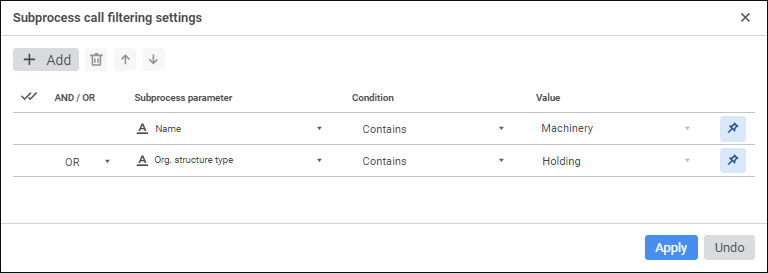
To add a subprocess call, click the  Add button on the toolbar.
To reorder conditions execution, select the  Up or
Up or  Down buttons on the toolbar by selecting checkbox of the required condition.
To delete one of the conditions, select the condition and click the  Delete button on the toolbar.
To delete all conditions:
Click the  Select All button.
Click the Delete button on the toolbar.
To set up subprocess call conditions, set the following parameters:
Subprocess Parameter. Select a dictionary or dictionary attribute that will be used in condition.
Condition. Select a condition to compare subprocess parameter with the value in the drop-down list:
Equal.
Not Equal.
Contains.
Does not Contain.
Contained In.
Not Contained In.
Not Crossed With.
NOTE. Displayed condition types depend on the attribute data type selected in the Subprocess Parameter column.
Value. Set process value or parameter that will be compared to subprocess parameter value.
To limit available values, when setting subprocess call condition parameter, click the  Fix button:
If a dictionary is selected in the Subprocess Parameter box, the Value box displays a list of subprocess parameter dictionary elements. The Value box cannot be empty.
If a dictionary attribute is selected in the Subprocess Parameter box, the Value box allows for entering values of the type corresponding to the attribute. The Value box can be empty if the string attribute value is fixed.
NOTE. The Fix button is pressed by default.
To disable the limit on the number of available values, when setting subprocess parameter condition release the Fix button. In this case, when selecting a dictionary/dictionary attribute in the Subprocess Parameter box, the Value box will display a list of dictionaries/dictionaries with attributes, respectively.
And/Or. If several conditions are added, select one of logical statements in the drop-down list:
AND. Subprocesses satisfying all filtering conditions are started.
OR. It is used by default. Subprocesses satisfying one filtering condition are started. Conditions check is executed in serial mode.
If none of filtering conditions is satisfied, on executing the process the step finishes without starting subprocesses.
See also:
Creating the Subprocess Call Step | Executing Subprocess Steps
 Settings button on the toolbar. The Subprocess Call side panel opens to set up the step.
 Filter button.