
 To open the Email Send Parameters page
To set up email notification sending parameters, use the Email Send Parameters page in the business process administration wizard.
To open the Email Send Parameters page
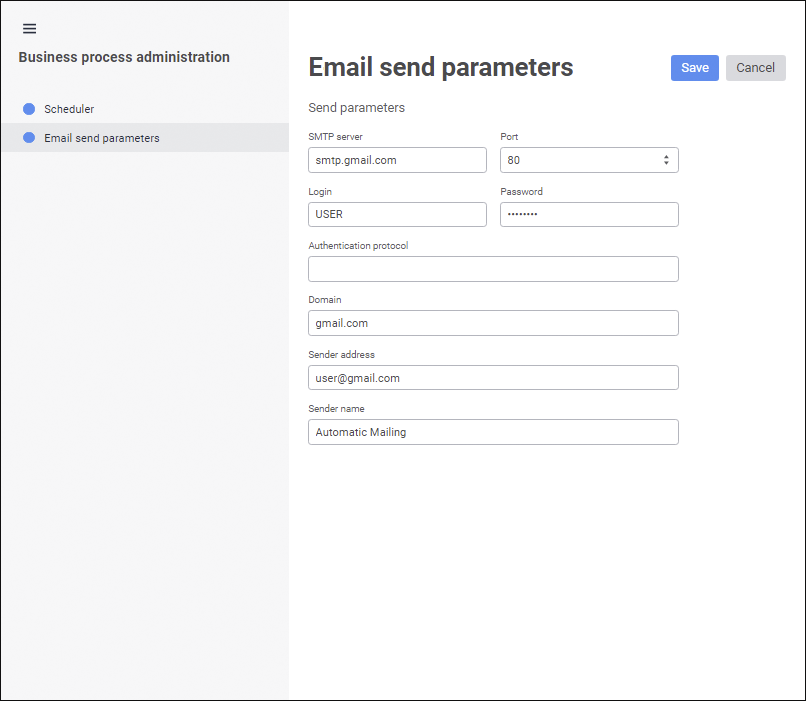
Set email notification send parameters:
SMTP Server. Specify DNS name, by which SMTP server is available. The box is mandatory.
Port. Specify TCP port, by which SMTP server is available. The box is mandatory.
Login. Enter user name of the account to access SMTP server. The box is mandatory.
Password. Enter user password. The box is mandatory.
Authentication Protocol. Specify the protocol used for user authentication on SMTP server, for example, Basic, Digest, NTLM, Kerberos, PLAIN, and so on. The list of supported protocols can be obtained by analyzing parameters of a specific SMTP server. If the protocol is unknown, leave the box empty. In this case SMTP server automatically determines how the use will be authenticated.
Domain. Specify domain name of SMTP server. The box is mandatory.
Sender Address. Enter email address to send messages. The box is mandatory.
Sender Name. Enter notification sender name.
After setting up business process parameters click the Save button.
See also:
Business Process Administration | Setting Up Process Parameter
 Administration item in the Business Processes component's context menu. The business process administration wizard opens.