
 To open the Scheduler page
Setup of business process scheduler includes business processes execution type definition, parameters setup for processes server execution and BI service URL specification. To set up business process debugging, use the Scheduler page in the business processes administration wizard.
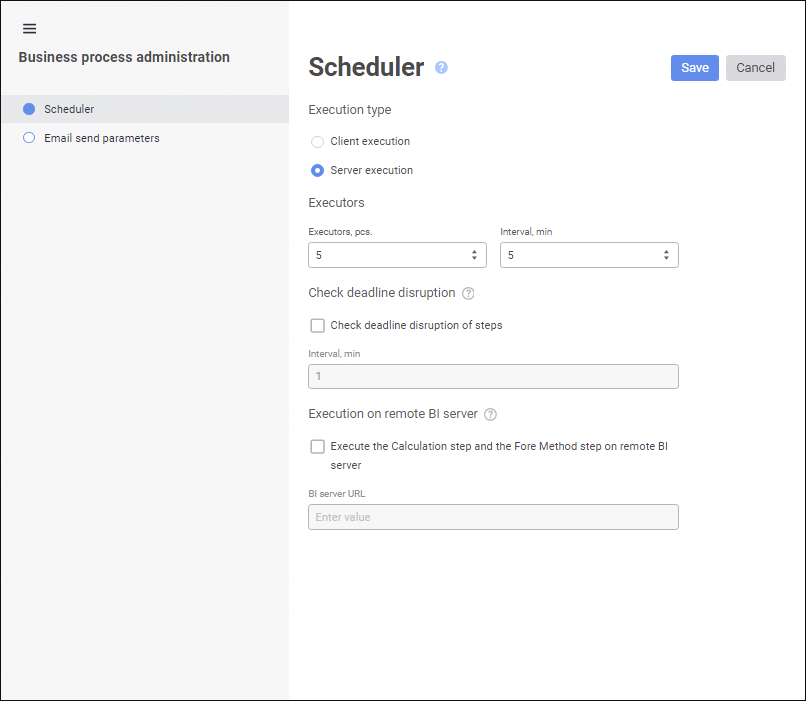
Set the parameters:
Client Execution. Select the radio button to execute processes on user local computer. Client execution is required only for business processes parameters debug. In production development use server processes execution. To start client execution, start processes.
Server Execution. Select the radio button to execute processes on server. Install and preconfigure Task scheduler. After server execution is selected, additional settings will be required. When the radio button is selected, the following parameters are available:
Executors. Set the following parameters:
Executors, pcs. Set the number of simultaneously working streams that allow for executing tasks from the scheduled task container with the BPM_EXECUTOR_CONTAINER identifier.
Interval, min. Set the time between executor starts (pause) that is required to recreate and initialize them. The parameter is set in minutes and is applied to each executor.
When the task is being executed by the scheduler, the executor is assumed as active and executes such available operations in business processes as step execution, process start, and so on. The executor finishes its work when the assigned task is complete and is restarted to execute the nest task. The tasks are distributed among the available executors in the order specified in the container. To ensure constant loading of the system, executors are started with a time shift because simultaneous start of executors results in time intervals when none of the executers are working. The left scheme displays system work in case of simultaneous start of executors, the right scheme displays system work with a time shift:
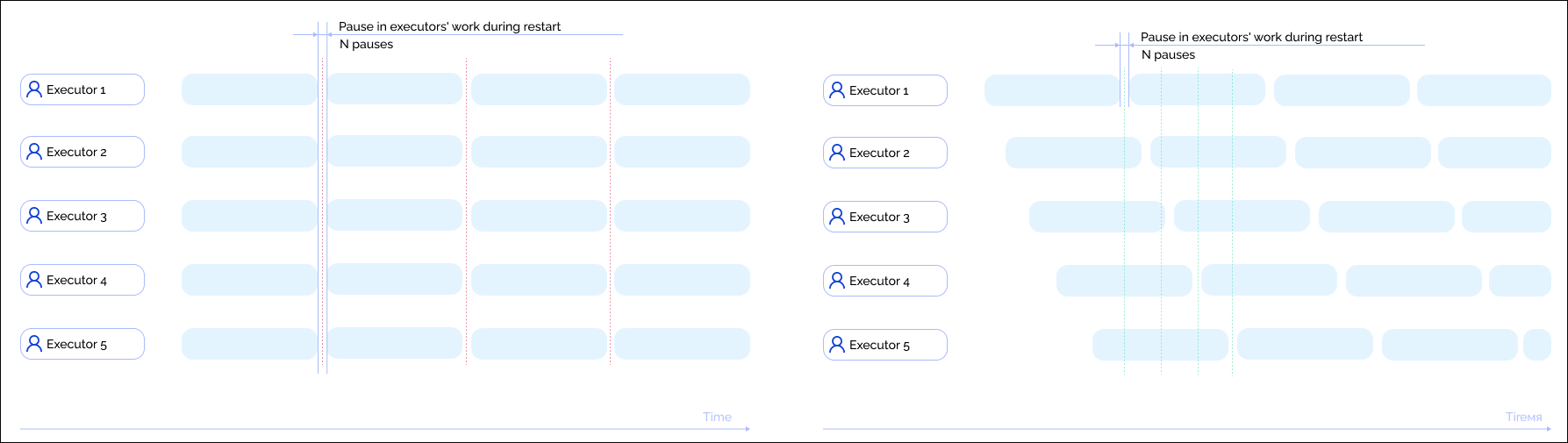
Five executors and five minute intervals are specified by default. Increase the number of executors if more steps must be executed in several parallel processes.
NOTE. Parallel execution of steps within one process instance is implemented by different executors if there are available executors. If there are no free executors, parallel steps are executed by the same executor.
Check Deadline Disruption of Steps. Select the checkbox to check deadline disruption of steps.
Interval, min. Set interval, in which the check is executed, in the Interval, min box. If steps execution deadline disruptions are found, the email notification is sent and/or the Fore method is executed, depending on settings determined on the Events tab.
Execution on Remote BI Server. The checkbox is deselected by default. To execute resource intensive steps: Calculation, Fore Method Call, and ETL Task, select the Execute the Calculation Step and the Fore Method Step on Remote BI Server checkbox and set URL in the BI server URL box:
HAProxy balancer to distribute the load between cluster's BI servers.
NOTE. Execution of steps on the BI server is available if the Execute the Calculation Step and the Fore Method Step on Remote BI Server checkbox is selected during process basic properties setup.
When setting up execution of resource-intensive tasks make sure that the BI server contains the registry.reg or Metabases.xml file with repository connection settings.
After changing scheduler settings click the Save button. The message is displayed informing that changes are saved successfully.
When client execution is selected, additional settings are not required.
When server execution is selected, go to server process execution setup.
See also:
Business Process Administration | Setting Up Process Parameter
 Administration item in the Business Processes component's context menu. The business process administration wizard opens.