Attribute-based access control method grants permissions on analytics platform level, filters data when a user accesses data by checking policies and rules. Attribute-based access control method (ABAC) is implemented via access control model, which is aimed to optimize access control subsystem. Attribute-based access control method is considered as a separate type of access control as discretionary and mandatory ones.
NOTE. Attribute-based access control method can be used simultaneously with the discretionary access control method. The combination algorithm of two methods is defined in the access control.
The access is restricted via policies and rules that contain a set of conditions to check attributes. This method provides the possibility to create combinations of conditions for expressing various policies. Granting user access to the object or data segment occurs only if the values of the user and object attributes allow the user to grant the access to the object.
Attribute-based method is determined by the elements:
Set of policies. It consolidates policies or sets of policies, determines whether an action or access to an object/data segment is possible based on policies.
Policy. It consolidates a set of rules and determines whether an action or access to an object/data segment is possible based on rules.
Rules. It determines the possibility to execute an action or access an object/data segment.
Attributes. Attributes of subjects and objects/data segments, for which it is possible to get a value based on information stored in the system.
Each element consists of the properties that are set in the attribute-based access control.
Only administrator or information security administrator can enable the mode if system administrator roles separation mode is active.
NOTE. Attribute-based access control structure creation (attribute addition, policy and rules editing) is controlled by the system and is available to the administrator with the Changing User Permissions, Distributing Roles, Changing Policy privilege and the Changing Security Label and Access Control List of Any Object privilege.
The attribute-based access control is set up by:
The owner of the ADMIN schema.
Members of the ADMINISTRATORS built-in group.
Users with the following privileges: Login; Changing User Permissions, Distributing Roles, Changing Policy; Changing Security Label and Access Control List of Any Object. Browsing all objects in the navigator; Read and Write Permission for All Objects.
Information security administrator on administrator roles separation.
To use attribute-based access control method:
Select the Use Attribute-Based Access Control checkbox on the Access Control tab of the policies editor.
Create user accounts and user groups.
Create custom attributes for users, user groups, objects depending on the formulated task.
Create a set of policies, policy and rules in the Attribute-Based Access Control section.
Before the user executes a certain operation with an object, the system checks if the operation can be executed. Execution possibility check starts after getting all the attributes, loading sets of policies, policies and rules. After the check is complete, the values of all the attributes specified in the set of policies, policies and rules are calculated. The sets of policies are filtered by attribute values. In the future, only the filtered policies and rules are calculated. As a result of attribute-based access control calculation, a decision will be made to grant access to the user.
IMPORTANT. If no condition is set in attribute-based access control structure, access to all operations on objects is denied.
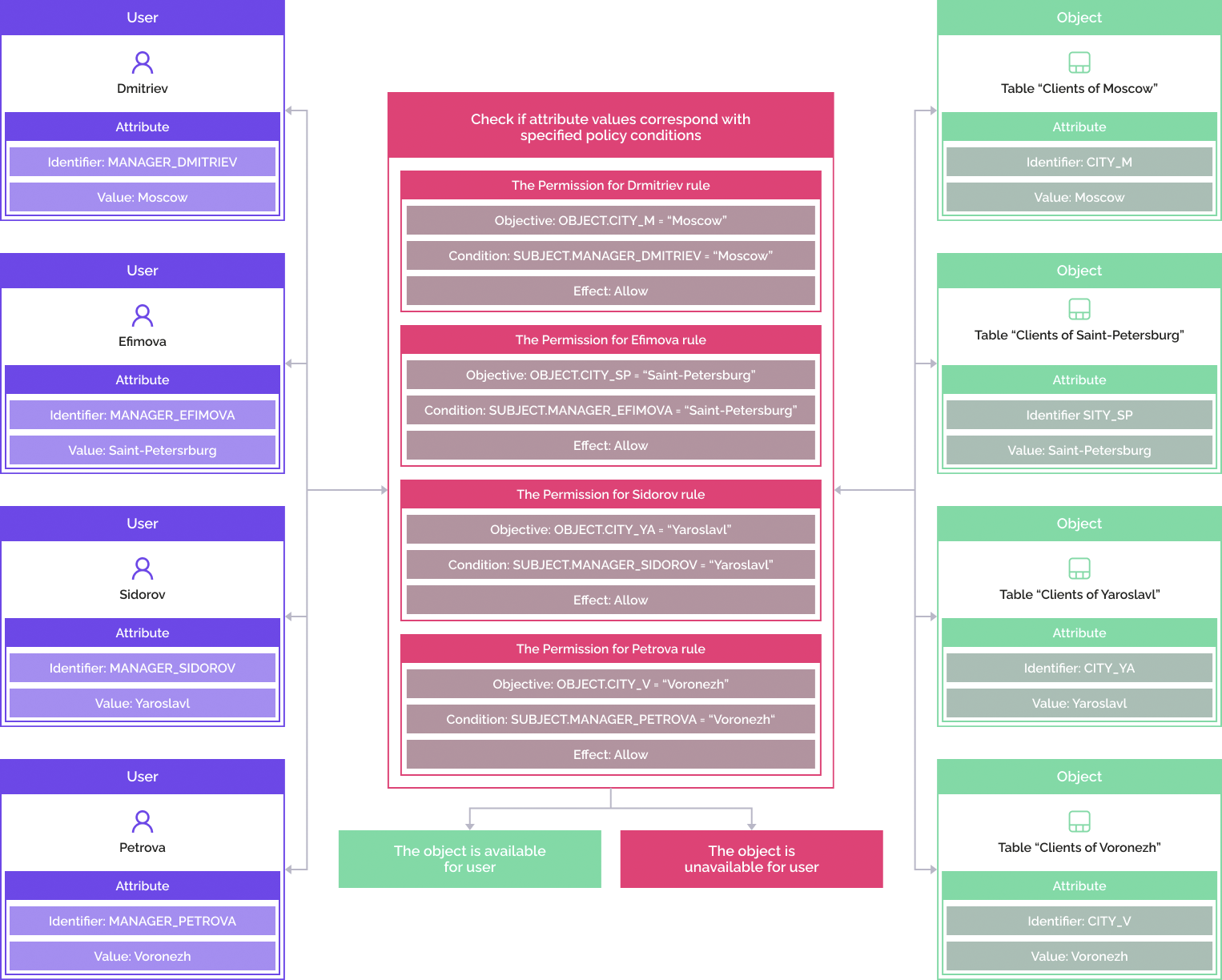
The users who are managers of the company must be provided access to customers of their branch.
Managers: Dmitriev, Efimova, Sidorov, Petrova. Branches in the cities: Moscow, St. Petersburg, Yaroslavl, Voronezh.
The example execution as a scheme:
Add attributes to users and objects that contain information about customers.
Create a policy with rules in attribute-based access control.
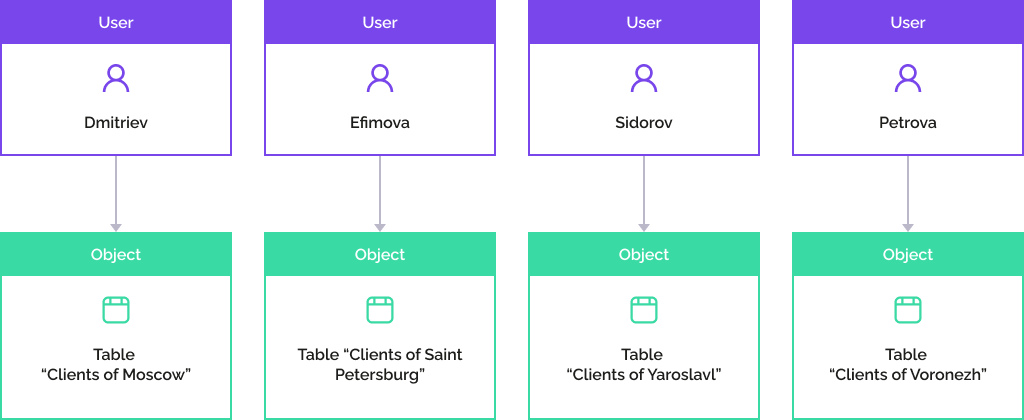
As a result, each manager will be allowed access to the customer table of their branch:
See also:
Selecting Access Control Methods and Their Setup | Adding Access Check Rules and Policies