Select the Add Comment item in the update structure's context menu.
Select the Comment update object type in the drop-down menu of the  Add Object to Update button on the toolbar.
When adding a comment to the update, the created update will contain the text explication. The text of comments is displayed on the Update page during the update.
NOTE. Adding a comment to update is available only in the desktop application.
To add a comment:
Select the Add Comment item in the update structure's context menu.
Select the Comment update object type in the drop-down menu of the Add Object to Update button on the toolbar.
After executing one of the operations the Comment dialog box opens:
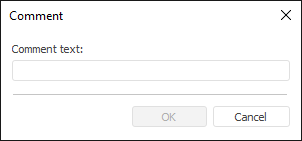
Enter comment text to the corresponding box.
The first 40 characters of a comment are displayed as its name.
See also:
Creating an Update | Adding a Security Subject