
Go to the Discretionary Access Control tab:
The following methods of access control for MDM dictionary/composite MDM dictionary elements are available:
Discretionary Access Control. The method is based on using access control lists assigned to each system object.
mandatory Access Control. It is based on assigning access labels to system subjects and objects.
Attribute-Based Access Control. It is based on using policies sets and access rules.
It is allowed to apply these methods individually and together: discretionary and mandatory access controls or discretionary and attribute-based access controls.
NOTE. Access permissions can be set up if access control is used, and the user has a privilege to change permissions.
If roles are separated between the information security administrator and the application administrator, by default, only the information security administrator can change access permissions using the security manager.
To set up discretionary access control:
Make sure that the Elements have Discretionary Access Permissions checkbox is selected on the Basic Settings page for MDM dictionary/composite MDM dictionary.
Select the Access Permissions item in the element's context menu. The Access Permissions dialog box opens:
Go to the Discretionary Access Control tab:
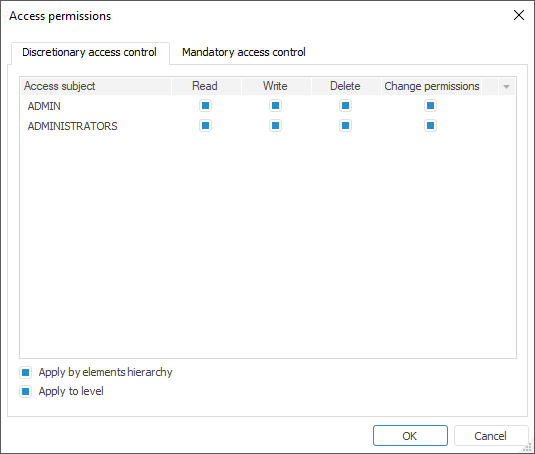
The tab contains a list of all access subjects determined for a dictionary.
Select checkboxes in the Read, Write, Delete, and Change Permissions columns:
When the checkbox is selected, the subject is allowed to execute the corresponding operation.
When the checkbox is deselected, the subject is denied to execute the operation.
If none of the checkboxes is selected for the subject, it is not displayed.
Apply by Elements Hierarchy. Selecting the checkbox enables the user to apply access permissions to all child elements of the configured element.
Apply to Level. Selecting the checkbox enables the user to apply access permissions to all elements of the level, to which the configured element belongs.
To set up mandatory access control in the desktop application:
Make sure that the Elements have Mandatory Access Permissions checkbox is selected for MDM dictionary/composite MDM dictionary.
Select the Access Permissions item in the element's context menu.
In the Access Permissions dialog box go to the Mandatory Access Control tab:
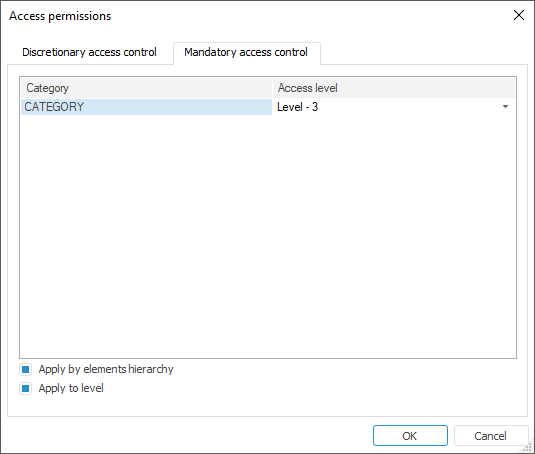
The tab contains a list of all security categories determined in the security manager.
For each security category set the required access level. By default, each category has the Access Denied level.
Apply by Elements Hierarchy. Selecting the checkbox enables the user to apply access permissions to all child elements of the configured element.
Apply to Level. Selecting the checkbox enables the user to apply access permissions to all elements of the level, to which the configured element belongs.
To set up attribute-based access control, make sure that the Elements have Attribute-Based Access Permissions checkbox is selected for MDM dictionary/composite MDM dictionary.
Attribute-based access control setup is available only in the security manager for MDM dictionary elements.
For details about attribute-based access control setup for MDM dictionary elements, see the Access Permissions for MDM Dictionary Objects article.
See also: