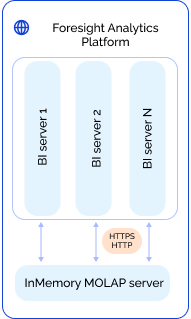
InMemory MOLAP server uses the InMemory MOLAP technology and provides data loading from sources, local data storage, quick multi-user access, and high-performance data processing.
For details about the InMemory MOLAP technology, see the Data Access Using InMemory MOLAP article.
The system configuration using InMemory MOLAP server:
The scheme displays the configuration that covers only interaction between BI server and InMemory MOLAP servers, while interaction between the rest of the system configuration elements remains unchanged.
NOTE. One can access the InMemory MOLAP server directly without the use of BI server. To do this, fill in the serviceUrl field in the config.json file and specify InMemory MOLAP server web service URL. Take into account that the version history, attachments, and comments will not be supported.
The InMemory MOLAP server is installed identically to BI server using the distribution file included in the Foresight Analytics Platform software package:
In Linux OS:
foresight-fp10.x-biserver*.deb for Debian-based distributions.
foresight-fp10.x-biserver*.rpm for RedHat-based distributions and ALT Linux.
In Windows OS:
FP10BIServerIIS_x64.exe.
To set up the server, follow the steps:
Determine server general settings that are identical to BI server settings in the settings.xml file or in the system registry.
Enable the use of InMemory MOLAP on the server in the settings.xml file or in the system registry. To do this, specify the CacheType parameter in the InMem section.
Set up caching. The setting depends on the specified caching method:
To use data caching with file cache:
Set up each BI server by specifying the following information in the Service section in the settings.xml file or in the system registry:
Specify address and port of InMemory MOLAP server for the address parameter in the Epts subsection.
Specify repository identifier for the Name parameter and unique name of the InMemory MOLAP server specified in the Epts subsection, for the endpoint parameter in the Mbs subsection.
Specify keys of repository cubes or repository cube shortcuts, working with which will use caching, for the Key parameter and unique name of the InMemory MOLAP server specified in the Epts subsection, for the endpoint parameter in the Cubes subsection in the Mbs subsection.
Set up InMemory MOLAP server by specifying the following in the InMem section of the settings.xml file or in the system registry:
Specify value of file for the CacheType parameter.
Specify full path to the folder with cache files as a value of the DataDir parameter.
Specify advanced settings of cache to optimize the use of cache data or to enable additional data handling methods.
NOTE. If shared access of InMemory MOLAP servers to shared data is used, set the SharedAccess parameter to true and take into account that the folder with files specified in the DataDir parameter must be a network resource that is common for all MOLAP servers.
Use the multidimensional cube data caching management console to set up caching of specific cubes.
To use global cache:
Specify the global value for the CacheType string parameter in the InMem section of the settings.xml file or in the system registry.
Use the multidimensional cube data caching management console to set up caching.
NOTE. If the section, subsection, or parameters are absent, they must be created manually.
When file cache is being used, that is, when the CacheType parameter is set to file, one can use advanced settings to optimize the use of cache data or to enable the use of additional data handling methods.
The settings can be divided into the settings that:
Determine InMemory MOLAP server work. Server settings are determined in the settings.xml file or in the system registry.
Determine work of InMemory MOLAP server and each cube. Server settings are determined in the settings.xml file or in the system registry. Cube settings are determined in the multidimensional cube data caching management console. One can set up using Fore.
Advanced general settings for server:
| Parameters | Description |
| BackupDir | Location of backup file. To save the backup file, make sure to create a folder where this file will be located. The parameter is used together with the BackupType and BackupTagTemplate parameters. |
| BackupTagTemplate | Backup file name template. The parameter is used together with the BackupType and BackupDir parameters. |
| BackupType | Backup file extension. To use, set the parameter to tzst. The parameter is used together with the BackupTagTemplate and BackupDir parameters. |
| CacheDims | Indicates whether InMemory MOLAP is used to cache dictionary data. To cache dictionaries using file cache, create a parameter and set it to true. |
| CacheLimitMb | Disk space limit allocated for storing variable data cache aggregated by selection. The value is specified in megabytes. The default parameter is not set. If the parameter is set, when the limit exceeds, outdated or unused cache data will be deleted. NOTE. The limit affects only aggregation and rollup caches calculated by selection. The rest of the cached data will not be deleted even if cache size exceeds the specified limit. |
| DataDir | The path to the folder with stored cache files. If the parameter is not set, files are saved to the folder by default:
The folder with files must be a network resource that is common for all MOLAP servers if shared access is used. NOTE. The operating system user who will work with cached data must have read and write permissions for the specified folder. |
| FixAggrPrecision | Disable rounding mode during aggregation. Available values:
The file cache assumes provides for intermediate rounding of numbers of the double type to avoid the loss of result precision during aggregation. The specified rounding precision is five decimal places, which is sufficient for use in financial applications. |
| LogDebug | Logging of operations executed with file cache. Available values:
|
| MemLimitMb | RAM limit in megabytes used by file cache. If the parameter is not set, it is set up automatically. |
| PreloadData | Attribute of data preload from cache to memory on the first cube request. If the parameter is set to True, then on the first request to any cached cube its cache is scanned for full loading into RAM. As a result, the first cube use will be slow and all the following will be significantly quicker. It can be used to implement data preloading. The parameter is set to false by default. NOTE. Preloading is executed till the RAM size or the MemLimitMb parameter value are not exceeded. |
| SharedAccess | Indicates whether cached data is used by several InMemory MOLAP servers at the same time. It enables the user to create a cluster with cache. To use, set the parameter to true. The parameter is set to False by default, cached data is not used simultaneously by several users. |
| Threads | The number of threads, in which parallel data processing is executed on aggregation. By default, the number of threads is equal to the number of processor logic cores. |
NOTE. All parameters should be of string type; values should be entered in lower case.
Advanced settings for server and cube:
See also:
Installing and Setting Up Foresight Analytics Platform