The running processes are executed at the server or user local computer. By default, the client execution of started processes ensuring resourceintesive calculation is set up.
The setup of server or client process runtime is executed using theTask Scheduler tool of Foresight Analytics Platform.
To set up server execution:
Run the utility with the BP_UTIL identifier. The Setting Up Parameters and Administrating Business Processes window opens.
On the Scheduler page select the Server Execution and set up required parameters.
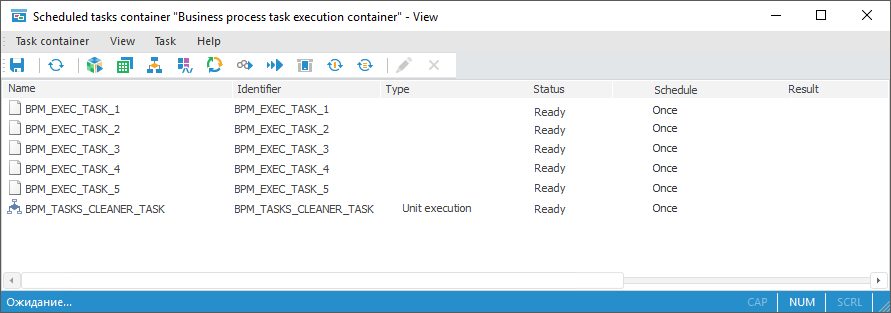
In the object navigator find the scheduled task container with the BPM_EXECUTOR_CONTAINER identifier and open it:
NOTE. If scheduled tasks container with the BPM_EXECUTOR_CONTAINER identifier is absent or empty, then select the Initiate Task Container item on the Debug page of the Setting Up Parameters and Administrating Business Processes window.
Select the Task Container > Save Options for Scheduler main menu item.
Click the  button on the toolbar.
Press CTRL+S.
After executing one of the actions the dialog box opens:
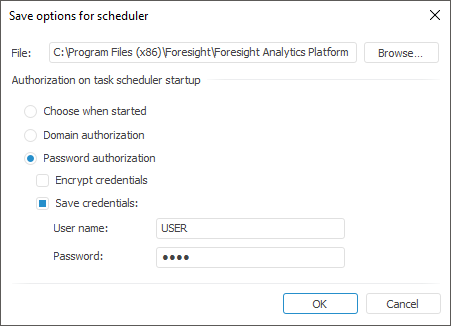
In the dialog box that opens in the File edit box check that the file name is Scheduler.xml, and enter path to file folder. By default, configuration file is saved to the folder with installed Foresight Analytics Platform.
In the dialog box that opens select password authorization and determine user name and password to start Foresight Analytics Platform. Save scheduler settings to the file by clicking the OK button.
To start task scheduler, start the Scheduler.exe file in the folder with installed Foresight Analytics Platform. A new task scheduler instance is started that is configured to the Scheduler.xml configuration file. In the task scheduler dialog box check that there is a repository, which processes will be executed at server and container with the BPM_EXECUTOR_CONTAINER identifier:
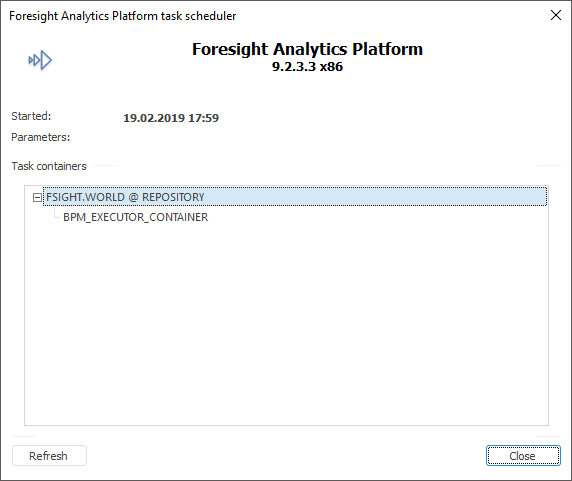
NOTE. To execute processes at server, start the task scheduler.
To provide better security and autonomous execution, it is recommended to set task scheduler as OS service.
See also:
Starting Process Execution | Setting Up Parameters and Administrating Business Processes