Batch export means exporting multiple report versions. The report versions are created based on fixed dimensions of the data source.
NOTE. Batch export of a regular report is available only in desktop application.
Batch export of the regular report is possible if this report has controls that are common for all report sheets. Controls must be associated with fixed dimensions. If the controls are common for all report sheets, but are not associated with the fixed dimensions, batch export of the report cannot be executed.
To execute batch export:
Make sure that all the report sheets have common controls.
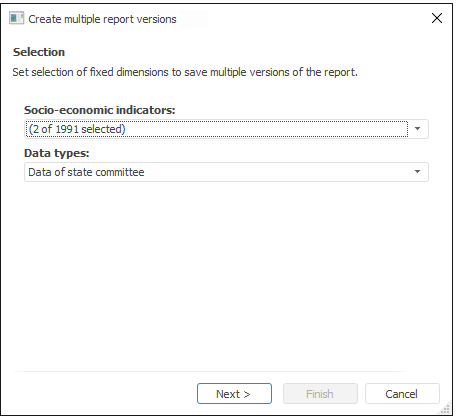
Select the Report > Export > Batch Export main menu item. The first page of the batch export wizard opens:
Select the fixed dimensions elements that are used to create report versions in the drop-down lists. The number of reports to be exported is equal to the Cartesian product of the selected elements in fixed dimensions. For example, the above figure shows that two elements are selected in the first dimension, and one element is selected in the second dimension. The number of possible pairs that can be made out of these elements (that is, the Cartesian product) is 2, which means that 2 report versions will be created.
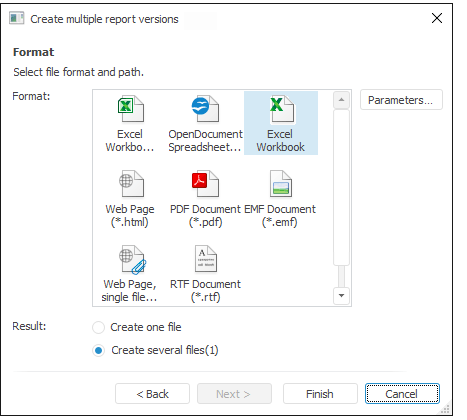
Select file format and export result:
Create one file.
Create several files.
On saving report versions to several files, file names are formed according to the following template:
<file name>+(<combination of fixed elements>)+.+<format>
For example: Socio-Economic Indicators (Data by regions; Tourism).xls.
Click the Finish button after export result and format have been selected. A standard dialog box opens for the user to select location for created file. If the report is saved to several files, the user is prompted to go to the folder that contains the created files.
Consider the following on batch export:
On executing report batch export to several files, name of the created file is formed as follows:
<file name>+(<combination of fixed elements>)
Consider that:
If file name is less than 218 characters, it is not contracted.
If file name has more than 218 characters, part of the file name including fixed selection is contracted as follows:
<file name>+(<combination of fixed elements>(<short.)).
If dimension names contain invalid characters, these characters are replaced with the "_" symbol on the batch export.
If identical names are contained in a dimension, name of the exported file is added with (N) on export. Where (N) is a sequence number.
For example:
Socio-Economic Indicators (Data by regions; Tourism).xls.
Socio-Economic Indicators (Data by regions; Tourism(1)).xls.
See also:
Report Export | Report Batch Print